
Tramino Pass: Guest registration form, tourist tax, and guest card (Hochschwarzwald, Allgäu-Walser-Pass)
Connect Tramino with API key and business address: Guest registration form and tourist tax from online check-in and guest cards via placeholder.
Updated on November 12, 2026
Tramino Pass: Guest registration form, tourist tax, and guest card
Tramino operates the electronic guest registration form and the guest card ("Pass") for several municipalities, for example in the Hochschwarzwald (Hochschwarzwald Card) and for the Allgäu-Walser-Pass. If your accommodation is located in such a municipality, Xentra sends the guest registration form directly to Tramino, just like with AVS and Feratel. The tourist tax comes from the response of the municipality, and your guests receive their guest cards via a link in your messages. The integration is marked as Beta in the app.
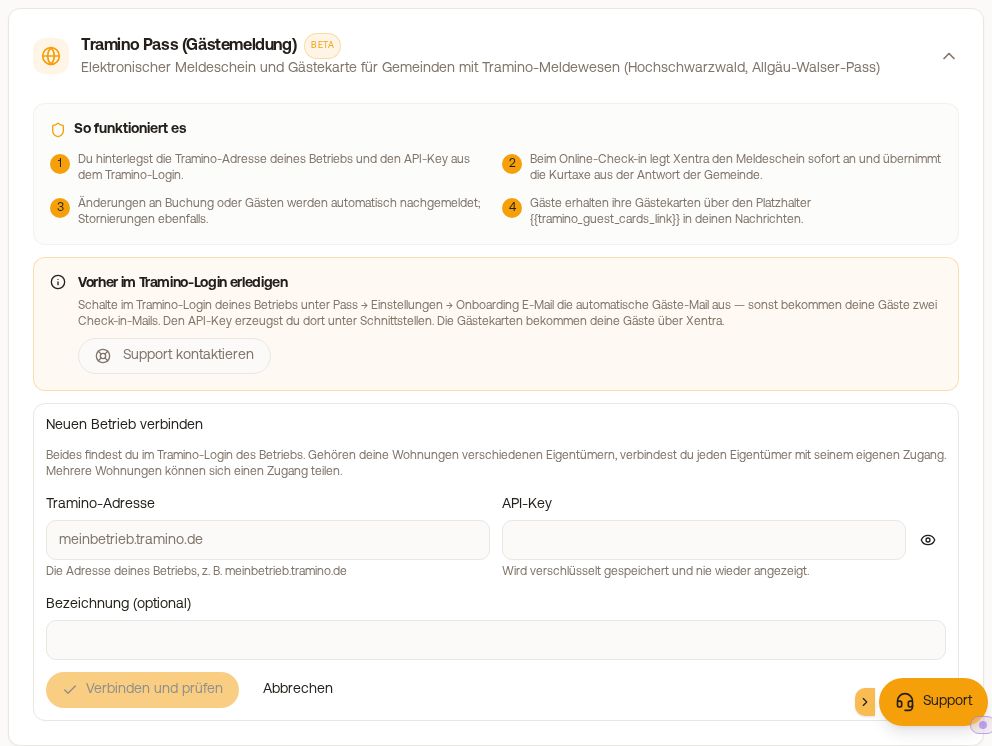 Tramino Pass (guest registration) in the Guest registration tab
Complete beforehand in the Tramino login
- In the Tramino login of your business, create an API key under Interfaces and note down the address of your business (for example meinbetrieb.tramino.de).
- Also in the Tramino login, turn off the automatic guest email from Tramino under Pass → Settings → Onboarding E-Mail. You do this yourself, not your tourism office. Otherwise, your guests will receive two check-in emails.
Connect in Xentra
- Integrations, tab Guest registration, click "Connect" at Tramino Pass. You land under Online check-in → Guest registration in the tile "Tramino Pass (guest registration)". If no guest registration has been set up yet, you can also do it directly there: at "Which guest registration do I need?" click "Set up" next to Tramino Pass, the tile opens on the same page.
- "Connect business": enter "Tramino address" and "API key", then "Connect and verify". A business has exactly one key, multiple properties can share it. If you have multiple businesses, you connect each one individually. If your properties belong to different owners, you connect each owner with their own access.
- Under "Properties", turn on guest registration per property. If only one business is connected, the toggle is enough. If you have connected multiple businesses, the selection "Choose business" appears at each property instead of the toggle: with the selection, you turn on the property, and its guests are reported to exactly this business. A property can only report to one registration system: if it already reports via AVS or Feratel, it cannot be turned on here. Agencies enter the number of the managed business under "Partner no. (agencies only)", empty means own business.
- Insert the placeholder
{{tramino_guest_cards_link}}(in the list: "Tramino guest cards (link)") into your arrival message so your guests get their guest cards. The link works as soon as the guest has completed the online check-in.
What happens next
- During online check-in, Xentra creates the guest registration form at Tramino immediately. On Tramino properties, the check-in asks for first and last name, date of birth, and nationality for every traveler, and additionally gender and address for the primary guest.
- Xentra takes the tourist tax from the response of the municipality, and the guest pays it during check-in. If the amount should come from your own tourist tax settings, turn on "Calculate tourist tax yourself" on the property; the guest registration form still goes to Tramino.
- Xentra automatically reports changes to the booking or guests, and a cancellation of the booking also cancels the guest registration form.
- If the guest, the municipality, or you change the guest registration form directly at Tramino, the booking shows a note. The guest data in Xentra is not overwritten in the process; check the guest registration form in the Tramino login then.
In the booking
In the Check-in tab, there is the card "Tramino Pass Meldeschein" with guest registration form number, status ("Reported", "Filed (incomplete)", "Invoiced", "Cancelled"), and the tourist tax according to the municipality. There you can find "Meldeschein PDF", "Guest cards PDF", "Resend", and "Open in Tramino login". "Cancel" is possible up to one day after departure as long as no guest card was used; an already paid tourist tax will then be refunded.
Disconnect
If you disconnect the connection, the API key is deleted and the guest registration is turned off for all assigned properties. Guest registration forms that have already been reported remain at Tramino.
Error messages when connecting
- "Tramino does not recognize this API key": check key and address.
- "The address must end with tramino.de": enter the address of your business, for example meinbetrieb.tramino.de.
- "The Tramino integration is not yet enabled on Xentra's side": write to hello@support.myxentra.com.