
Guest registration: which connection is right for you?
AVS Direkt, Feratel, Tramino, WinTOP, or Chekin: which guest registration connection is right for you, where you set it up, and who is responsible for what.
Updated on November 12, 2026
With guest registration, Xentra automatically sends the data from the online check-in to your municipality, tourist office, or authority. Which connection you need depends on which system your location uses.
In Germany, you do not need Chekin. Xentra connects directly to the German guest registration form systems (AVS, Tramino, WinTOP), as well as Feratel Deskline in Austria. Chekin is intended for countries without a direct connection, such as Italy, Spain, and Portugal.
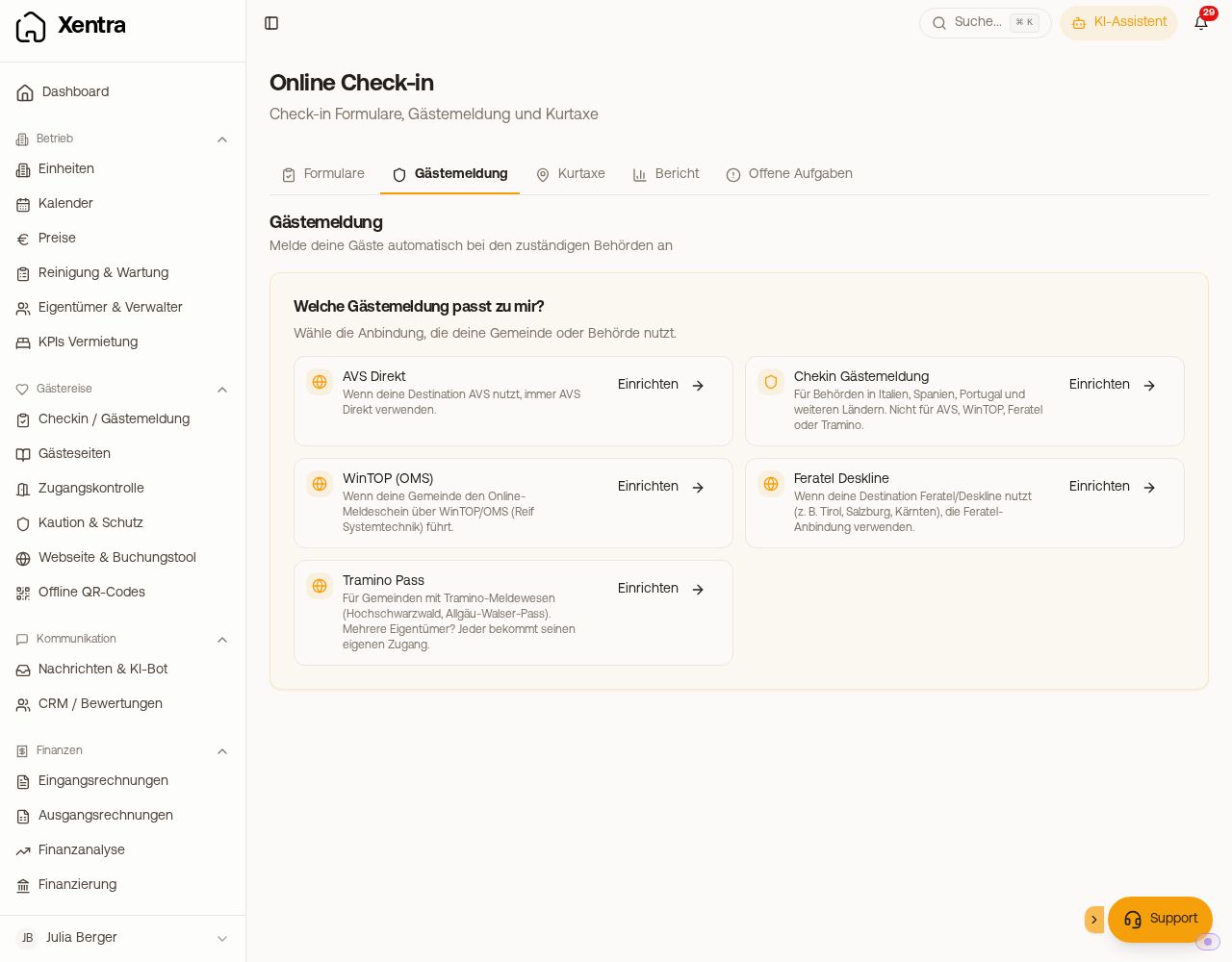 Guest registration tab with the selection "Which guest registration do I need?"
Directly connected
- AVS Direkt: Guest registration form, tourist tax, and digital guest card for locations with AVS (many spa towns in Germany and Austria). See AVS Direkt: guest registration form, tourist tax, and digital guest card.
- Feratel Deskline: Guest registration, tourist tax, and guest cards, for example in Tyrol, Salzburg, or Carinthia. See Feratel Deskline: Guest registration, tourist tax, and guest cards.
- Tramino Pass (Beta): Guest registration form, tourist tax, and guest card in the High Black Forest and for the Allgaeu Walser Pass. See Tramino Pass: Guest registration form, tourist tax, and guest card.
- WinTOP (OMS) (Beta): Online guest registration form via WinTOP by Reif Systemtechnik, for example in many locations in Bavaria. See WinTOP: Online guest registration form and tourist tax.
For abroad: Chekin
- Chekin: Police and statistical reporting in Italy, Spain, Portugal, and other countries without a direct connection. Not for locations with AVS, WinTOP, Feratel, or Tramino. See Chekin Integration.
In Spain, you report via Chekin, which submits the registration to SES Hospedajes. There is no direct connection to SES Hospedajes; the tile under Integrations cannot be set up.
Where you set it up
Checkin / Guest Registration, Guest registration tab. As long as nothing is connected, you will see Which guest registration do I need? at the top: first the directly connected systems, followed under All other authorities by Chekin. Click Set up next to the appropriate connection: The page then shows only this connection with its steps, and with Choose another connection you return to the selection. Once a connection is active, you see its card. You can add a second guest registration, for example for another municipality or another country, using Add another guest registration at the bottom of the page.
All connections are also available under Integrations, Guest registration tab.
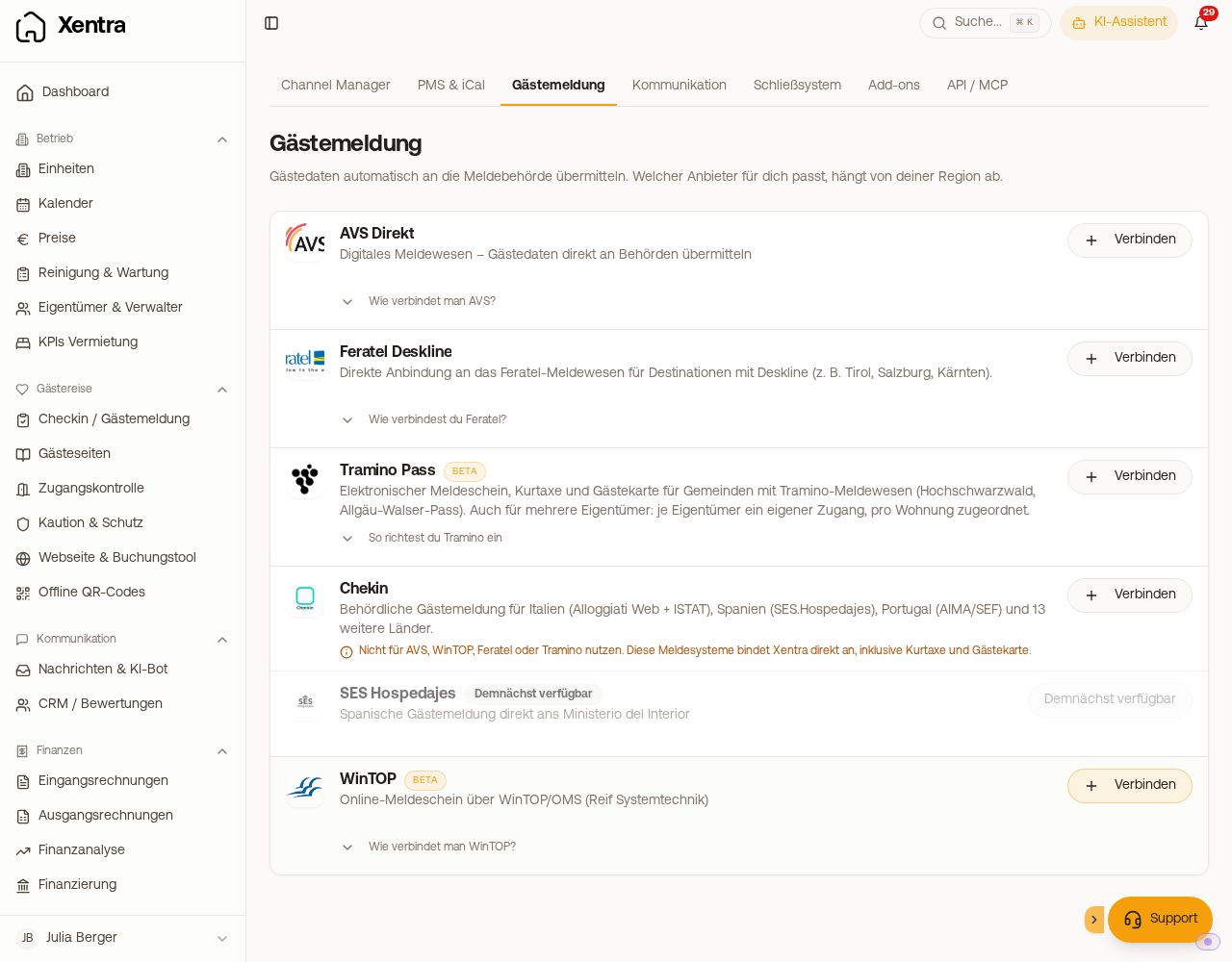 Integrations, Guest registration tab with all providers
What you should know beforehand
- What comes through the Xentra check-in is reported. Without a completed online check-in, no registration is created. The check-in template must be active and assigned to the unit.
- A unit reports to exactly one system. If it already reports via AVS or Feratel, it cannot also be enabled for Tramino; if you activate Chekin, it will be turned off for a unit with a different connection.
- Required fields are requested automatically. Whatever your authority requires (for example the date of birth of all travelers or the primary guest's address), the check-in asks for automatically for these units.
- Exclude portals: If you have excluded a portal from authority reporting in the tourist tax settings, Xentra does not report its bookings. The booking then shows "No registration sent".
Who is responsible for what
Xentra transmits the data upon your instruction and completes the designated transmission step. You remain subject to the reporting obligation and liable for the tourist tax, and you are responsible for the content (number of guests, nights, age, exemptions). Xentra displays the status exactly as reported back by the portal. Therefore, check your registrations regularly directly in the portal as well. If a registration cannot be retried in Xentra, for example because no registration was created for a booking, complete it directly in the portal or with the authority.
Keeping an eye on the status
- In every booking, under the Online Check-in tab, you will find the card for your connection with registration status, tourist tax, and guest cards.
- The Report tab shows under Guest registration how many registrations are confirmed, pending, or failed.
- Under Open tasks, Xentra lists bookings where check-in, registration, or tourist tax are still pending.
Is the guest registration form mandatory in Germany?
Since January 1, 2025, the special registration obligation in accommodation establishments (Sections 29 and 30 of the Federal Act on Registration) applies only to foreign guests. Your municipality may still require data from all guests via its tourist tax or guest contribution statutes. In Austria, the registration law applies to all guests. If you write "required by law" in a template, check whether this is true for your guests and your location.
You only need the ID number from foreign guests. In your check-in template, section "Guest data", enter "Germany" under "Do not ask for ID number from" (visible as soon as you request the passport/ID number). For this to take effect, the Nationality must be requested in the check-in. Xentra does not provide legal advice; if in doubt, ask your municipality or tourist office.
Troubleshooting: the guest registration is not arriving
- Is the unit active for the connection (toggle or Save & Activate)?
- Has the guest fully submitted the online check-in? A started check-in is not reported.
- Is an active check-in template assigned to the unit?
- Is the booking's portal excluded from authority reporting in the tourist tax settings?
- If the card in the booking shows an error, it tells you what to do. You can find specific errors in the articles on AVS, Feratel, Tramino, and WinTOP.