
Feratel Deskline: Guest registration, tourist tax, and guest cards
Set up Feratel, guest card data sharing, schedule, how the guest pays the tourist tax, and how the guest cards reach the guest.
Updated on November 12, 2026
If your accommodation is located in a destination with the Feratel registration system (for example in Tyrol, Salzburg, or Carinthia), Xentra registers your guests directly with Feratel from the online check-in, takes the tourist tax from the response, and fetches the guest cards.
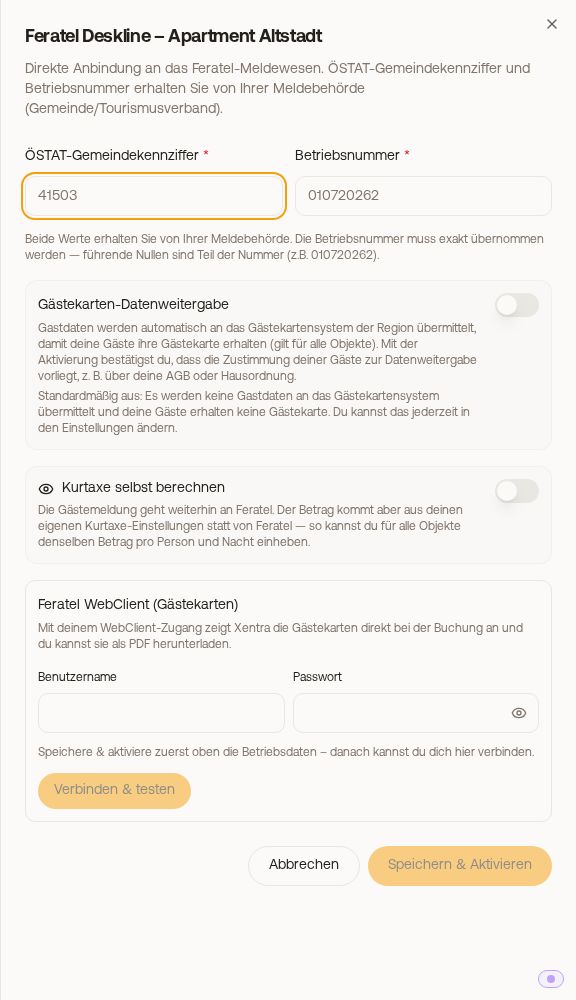 The Feratel setup in the Guest registration tab
Set up
- First, your destination must unlock the interface for your business, see Feratel: Activation by your destination.
- Checkin / Guest Registration, Guest registration tab, click Set up under Feratel Deskline. If you already use another guest registration (for example AVS Direkt) and no apartment is connected to Feratel yet, the Feratel card will be missing there. In that case, open Integrations and click Set up under Feratel Deskline: Guest registration opens with the Feratel card. As soon as an apartment is connected to Feratel, the card remains permanently visible there.
- Enter the ÖSTAT municipality code and Business number for each apartment. Leading zeros are part of the business number.
- Set the Guest card data sharing (see below), then Save & Activate. Xentra checks the connection and loads the configuration.
- Optionally connect Feratel WebClient (guest cards): username, password, then select the Property (provider). Without this access, Xentra cannot fetch guest cards.
Via the clock icon (Schedule) in the header of the Feratel card, you specify under "When is the registration sent to Feratel?" when the registration is sent to Feratel: on the arrival day or up to 14 days before, for all your accommodations. The arrival day is recommended: sending earlier already uses up a registration form number, even if the booking is canceled afterwards.
Registration form numbers from your municipality
Every registration form needs a number from a number block that your municipality or tourist board assigns to your property in Feratel. The Feratel Deskline card for the apartment shows how many are still available ("... free registration form numbers").
If your property does not have a number block yet or all numbers are used up, Xentra automatically requests a first block from Feratel when activating Feratel and every time you click Load config in the Feratel Deskline card. Usually, the free numbers appear immediately. Until then, the card displays No registration form numbers assigned yet.
If Feratel does not assign a block, the card displays Feratel did not assign a number block along with the reason from Feratel. Without numbers, guests cannot be registered upon arrival (in Feratel, the error is called "Sheet-number pool empty"). Here is how you solve it:
- Ask your municipality or tourist board to assign a number block for registration forms to your property in Feratel.
- After that, click Load config in the Feratel Deskline card for the apartment. The free numbers appear, and Xentra automatically resends registrations for current and upcoming stays that failed because of this.
- Stays that are already over are then shown on the card under Unregistered stays. By clicking Report now and confirming, Xentra registers them retroactively, up to 15 per click, without refund and without new payment for the guests.
If numbers run out later, Xentra automatically fetches the next block from Feratel.
Guest card data sharing
For your guests to receive a guest card, their data must go to the region's guest card system. The Guest card data sharing toggle is off by default and applies to all properties. As long as it is off, nothing is shared and no guest card is created. By switching it on, you confirm that you have your guests' consent, for example via your privacy policy. You can find it in the setup dialog and later on the Guest registration page.
What happens during check-in
- Xentra only registers what comes via the Xentra check-in. Without a completed check-in, there is no registration and no guest card. If the check-in is missing, you create the link in the booking under the Online Check-in tab with Create link.
- After the step with the travelers, Xentra pre-registers the guests with Feratel and takes over the amount calculated by Feratel. The guest pays it during the payment step. At the time specified in your Schedule (default: on the arrival day), the pre-registration is converted into the guest registration form.
- Discounts, for example for severe disability: Feratel assigns each guest to a guest type based on age. You enable guest types without an age limit (for example severely disabled, accompanying person, business): Feratel card for the apartment, Edit, Loaded guest types, check Selectable at check-in. The guest then selects it per person under Tourist tax category during online check-in, and Feratel calculates the amount for this group. You can see which group a guest selected in the booking under the Online Check-in tab ("Tourist tax category selected by guest"). You verify proof, for example a severe disability card, upon arrival. Without a checkmark, the guest selects nothing, everyone is assigned by age. Exemptions you set up under Tourist tax only apply when Xentra calculates the tourist tax itself.
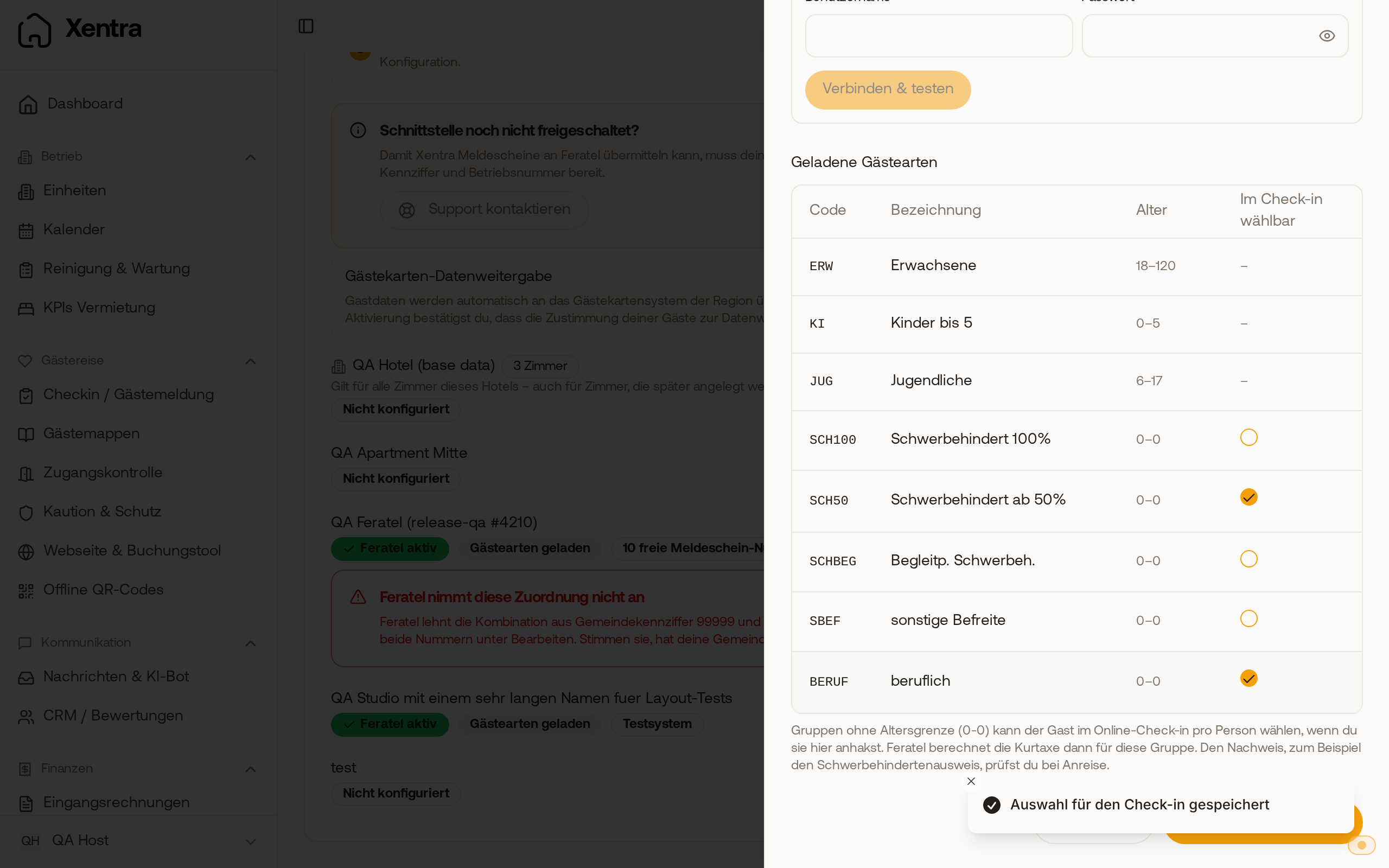 In the Feratel card, you check which guest types without age limit the guest can select at check-in.
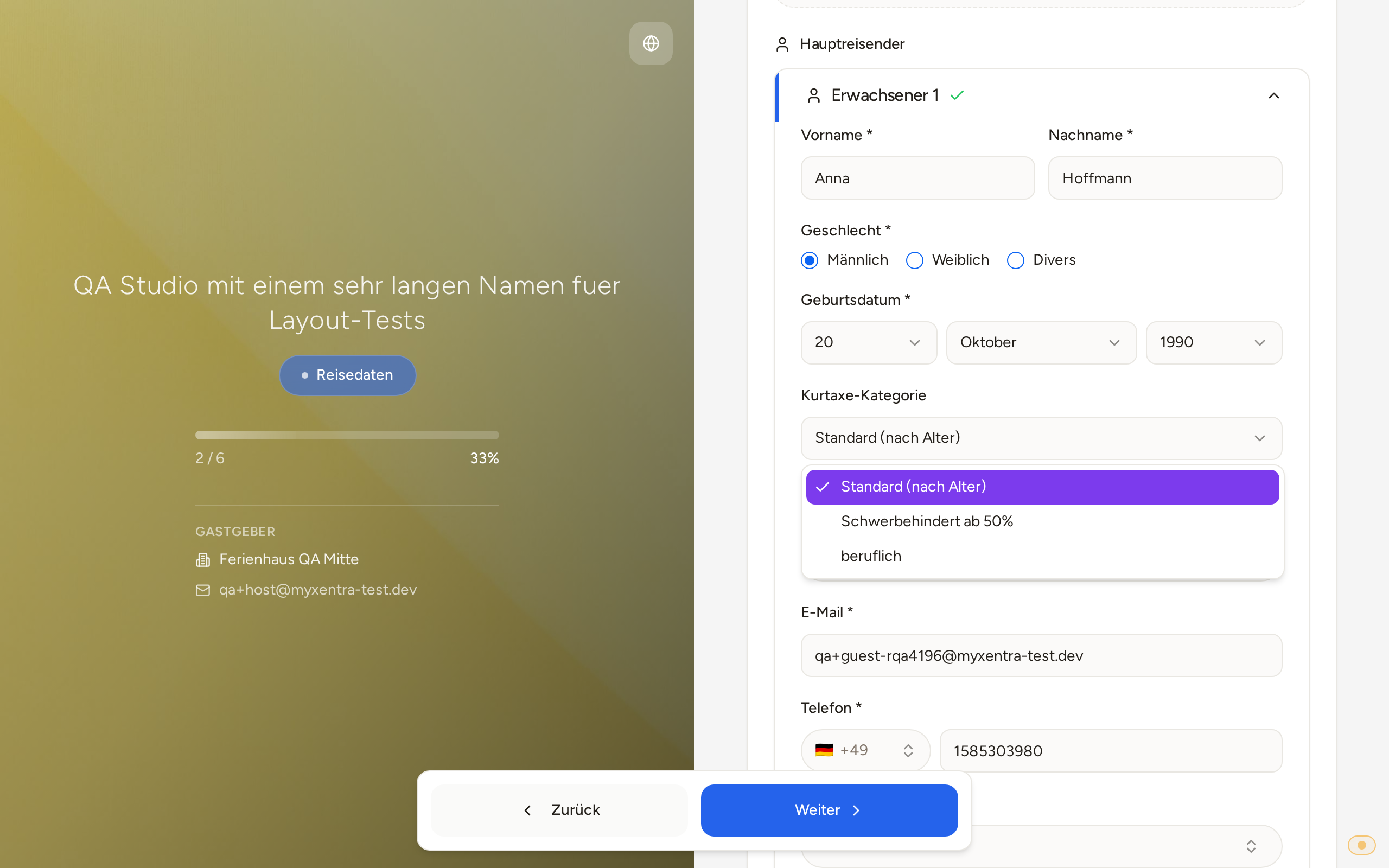 During online check-in, the guest only selects the approved groups under Tourist tax category.
- Calculate tourist tax yourself (per apartment): The amount then comes from your tourist tax settings, but the registration is still sent to Feratel.
- If a guest registration cannot be transmitted, you will receive an email with the error returned by Feratel. You can also see the error in the booking under the Online Check-in tab, Feratel visitor registration card. If Feratel rejects guest details, it states below which field you should check in check-in, for example "Please check in check-in: Country of residence and postal code of guests". If the guest data at departure differs from that at Feratel, Xentra reports the departure using the data stored with Feratel and notes this in the card.
- If the guest checked in, but the registration form did not arrive at Feratel (transmission permanently failed, not converted the day after arrival, or never pre-registered), Xentra displays "Not all guests registered": in the Calendar, under the Bookings tab, and under Checkin / Guest Registration, Open tasks tab.
How the guest cards reach the guest
With the direct connection, Feratel does not send the card. With saved WebClient access, Xentra fetches the cards for the booking; you see them in the booking under the Online Check-in tab, Feratel visitor registration card, and can retrieve them again immediately with Refresh. They reach the guest via a link: insert the placeholder {{feratel_guest_cards_link}} (Feratel guest cards) into your arrival message. The page populates as soon as the cards are available. The cards do not appear on the guest page.
Some destinations only release a pre-registered guest card starting on the arrival day. Before that, the guest sees "Your guest cards are available starting on the arrival day" along with the date. This is not an error; starting on the arrival day, the download works via the same link.
Destinations with guest cards on the registration form
In some destinations (for example Bad Sooden-Allendorf), the guest cards are listed on the registration form, one per person. Xentra detects this automatically. The Feratel visitor registration card in the booking then shows Guest cards on the registration form with Open registration form with guest cards; the list below is called Parking permits from the card system.
- The registration form with the cards is generated as soon as Xentra transmits the guest registration to Feratel, meaning at the time set in your Schedule. For example, if you set 2 days before arrival there, the guest receives their guest cards 2 days in advance. Until then, the guest sees via their link that the cards are still being generated.
- As soon as it is available, Xentra automatically sends it to the main guest.
If no card arrives despite registration: see Feratel: the download link for the guest card remains empty.