
Feratel: Activation by your destination
How your municipality activates the Xentra interface at Feratel, with Company Code and email template, and which two numbers you need per unit afterwards.
Updated on November 13, 2026
First the activation, then the numbers
For Xentra to report your guests to Feratel, your destination (municipality or tourism association) must activate the Xentra interface for your business. Feratel itself cannot do this, and without activation, reports go nowhere.
If your tourist office searches for "Xentra", it does not always find us. Therefore, provide both, the code is unique:
- Company Name: Stellar Tourism Innovations GmbH (Xentra)
- Company Code: VT57ELLAC2
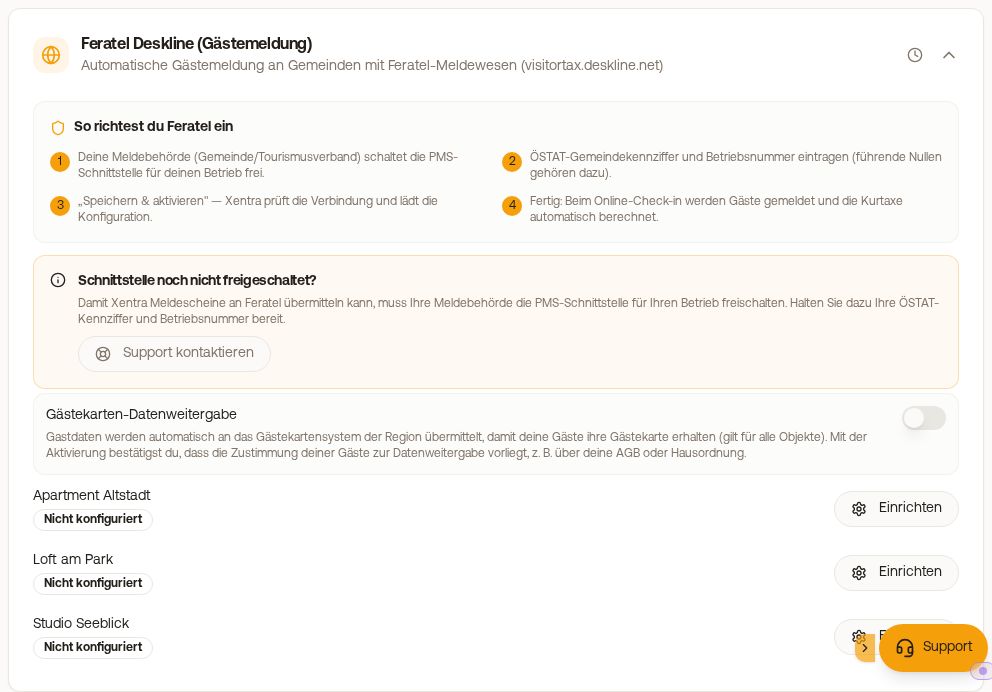 Feratel setup with the steps for activation
Email to your destination
You can copy this email directly:
Subject: Activation of the Xentra interface for [Business name]
Hello, please activate the interface of the following provider for our business [Business name, if applicable registration number]:
Company Name: Stellar Tourism Innovations GmbH (Xentra) Company Code: VT57ELLAC2
Thank you very much and kind regards [Your name]
Feel free to CC us (hello@support.myxentra.com), then we can follow along.
Afterwards: the two numbers per unit
As soon as the activation is confirmed, you need from your destination:
- the ÖSTAT municipality code. For a location in Germany, the field has the same name, meaning the municipality code that your destination maintains at Feratel for your location (usually seven to eight digits).
- the Business number, including leading zeros
You enter both under Checkin / Guest Registration, tab Guest registration, in the Feratel Deskline card for each apartment and click Save & Activate. If Feratel rejects the combination of municipality code and Business number, the card shows red Feratel does not accept this setup with both numbers. As long as this is the case, nothing is reported for this unit. Check both numbers under Edit. If they are correct, your municipality has not yet activated Xentra for the business. You will receive an email and a notification once a week until it is fixed. Afterwards, the card shows Unreported stays with Report now: This retroactively reports the affected stays that have already departed, up to 15 per click, without refund and without new payment for the guests. Each stay requires a guest registration form number.
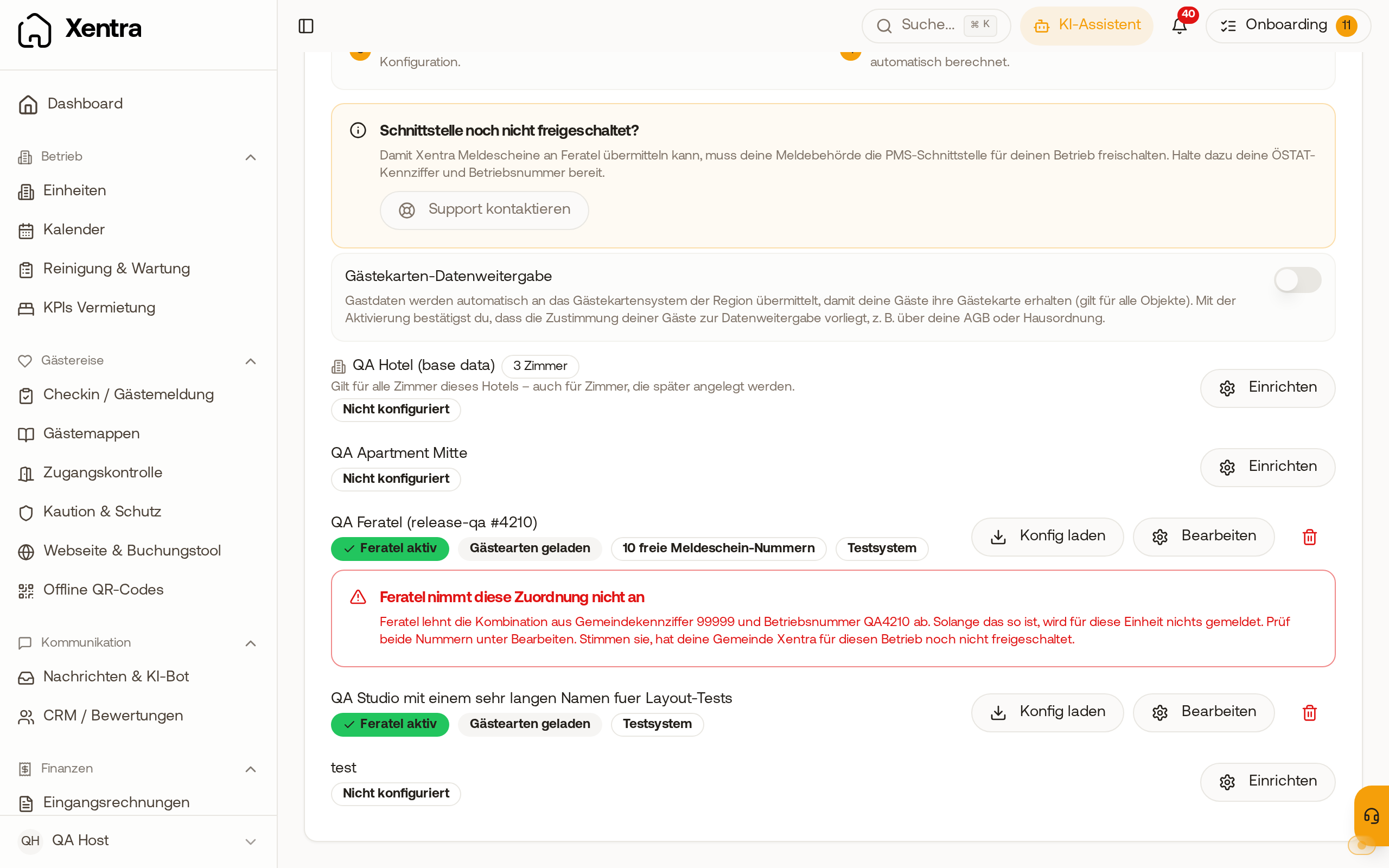 The Feratel card shows in red that Feratel rejects the combination of municipality code and business number.
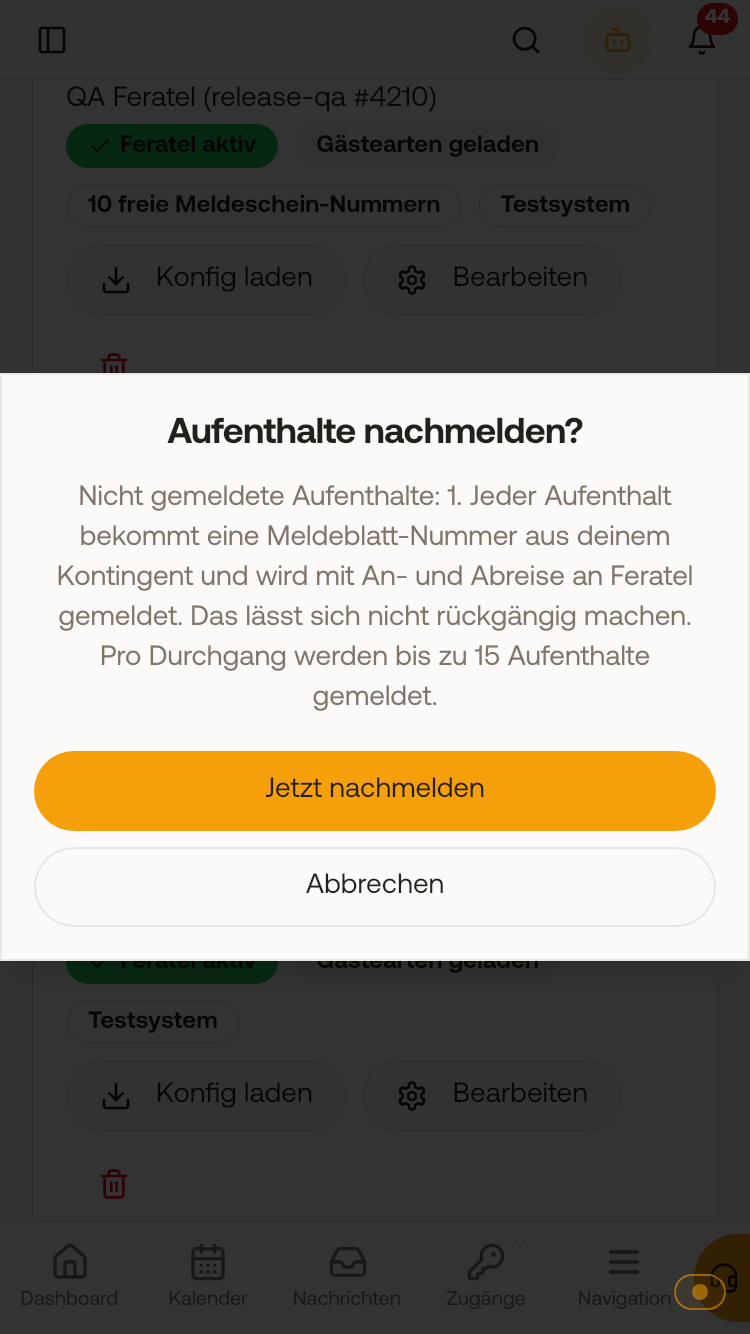 Before reporting retroactively, Xentra asks how many stays are reported. The box Interface not activated yet? in the Feratel card, on the other hand, is only a note, not an error message: If Guest types loaded is shown for your apartment, activation is complete. How to proceed afterwards, even if the block of numbers for the guest registration forms is still missing: see Feratel Deskline: Guest registration, tourist tax and guest cards, section Guest registration form numbers from your municipality.
Red message "Feratel does not accept this setup"
If Feratel rejects the combination of municipality code and Business number of a unit, this red message appears in its Feratel Deskline card with both numbers. As long as this is the case, nothing is reported for the unit.
- Check both numbers in the card under Edit, for the Business number also the leading zeros.
- If they are correct, your municipality has not yet activated Xentra for this business. Send them the email from above.
Until it is fixed, you will receive an email once a week and a notification in the bell, instead of an error email per booking.
Report stays retroactively
As soon as Feratel accepts the assignment, the card shows "Unreported stays" with their count. With "Report now" and confirming, Xentra retroactively reports the affected stays that have already departed, up to 15 per click. Nothing is billed: no refund and no new payment for the guests.
Common misunderstandings
Web Client and Expert Client. As a host, you have access to the Feratel Web Client, your municipality works in the Expert Client. You do not need the Expert Client, activation happens on the municipality's side. You store your Web Client access in Xentra so we can fetch the guest cards.
Tourist tax rates. The amounts are calculated by your municipality's system. You do not need to maintain rates in Xentra, unless you switch on Calculate tourist tax yourself.
Moving from a legacy system is a separate matter. If you previously had the Feratel interface through another provider, it must be moved to Stellar Tourism Innovations GmbH (Xentra). This is independent of the booking portal topic, best done one by one.