
Collecting add-on sales: commission, payment by invoice and Stripe
Commission on upsells, online payment or payment by invoice per template, Stripe fees and why you need a fully set up Stripe account.
Updated on November 6, 2026
Commission: only on what is paid through Xentra
A commission is charged on add-on sales (the platform fee, net plus VAT; you find the current rate on the pricing page), but only if the guest pays through Xentra, that is, by card in the online checkout or via a Xentra payment link. It is withheld from your payout directly when the payment comes in.
If the guest buys by invoice and transfers the money to you directly, no payment runs through us, so no commission is charged either.
Setting payment methods, per template
For each check-in template and each guest guide there are two switches:
- Check-in: Guest Journey → Checkin / Guest Registration → open template → Payment & upselling → Allow online payment and Allow payment by invoice
- Guest guide: Guest Journey → Guest pages → open guest guide → Products & Upselling → Allow online payment and Allow invoice payment
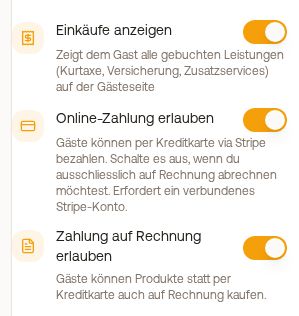 Products & Upselling block in the guest guide with the switches Show Purchases, Allow online payment and Allow invoice payment
If you switch off online payment, you only bill by invoice. If you switch off both, the guest cannot pay for chargeable services; the check-in template then warns you.
Two things that often surprise:
- The invoice option is not always shown to the guest. It disappears as soon as a deposit is authorized in the same process or an insurance is booked along with it. Both strictly require a card. For deposits and damage protection, online payment always stays active.
- A guest invoice that is settled via a Xentra payment link runs through us again and is therefore subject to commission. The commission-free route is a transfer directly to you.
Stripe fees and payment methods
Xentra bears the Stripe fees for the payment. Only the commission (plus VAT on it) is deducted from your payout. Which payment methods the guest sees in the checkout (for example card, Apple Pay or Google Pay) Stripe selects automatically, depending on device and country; you do not set this in your account.
Collecting only works with a completed Stripe account
Without a fully set up Stripe account, Xentra does not offer the guest card payment. If payment by invoice is also off, the guest cannot pay for chargeable services. Opening the setup link under Settings → Payments is not enough: you must submit the form at Stripe to the end (for a GmbH, beneficial owners and proof of identity are part of it). Only once Stripe has enabled payments and payouts is the sale active.
Services on request
For services with "Approval required", the guest only pays after your approval, via a payment link that Xentra creates and sends automatically. How this works and where you find the link: see Add-on on request: approve, decline, payment link.
"Paid" in the booking: via Stripe or by hand?
In the booking, card "Payments", it says "Paid" when the money came in through Stripe. The same "Paid" also appears on an item that the guest chose by invoice and that you or your team then closed with "Mark as paid". No money flowed through Xentra in that case, you received it directly. A tourist tax that you noted as settled outside Xentra with "Mark as already settled" shows as "Settled externally".
Receipts for your bookkeeping
If the guest pays an add-on through Xentra, the payment runs through Xentra's Stripe account and is paid out to you. Stripe does not create a separate receipt per payment for this; in your Stripe account you only see the transfer to you. You find your documents under Billing, tab Finance:
- Transactions: set the filter Type to Service, then Excel export or CSV export: every payment with amount, platform fee and payout.
- Payouts: Receipt (PDF) for each payout, that is, for each transfer to your bank account.
- Monthly Platform Fees: our invoice for the commission as a PDF. It is the receipt for the input tax deduction of the fees.
You open Billing in the browser, it is not available in the app.