
Guest page: Show sections only upon arrival (visibility)
Show sections of your guest page only from check-in, after completed check-in, or hide them after check-out, even hours or days beforehand.
Updated on November 13, 2026
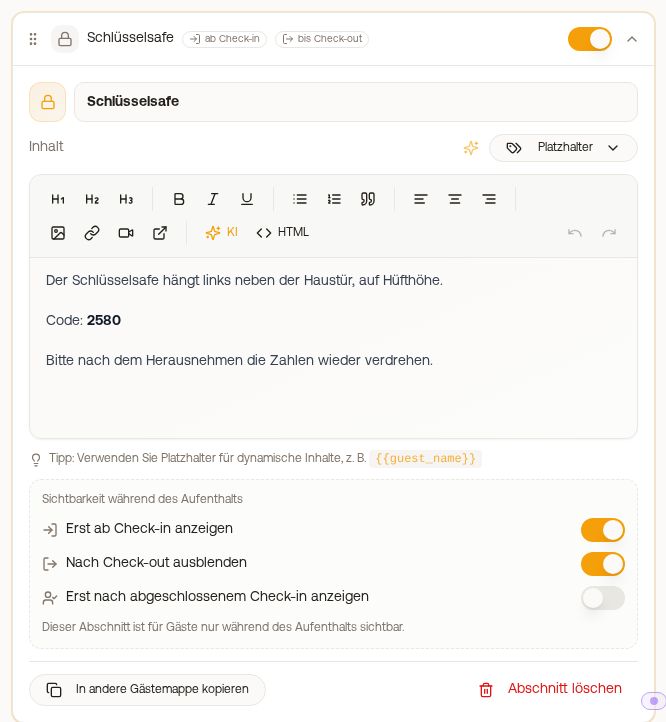
Guest page: Show sections only upon arrival
Every section of a guest page has the area "When do guests see this section?" when expanded. This way you show the key safe code only on the arrival day, for example, and hide it again after departure.
Path: Guest journey → Guest pages → Guest guide Edit → expand the section.
| Selection | When the section appears |
|---|---|
| Always | before, during, and after the stay |
| From check-in | from the check-in time on the arrival day, or earlier (see Release earlier) |
| Until check-out | until the check-out time on the departure day |
| Only during the stay | from the check-in to the check-out time |
Below it is the check box "Only once the online check-in is completed". This means the section only appears once the guest has submitted their online check-in. If a mandatory tourist tax is still pending, or if the AVS registration is still pending or failed, it remains hidden until then. The check box applies in addition to the selection above (and): "From check-in" with a check box means from the check-in time on the arrival day and only once check-in is completed.
What is right for access codes?
If a code should only be visible from the check-in time on the arrival day, select "From check-in" or "Only during the stay" and check the box. The check box alone releases the section as soon as the guest submits the form, which could be days before arrival. Confirmation by you is not needed for this.
A door code placeholder (for example {{key_code}}) in such a section leaves the server only when the section is visible. A guest cannot read it beforehand from the source code of the page.
This also applies to a fixed code that you stored in a custom field of the unit and insert with {{unit.<feld>}}, for example the code for a key box: it is only delivered with a visible section that shows it. If this section is set to Always, the code is visible at any time, even before check-in and after departure. Visibility is rechecked on every call, even if the guest saved their personal link. For a canceled booking, the entire guest guide is locked.
Where the time comes from
The time does not come from the guest guide, but from your access times, in this order:
- an access time stored on the individual booking,
- an override for this unit under Access Control → Settings → Time Settings → Overrides,
- the default time in the same Time Settings,
- 14:00 at check-in and 12:00 at check-out, if none of these are set.
If the guest has booked an extra service such as early check-in that shifts door access, the section opens correspondingly earlier (see Access period of a booking and visibility of the access link). The decisive factor is the time zone of the property, not the estimated arrival time specified by the guest on Booking.com.
If you change the check-in time, it also applies to door access.
Release earlier
With From check-in and Only during the stay, the line Release appears below the selection. There you choose when the section opens:
- at check-in time (default),
- on the arrival day from … with a custom time,
- 24 hours before or 2, 3, 5, or 7 days before, calculated from the check-in time.
This way you show directions and parking 5 days before arrival, for example. With the check box Only once the online check-in is completed, both apply: the point in time is reached and the check-in is completed. A time on the arrival day never opens the section later than door access, for example with a booked early check-in. A door code of the lock or booking still appears in such a section only at check-in time: the text is there earlier, the code comes with door access. In contrast, a fixed code from a field of the unit (for example for a key box) is shown by the section right with the text. Afterwards click Save at the bottom; the section card then shows From check-in · 5 days before, for example.
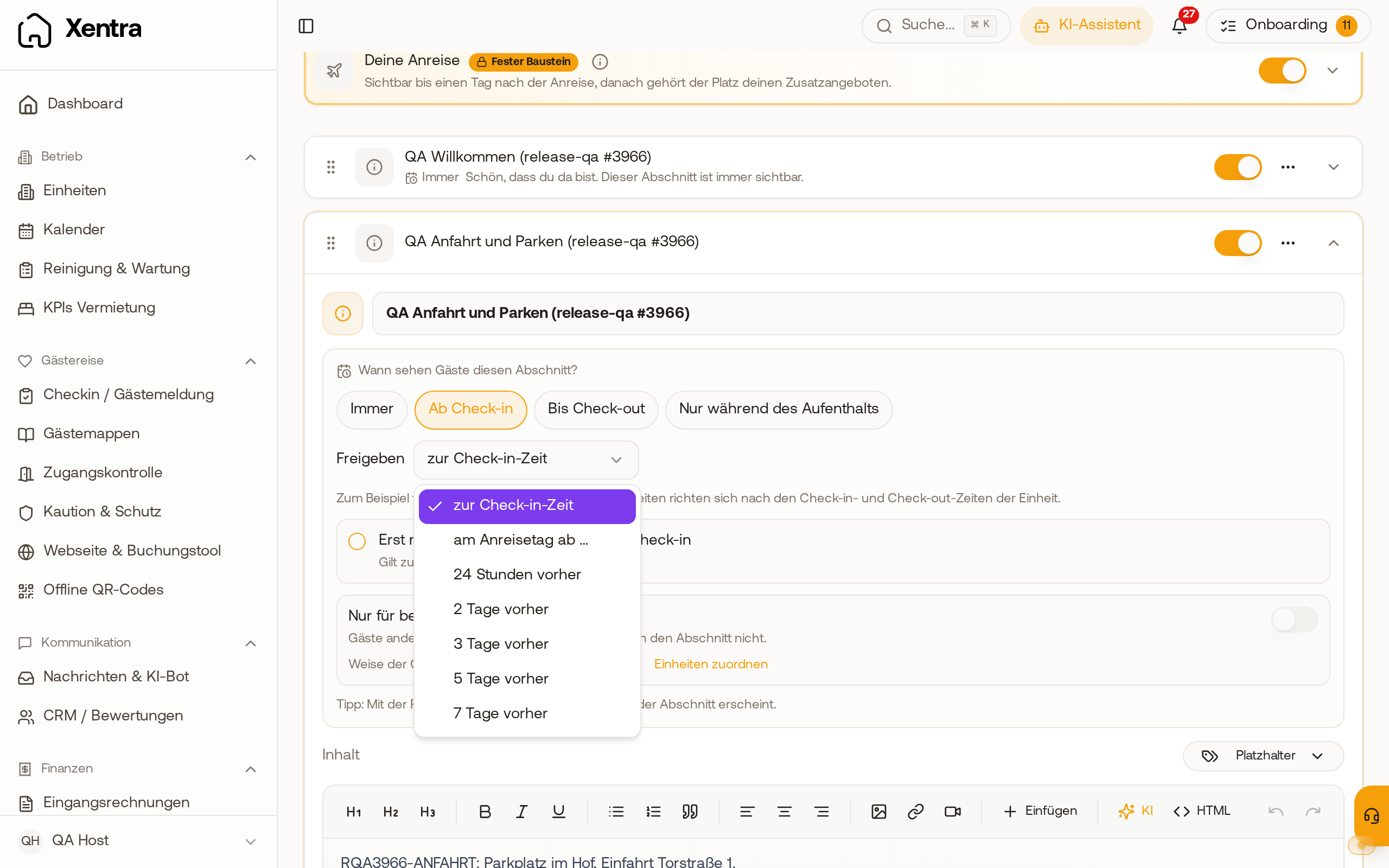 Under "From check-in", there is the line "Release" with at check-in time, on the arrival day from … and 24 hours to 7 days before.
An already open guest page refreshes automatically at the release time, the guest does not need to reload. In the preview, you select the Phase at the top (for example Before arrival or Arrival day) and whether the online check-in is completed, and see which sections are already open then.
Only for specific units
Show a section only for some units of a guest guide: see Guest guide: Sections only for specific units.
What guests see before release
For guest guides in the new design, select in the Settings tab under Locked sections what a guest sees of a section that is still locked. They never see the content in any case.
- Sketched: title with lock and from when: the title with a lock and the time, for example "from Oct 28, 14:00". New guest guides start like this.
- Just a hint that more is coming: instead of the title, a sentence such as "From your arrival day, you will find more info about your stay here."
- Hide completely: locked sections do not appear at all, not even in the table of contents.
Afterwards click Save at the bottom.