
Platform fee: how much it is and where to find the proof
On which payments Xentra keeps a platform fee, where you find the current rate and how the monthly invoice documents the fee.
Updated on November 6, 2026
For every payment that a guest makes through Xentra, Xentra keeps a platform fee. It is deducted directly when the payment comes in, via Stripe Connect; you don’t transfer anything afterwards. If the guest pays you directly (bank transfer, cash, portal), no fee applies.
How high the fee is
The fee is a percentage net plus VAT, calculated on each item separately: tourist tax, extra services from check-in, products, bookings through the booking tool, invoice payment links, payment links with a free amount from the booking, damage waiver and collected deposits. You find the current standard rate on the pricing page under transaction fees. For individual accounts a different rate may have been agreed; that one applies instead of the standard rate. Which rate was actually applied to a payment is shown in the Excel export (see below).
Which VAT applies to the fee depends on the country of your Stripe account:
- Germany: 19%.
- Other EU country: the standard rate of that country.
- Other EU country with a valid VAT ID: 0% (reverse charge). The number must be confirmed through the EU VIES system; a number that is merely entered is not enough.
- Outside the EU: no VAT.
Stripe fees are borne by Xentra, including for foreign cards or more expensive payment methods.
Payments before 28.08.2026 may still carry an older, higher rate on extra services and damage protection. That is not changed retroactively.
Booking tool: when the fee applies
For bookings through your direct booking tool, the fee applies only if the guest pays online there by card via Stripe. It does not apply to bookings created manually in the calendar (including €0 bookings and blocks), to bookings through portals such as Airbnb or Booking.com or from your PMS, or if the guest pays by bank transfer outside Xentra.
Why a fee looks “odd”
If a guest pays tourist tax and extra services in one transaction, you see one fee: the sum of the partial fees, each calculated on its own item. The formula that always adds up: guest payment minus platform fee = your payout. You can read the actual rate per payment in the Excel export, in the column “Fee rate net %”.
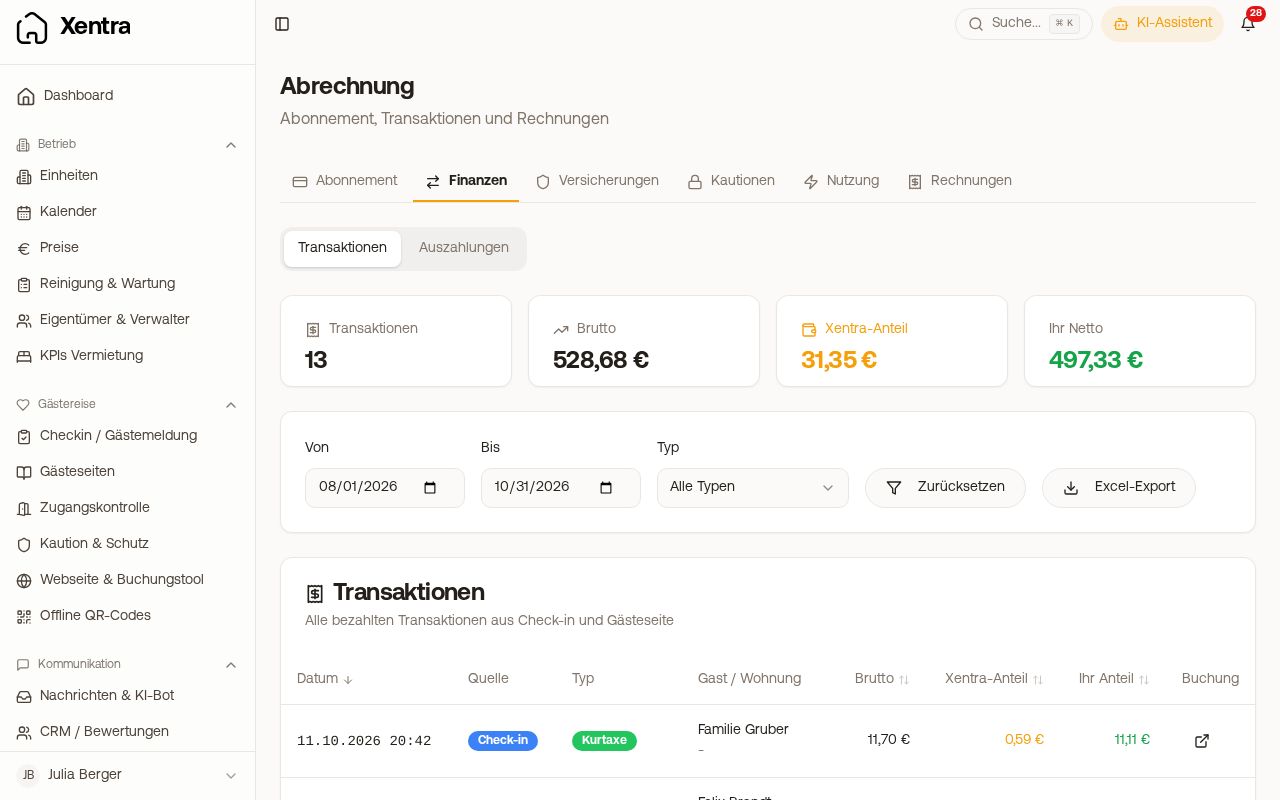 Finance tab with transactions, Xentra share and Your Net
The monthly invoice for the fees
Once a month (on the 2nd) you receive an invoice for all platform fees withheld in the previous month. You find it under Open billing on the “Finance” tab, card “Monthly Platform Fees”, and in the list on the “Invoices” tab. Each payment appears on it as a separate line item (guest, unit, period, payment date, Stripe charge ID). The fees were already withheld when the payment came in; the invoice is only the receipt and is already marked as paid. It is your input VAT receipt, not a receipt for each payout. With a valid VAT ID in another EU country, it shows reverse charge (0% VAT with a note).
Older commission invoices with numbers “PL-…” remain available as an archive on the “Invoices” tab.
Where you see every fee
- “Finance” tab, “Transactions” sub-tab: every payment with total amount, “Xentra Share” and “Your Net”, filterable by period and type.
- “Excel export” in the same tab: detail sheet with fee basis, fee rate, net and VAT per payment, plus a control sheet against the monthly invoice.