
Notifications for guest messages: language, stay and bundling
How push, bell and email report new guest messages: in your language, with the stay in the title and several messages grouped together.
Updated on November 6, 2026
If a guest writes to you, Xentra reports it in the bell, by email and with the Xentra app via push. To switch these on and off, go to Settings, Notifications, row New guest message.
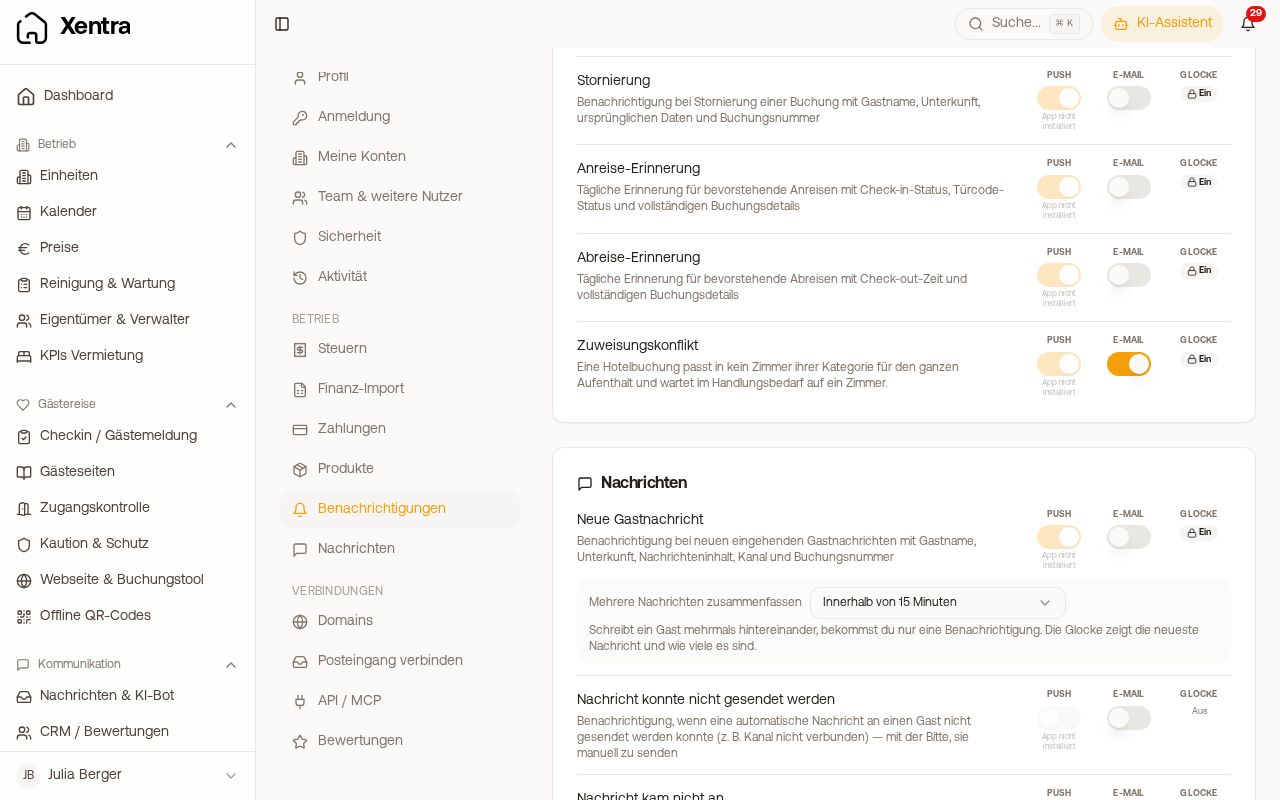 Row “New guest message” with “Bundle multiple messages”
The stay appears in the title
The bell and push show the stay alongside the name, for example “Dominik · 04.10. → 09.10.”. This way you see immediately whether the guest has already arrived or is still to arrive. Very long names are shortened for this. If the message does not belong to any booking, only the name appears. If a guest writes to you by email without a sender name (for example with Apple’s “Hide My Email”), the first name from the booking appears in the title instead of their address. There is no setting for this.
Only the new text, without the quoted history
If a guest replies by email, their mail program often attaches the previous history (“On 13.10.2026 at 14:54 wrote …”). Push and bell show only their new message, not the quoted history. You see the whole text in the inbox.
Guest messages in your language
If a guest writes to you in another language, push and bell show their message in your language, just like the inbox and email. This applies if you have installed the Xentra app; without the app, the bell stays in the original and the translation appears in the Inbox.
- Short messages (under 20 characters, for example “Gracias!”) and messages that are already in your language stay in the original.
- Each message is translated only once; push, bell, email and inbox use the same translation. It counts toward your AI Credits, as in the inbox.
- If the translation is not ready within a few seconds, the push arrives in the original. The translation still appears in the inbox.
Several messages from a guest are bundled
If a guest writes several times in a row, you only get one notification within 15 minutes: one push, one email, one entry in the bell. The bell shows the latest message and, in brackets, how many there are, for example “Ana · 14.10. → 16.10. (3)”. The email shows the first message; all further ones are in the inbox.
- As soon as you read the bell entry or reply to the guest, the next message notifies you immediately again.
- On the iPhone, each further message silently replaces the entry on the lock screen, without sound and without a new banner. On Android, the first message stays.
- A message after the 15 minutes have elapsed notifies you individually again.
- You can change this in the row “New guest message” under “Bundle multiple messages”: Within 15 minutes (default), Within 5 minutes or Off, each message individually. The setting applies to push, bell and email at the same time.
- In the Xentra app you find the same choice under Settings, section “Guest messages”. It applies to your whole account, not just this device. Team members do not see it.
Messages without a booking
- Unassigned guest message: if someone writes to you via WhatsApp, Instagram or SMS and the message cannot be assigned to a booking (usually an enquiry from someone who has not yet booked), a notification appears in the bell and as push, at most once per hour per sender. This is on by default; you switch on an email for it yourself. In the Inbox you see such messages via the filter icon, “Unassigned”, “Only these”.
- Unassigned email: for emails without a booking there is a separate notification, off by default.
All other settings: see Setting up notifications: push, email and bell.