
Deposit by bank transfer: request, receive, settle
Fixed deposit for long stays and companies: request by bank transfer, mark as received, and settle with deductions after departure.
Updated on November 12, 2026
For long stays and companies: a fixed deposit that the guest transfers before arrival and that you settle after departure. This is not the card deposit from the online check-in (card "Damage Protection / Deposit"), see Deposit: when it is reserved, withheld, and released.
Where: on the booking, Details tab, the "Security deposit (bank transfer)" card. As long as nothing has been requested, it says "No deposit yet.". For a booking across multiple rooms, the card shows all rooms. You and team members with the permission to edit bookings can change it.
- "Request deposit": Enter the amount and "Due" (suggested is arrival), "Save". The card shows "Requested, not received yet." and "Due ...".
- "Deposit request (PDF)" downloads a letter for the guest with amount and due date, along with your bank details and reference if you saved an IBAN (Outgoing invoices, Settings, Bank account).
- Once the money arrives: "Mark as received", check amount and date, "Save". The card shows "Received on ...: amount".
- After departure: "Settle". Under "Deductions", enter what you withhold, for example final cleaning ("Add deduction", description and amount). If the booking has an invoice with cleaning or laundry, "Import cleaning and laundry from invoice ..." imports these lines. Xentra shows Received, Deductions, and "Refund". If the deductions are higher than the deposit, Xentra points this out; you request the difference separately from the guest.
- Afterward, the card shows "Settled on ...: ... refunded, ... withheld", and "Deposit statement (PDF)" downloads the statement for the guest. You transfer the refund yourself.
A deposit is not an invoice: no invoice number, no VAT. You can cancel a requested deposit and request a new one afterward.
Deposit in the offer
In offers, you enter an amount per unit under "Deposit"; you set a suggestion for each new offer under Calendar, Offers, Settings. The guest sees "Security deposit, refundable" separately from the total price. If they accept the offer, Xentra creates a requested deposit for each room, due on arrival. See Offers to guests.
In messages
In automated messages, you use {{security_deposit_amount}} (amount) and {{security_deposit_due_date}} (due on).
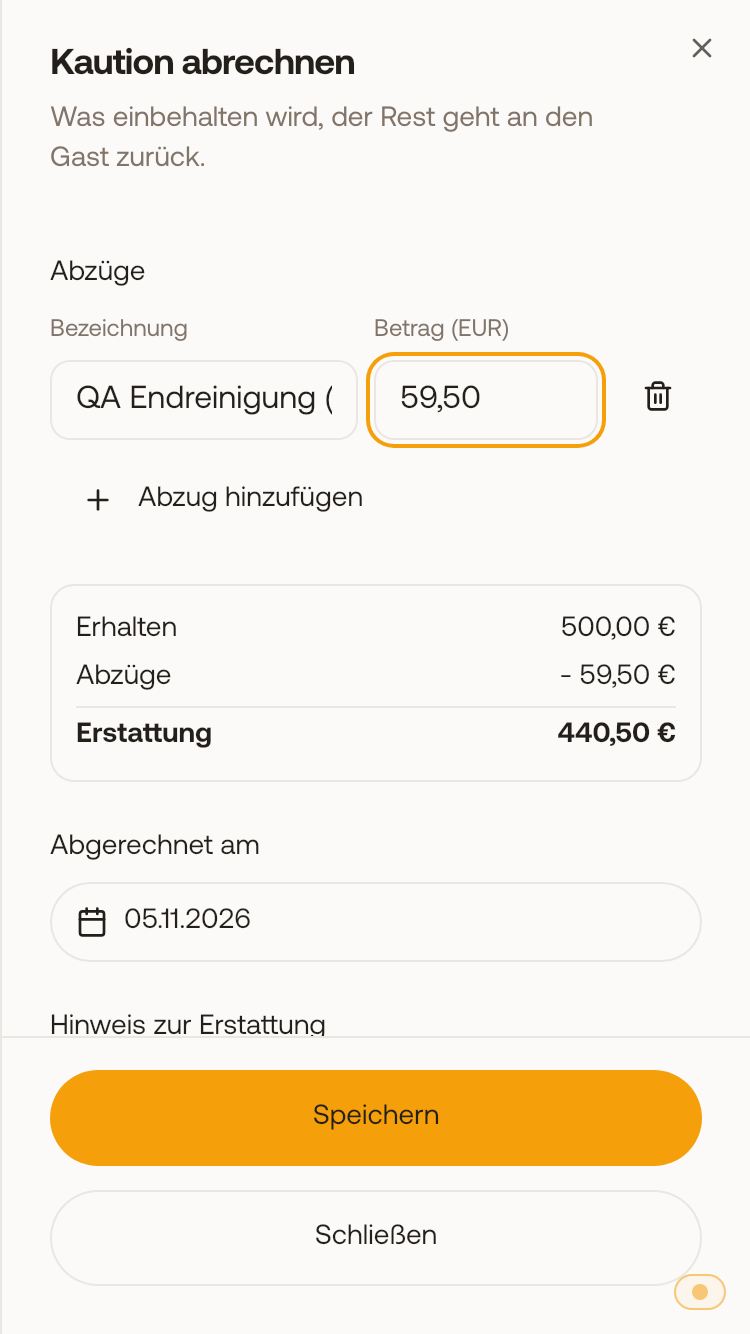 When settling, you enter the deductions and immediately see what goes back to the guest.