
Hotels in the booking tool: one card per room category
If you have a hotel with room categories, your booking tool shows each category as one card, for example "Double room, 3 rooms left".
Updated on November 2, 2026
If you have a hotel with room categories, your booking tool shows each category as one card, for example "Double room, 3 rooms left". The guest books the category, and the room is assigned automatically when booking.
In the settings of the booking tool (Open booking tool, Settings → General, card "Bookable Units") you select the category as a whole: it appears there as one entry such as "Double room (3 rooms)". Old links to a single room automatically open the card of the category.
Several rooms in one booking: see "Hotel cart: book several rooms of one category" and "Hotel mode in the booking tool: several units in one booking".
Content applies to all rooms of a category
You maintain photos, description, equipment, size, bedrooms and beds once per category. Under Units, open "Rooms" on the hotel card, and for any room of the category click the pencil. Whatever you change there, all rooms of the category take over when you save. Room name, Wi-Fi, door code and custom fields stay per room.
If the rooms currently differ, for example after an import, the window shows where, and offers to transfer the content of this room to all of them. If another room has its own, different content that would be replaced when saving, Xentra asks first and names the rooms and what changes. Empty rooms are filled without asking. New rooms of a category receive the content automatically.
Guests can tap the photos on your booking page, view them large and swipe through them.
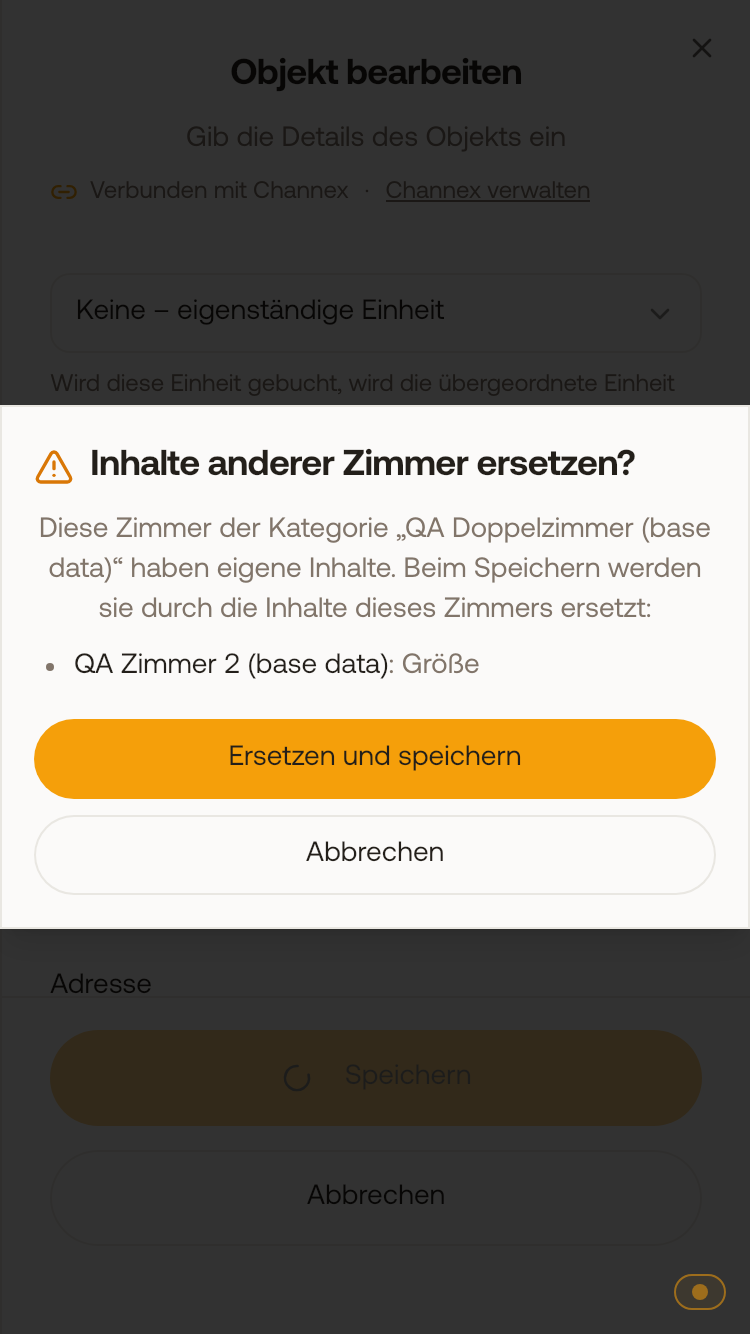 Before Xentra replaces the own content of another room, it asks and names the room and section.
Change the card name
On the card in the booking tool is the name of the room category, not the name of the individual room. If you change the name of a room under Units, the card therefore does not change. You change the card title like this: Open units, on the hotel card "Categories", edit the category, adjust name and translations, then Save. The names of your rooms in Xentra and the listing titles at Airbnb and Booking.com remain unchanged.