
Guest statistics (Beta): monthly overnight statistics for Austria
How you generate the monthly overnight statistics for your municipality in Austria (Statistik Austria, Graz CSV, Vienna VIETour) from your online check-ins.
Updated on November 6, 2026
Hosts in Austria report arrivals and overnight stays by origin to their municipality (Statistik Austria) every month, in Graz via CSV upload, in Vienna via VIETour. Xentra calculates the numbers from your online check-ins and gives you a file to upload for each reporting unit.
Where: Menu item Checkin / Guest Registration (open), tab Guest statistics. You only see the tab if at least one of your accommodations is located in Austria.
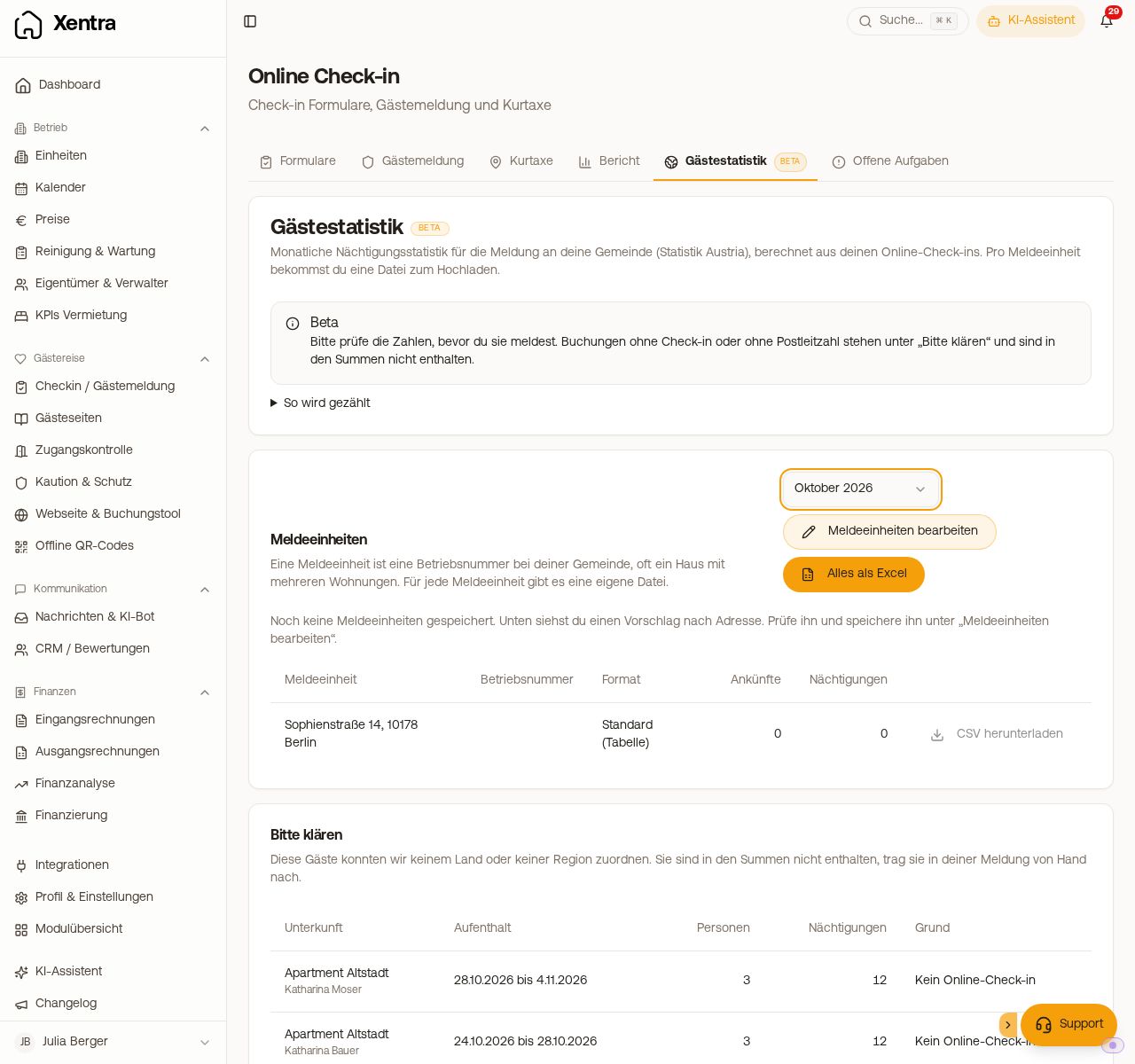 Guest statistics tab with month, reporting units and download
How to proceed
- Select Month. The previous month is pre-selected.
- Check reporting units. A reporting unit is a business registration number with your municipality, often a house with several apartments. Under Edit reporting units, you set the name, business number, File format (Graz (CSV upload), Vienna (VIETour) or Standard (table)) and the accommodations, and save. As long as nothing is saved, Xentra suggests a split by address.
- Click Download CSV per reporting unit and upload the file to your municipality. Everything as Excel contains the totals, each guest individually and the open cases.
- View Please clarify: bookings without online check-in and guests from Austria or Germany without a postal code are not included in the totals. Add them by hand in your report.
How it is counted
- Origin is the guest's residence. If the country of residence is missing, Xentra uses nationality instead. Austria counts by federal state, Germany by region, both via the postal code.
- Additional guests without their own details count with the main guest's country. If an accompanying guest only provides the country, Xentra uses the postal code of another person from the same country.
- Every person arriving in the month is an arrival, including children. Overnight stays are persons times nights in the month; stays across the turn of the month are split.
- For bookings with multiple rooms, each guest counts in the room they selected during check-in.
So less remains open
Ask for the Postal code for the main guest and the Country of Residence for additional guests in the check-in form: Checkin / Guest Registration, Forms tab, open template, Guest data section, under Required Information for the main guest and for the additional guests.
Overnight tax
If you report the tourist tax to your municipality yourself (tourist tax setting with a fixed amount per person, no Feratel, AVS, Tramino or WinTOP), you will also see the Overnight tax card in the Guest statistics tab. It shows all overnight stays per accommodation and month, split into tax-exempt and taxable, and the amount according to your tourist tax setting. Tax-exempt are guests who pay nothing according to your settings, for example children or an exemption from the check-in; the age counts on the arrival date.
- Per accommodation, you download the month with Excel, all accommodations at once with Overnight tax as Excel (Overview, Open cases, Bookings).
- In the Excel file, you can see per booking whether the check-in is completed and how the tourist tax was paid: in Xentra, on site, via the portal or without proof of payment.
- Open cases are bookings without completed check-in or without proof of payment. Bookings without check-in are not included in the totals: check them individually before you report.
Notes
- The feature is in Beta: Check the numbers before you report them.
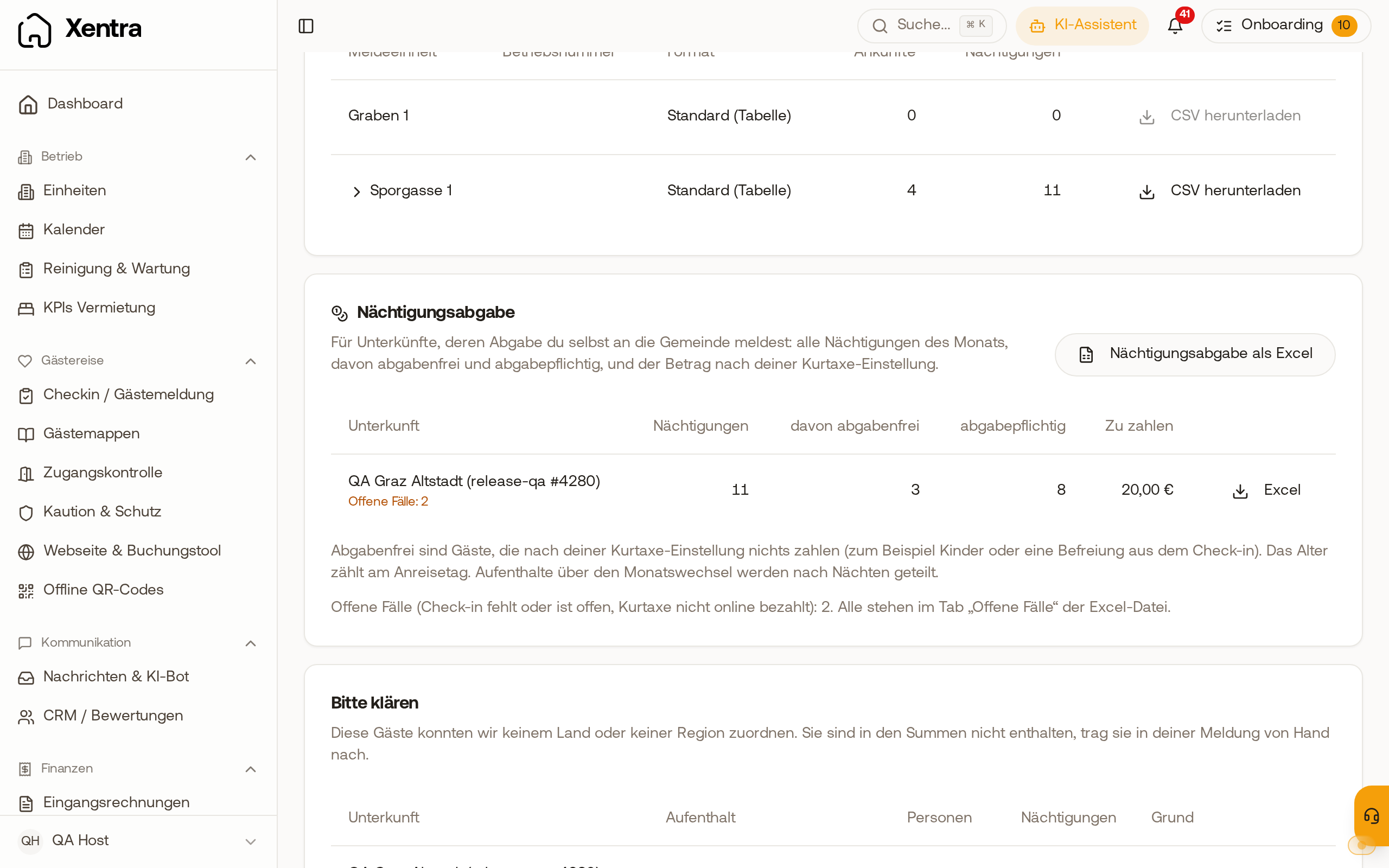 The Overnight tax card shows overnight stays, tax-exempt and taxable nights, and the amount per accommodation.
- If you report individual accommodations via Feratel, clarify with your municipality whether the statistics are already included there so that nothing is reported twice.
- The Vienna file uses the country codes of Statistik Austria. If VIETour rejects a code, write to us at hello@support.myxentra.com.