
Self-service invoices: the guest creates their own invoice
Guests get their invoice themselves via a link, with timing, fallback invoice, and sending.
Updated on November 9, 2026
The guest creates their invoice themselves
Instead of sending an invoice to every guest, any guest who needs one can create their invoice themselves via a link. They enter their billing details, for example a company address.
Turn on
Guest Invoices, button "Settings", section "Automation", toggle "Self Service Invoices", save.
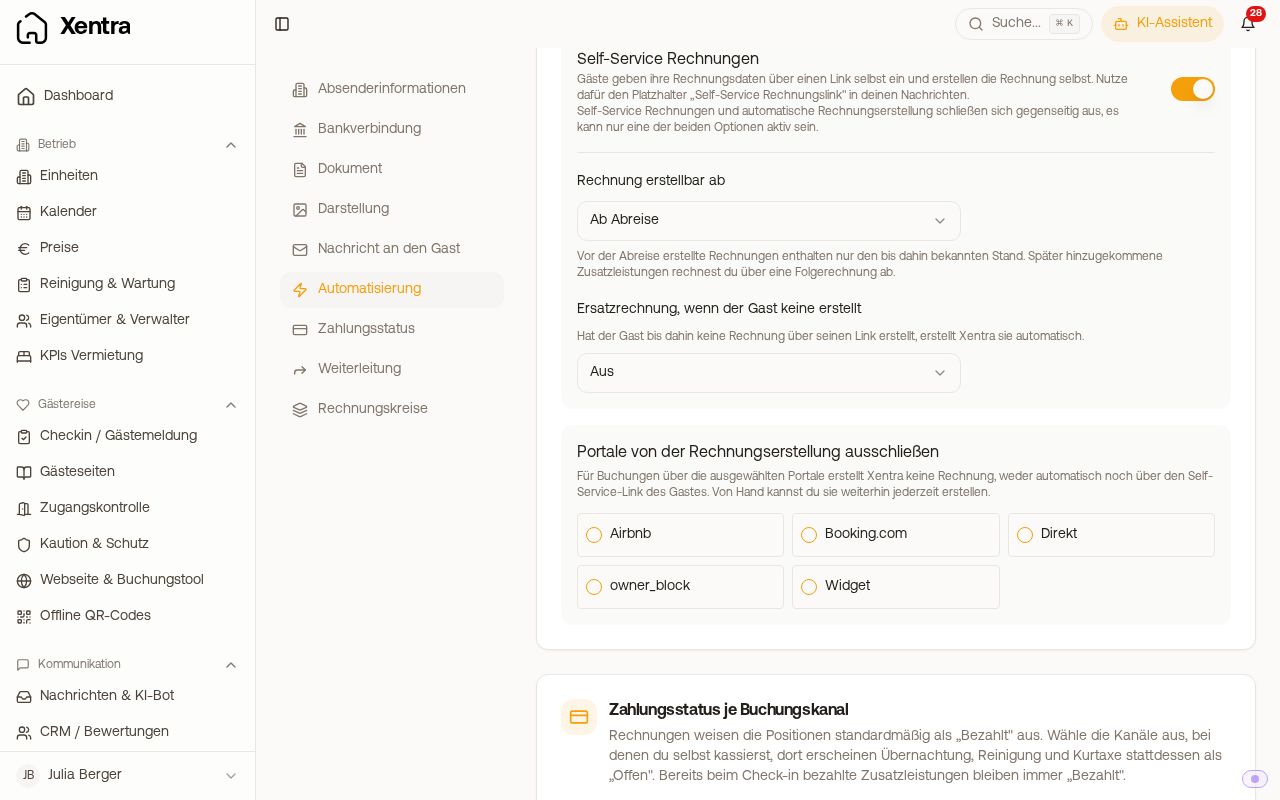 The toggle "Self Service Invoices" with timing and fallback invoice
- Self-service and "Auto-create invoice on departure" are mutually exclusive, only one of them is on at a time.
- "Invoice can be generated from": "Immediately after booking", "From arrival", or "From departure" (default). Before that, the guest sees "Not available yet" and the date from which it works. An invoice before departure only contains the status known up to that point. You bill additional services added later via a follow-up invoice.
- Channels you checked under "Exclude channels from invoice generation" do not receive an invoice via the link either. Their guests see a note to contact you instead. Xentra shows you in the section which channels are affected.
What the guest fills out
The guest selects "Private" or "Company" and enters their name or company name and address themselves, and optionally also VAT ID and tax number for a company. Nothing is prefilled from check-in. Before creating it, they see an Invoice Preview with the line items. "Create invoice" creates a real invoice with a sequential invoice number, after which the guest can no longer change it. This also applies if you try the link yourself. If password protection for invoices is enabled, the page displays the invoice password to the guest right away.
Sending the link to the guest
The guest needs the placeholder {{invoice_self_service_link}} ("Self-service invoice link") in one of your message templates, ideally in one that goes out after departure. If it is not in any template, the section warns you with "No message template contains the invoice link": without a link, no guest can access their invoice.
- The link ends in
/invoice-request/<Code>. Xentra only creates the code per booking when a message or the guest guide uses the placeholder for the first time. Therefore, another program cannot create the link itself: Put the placeholder in the guest guide and give the program the booking's guest guide link. - When the guest retrieves the invoice, they get it immediately on the page to download. It is not additionally sent by email. The link leads back to the same invoice later.
- In your list, it carries the icon "Created by the guest" and does not count as "Not sent". If you still want to send it, you can do so via the three-dot menu.
Fallback invoice if the guest does not create one
Under "Fallback invoice if the guest does not create one", you select Off, On departure day, or 1, 2, 3, 5, 7, or 14 days after departure. If the guest has not retrieved an invoice by then, Xentra creates it automatically. This way your accounting gets every invoice, while the guest can still get theirs themselves.
- The fallback invoice uses the booking details. After that, the guest can no longer enter a different billing or company address. Therefore, plan the timing generously and remind the guest beforehand with a message automation.
- Without a fallback invoice, no invoice is created for guests who do not use the link.
- "Send the fallback invoice automatically" sends the fallback invoice to the guest. Without this option, it is only ready for sending in your list.
If you switch back to "Auto-create invoice on departure" afterwards, the timing and fallback invoice are lost. Xentra therefore asks for confirmation beforehand.
What fits when?
- Auto-create invoice on departure: Every guest should receive an invoice, and the booking details are sufficient for it.
- Self-service without fallback invoice: Only some of your guests need an invoice, such as business travelers with a company address.
- Self-service with fallback invoice: The guest enters their details themselves, and your accounting still receives every invoice.
Sending the link via an external tool
The invoice link only exists in Xentra: in your message templates, in the inbox, and in the guest guide. It cannot be retrieved via the data API, webhooks, or PMS field rules. If you use an external tool for guest communication, create a section in the guest guide with {{invoice_self_service_link}} and give the tool the link to the booking's guest guide. The data API provides this per booking in the guest_page_link field if your API key has the permission Access. The guest then reaches the invoice form with one extra click.
Test the process yourself with your own booking before sending the link to guests.