
For the next guests: Check-in answers in the cleaning task
What your cleaner sees about the next guests: Answers from the online check-in, booked extras, your note, and which checkboxes you set for it.
Updated on November 14, 2026
When your guests answer your questions in the online check-in, for example how the beds should be made, when they arrive, whether a baby is traveling along, or if someone has allergies, your cleaner sees these answers directly in their task. This way, they make the beds right away without asking you.
Where the answers are located
Under My tasks, the cleaner opens a departure cleaning. Under the Booking section, there is the collapsed card For the next guests. Even when collapsed, it shows small tags: Extra bed, if more guests arrive than the unit normally accommodates, the booked extras of the next guests, and how many answers there are, such as "4 answers". Tapping the card expands it and shows each question with the guest's answer.
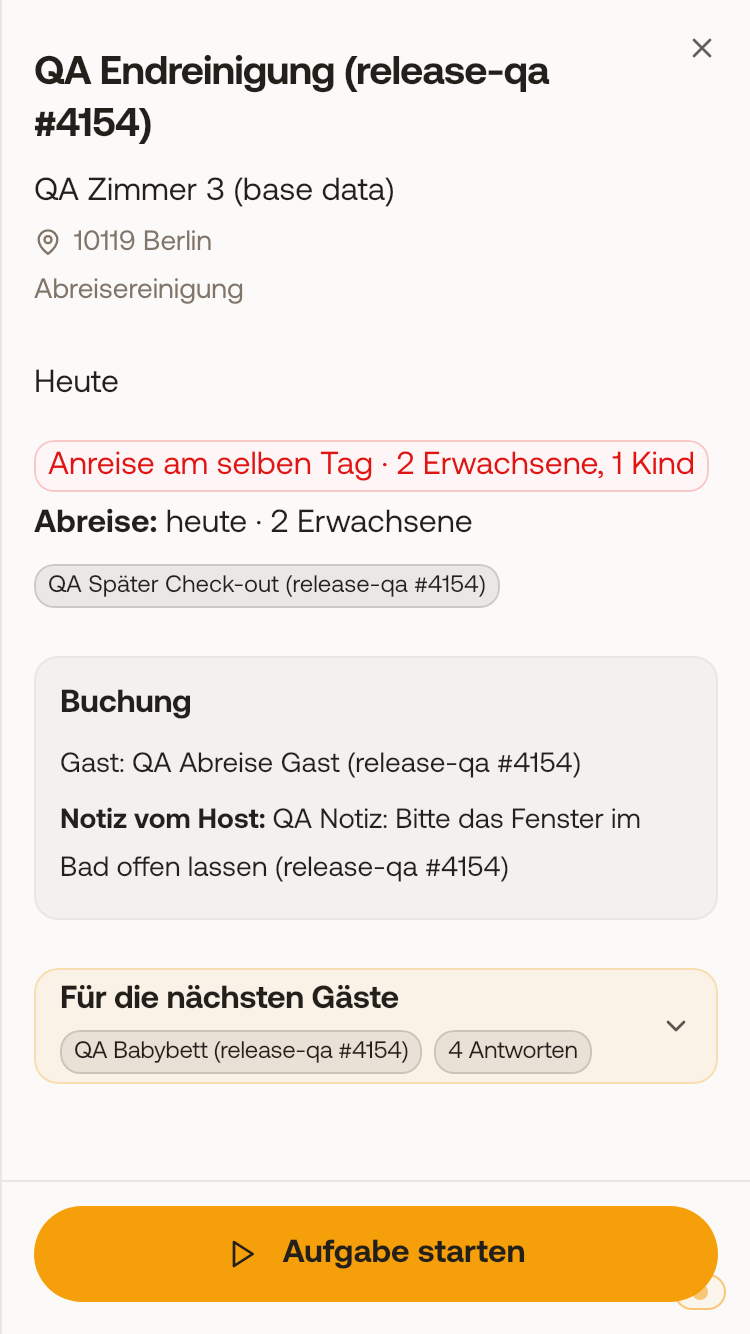 Collapsed card "For the next guests" with a booked extra and "4 answers", above it the Booking section with the note from the host.
The answers come from the booking arriving after the cleaning, or for a preparation before arrival, from its own booking.
Entire house with rooms: When cleaning the entire house, guests who arrive next in one of its rooms also count. Then the name of the room is included, such as "Arrival on the same day · Linde · 4 guests" or in the task "Next check-in: 25.11.2026 · Linde · 2+2". If multiple rooms arrive on the same day, all of them are listed, for example "Ahorn · 2 guests + Linde · 1 guest". Answers and extras from the check-in are only available once the guest has submitted the online check-in. If the cleaner has started the task, the card sits above the checklist, also collapsed. Maintenance tasks and completed tasks do not have a card.
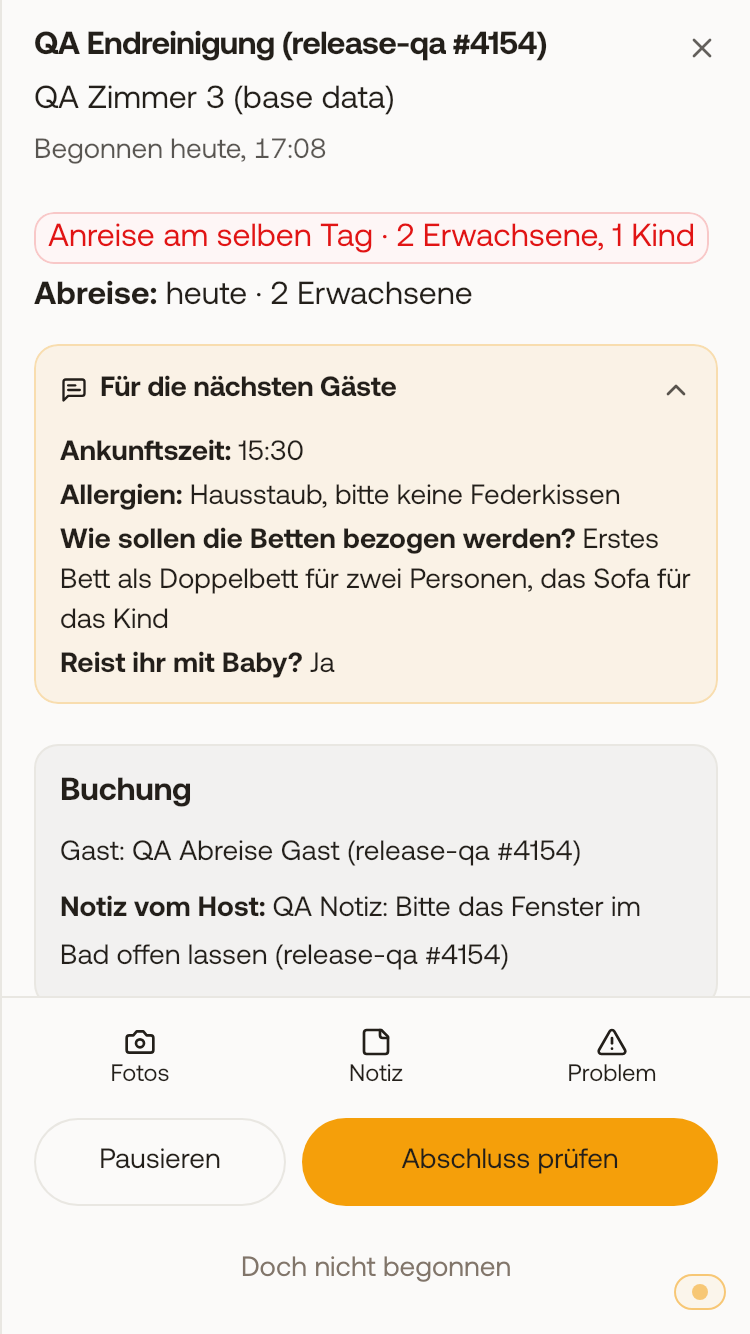 Started task with expanded card and the answers of the next guests above the checklist.
Booked extras and your note
- What the departing guests have booked, such as a late check-out, appears as a tag under the Departure line.
- What the next guests have booked appears in the card For the next guests.
- A late check-out of the departing guests or an early check-in of the next guests can be seen by the cleaner directly on the card in My day and in the List without opening the task: as a gray tag with the name of your add-on service. This applies to departure cleanings and to preparations before an arrival. Xentra recognizes both by name, so name the add-on service for example "Später Check-out", "Late Check-out", "Früher Check-in", or "Early Check-in". All other extras are only listed in the opened task.
- Extras that only affect you are not shown to the cleaner by Xentra: parking space, food and drinks (such as breakfast or wine), sauna and wellness, transfers, and excursions. What is related to cleaning, such as a baby bed, bed linen, pet, early check-in, or late check-out, remains visible.
- If the guest has booked an add-on service multiple times, the quantity is displayed behind it, such as "Towels ×4". For a single booking, only the name appears, just as you named the add-on service.
- An extra only appears once it is approved: An add-on service that you have not yet approved is not visible to the cleaner. Extras from the guest guide appear as soon as they are paid for.
- The Cleaning Notes of a booking appear in the gray Booking section as Note from the host.
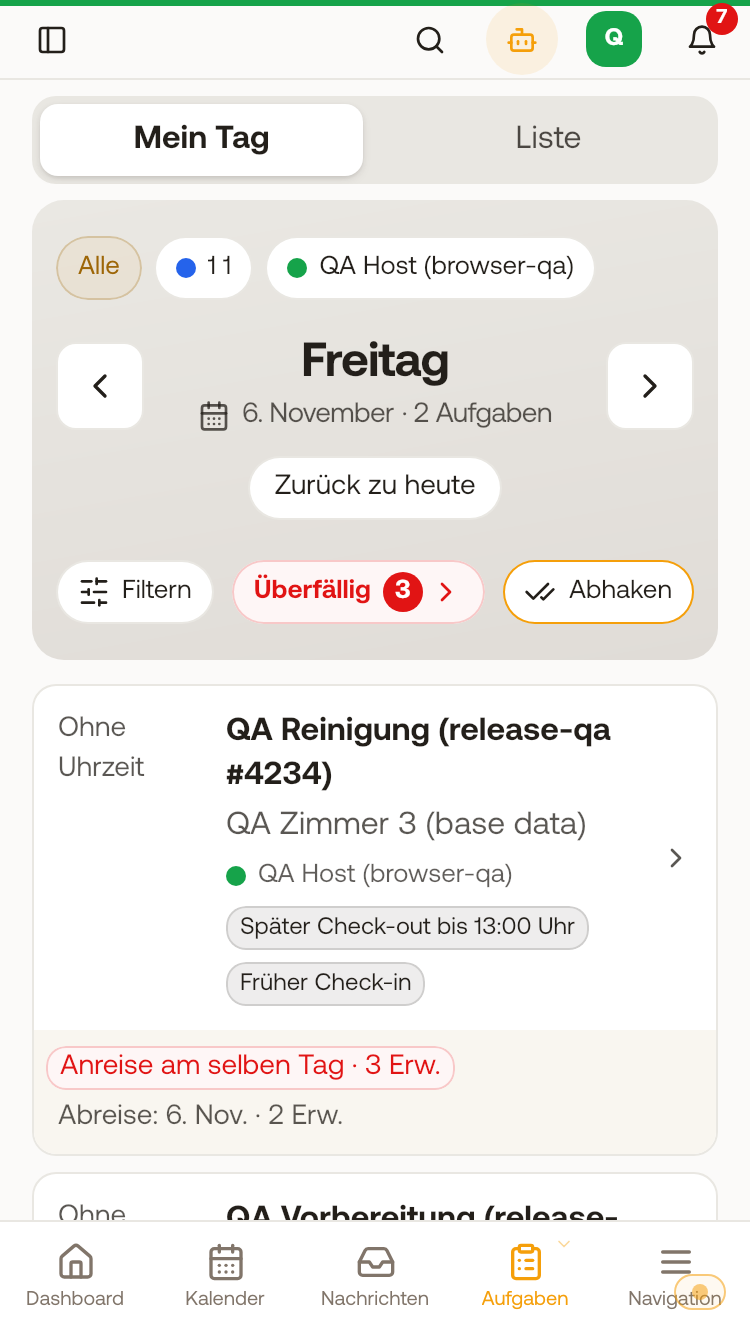 Card in My day on mobile with the tags "Late check-out until 1:00 PM" and "Early check-in", without the task being opened.
Guest has checked out
If the departing guest taps "I have checked out" in the guest guide, the assigned cleaner of the open departure cleaning receives the notification Guest has checked out (bell and push, depending on their push settings for tasks). In the task, it then says "Guest has checked out:" with the time. For preparations, this does not appear. For this, they need the Departure checkbox enabled under Visible booking data. Read more in "Check-out in the guest guide: Check-out link and "I have checked out""
What you enable for it
Only people you enable it for can see the answers: Settings, Team & additional users, expand member, check the Check-in answers checkbox under Visible booking data. By default, it is off, and without it, the card does not appear. Booked extras require the Booked add-on services checkbox, the note from the host requires the Cleaning Notes checkbox. The cleaner never sees files, signatures, or consents from the check-in.
How the cleaner otherwise works with their tasks: My day: How your cleaner works with Xentra.