
Offers: invoice or proforma on acceptance by bank transfer
Decide whether Xentra sends an invoice or proforma right away when an offer is accepted by bank transfer, for example for companies that only pay against an invoice.
Updated on November 6, 2026
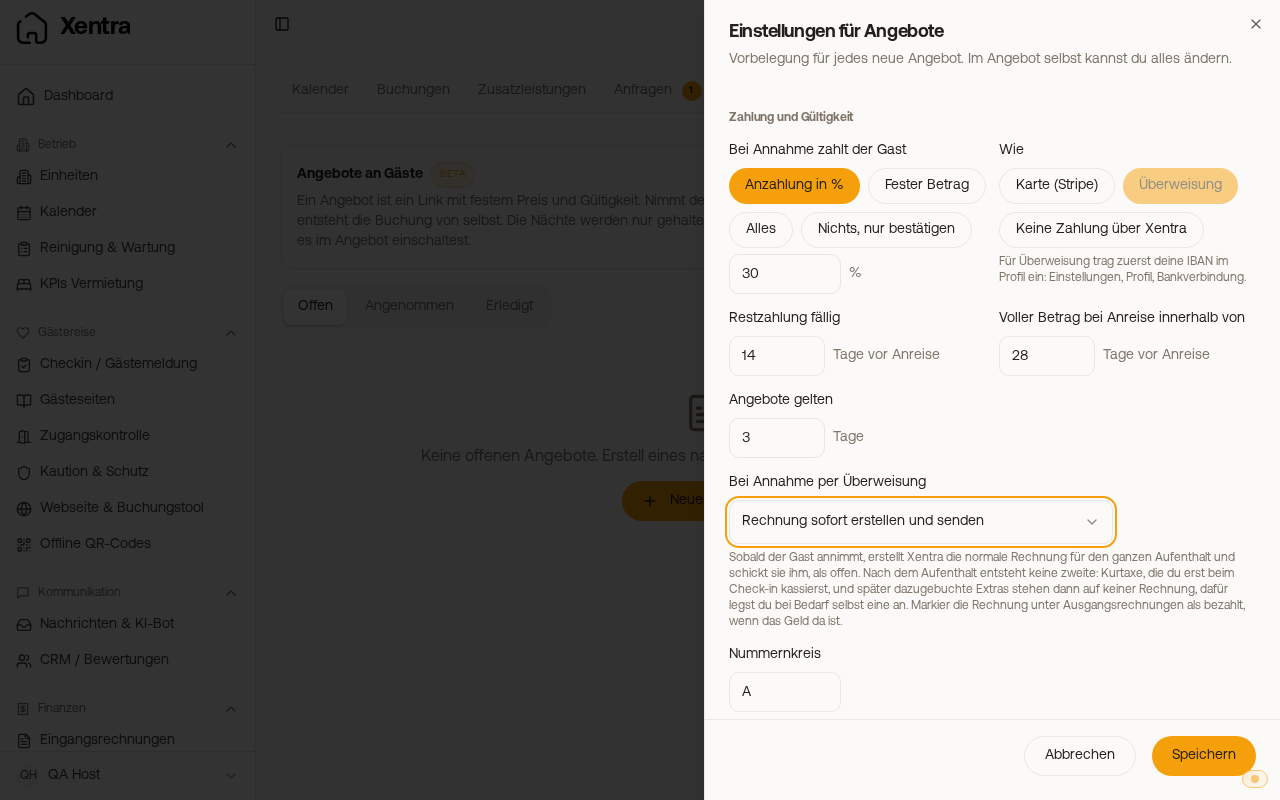
Companies often pay only against an invoice. That is why you define what happens when a guest accepts your offer and pays by bank transfer.
You set it up like this: Calendar, tab Offers, Settings, field On acceptance by bank transfer, then Save.
- Nothing extra (default): the guest gets the confirmation with your bank details, as before. The invoice is created after the stay.
- Create and send the invoice right away: as soon as the guest accepts, Xentra creates the regular invoice for the whole stay and sends it to them, as open. After the stay no second one is created. Tourist tax that you only collect at check-in, and extras booked later, then appear on no invoice; if needed, you create one yourself for them. Once the money has arrived, you mark the invoice as paid under Guest Invoices. If creating or sending fails, you get a notification via the bell icon.
- Provide a proforma invoice: the guest can download a proforma invoice as a PDF for their accounting on the offer page; the link is also in the confirmation email. It has no invoice number and is not an invoice. The real invoice is created after the stay, as before.
The setting only applies if the guest pays by bank transfer. Card payments do not change. An offer that has already been accepted keeps what was set at the time of acceptance.