
Activity: who changed what?
The activity log under Settings shows every change with the login that triggered it, filterable by person, category and period.
Updated on October 19, 2026
Under Settings, Activity is the activity log of your account: sign-ins, created, changed and deleted entries, settings, team changes and more, each with the login that triggered it.
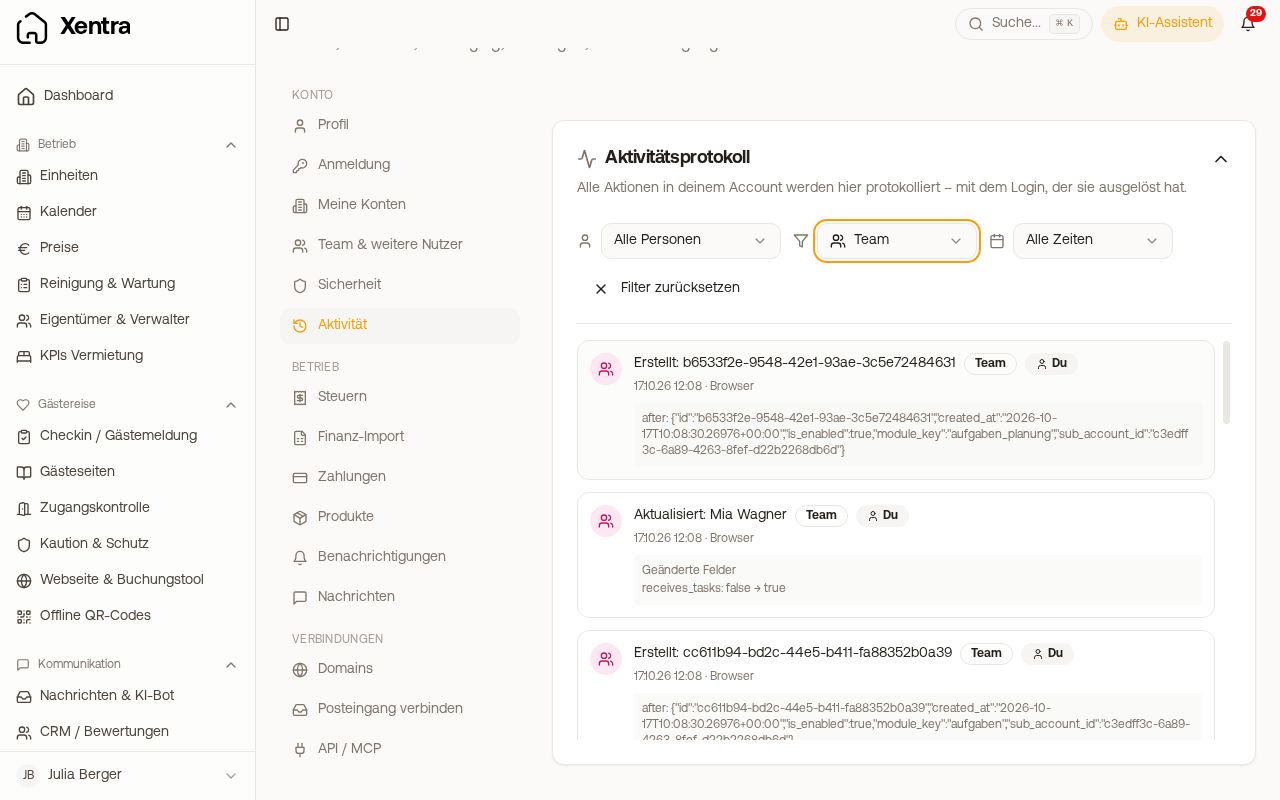 Activity log with filters by person, category and period
What a row shows
- What happened, for example “Logged in” or “Created: arrival info 1 day before arrival”.
- The category, for example authentication, bookings, messages, settings, team or integrations.
- Who: You, the main account, a team member with their name, System (automatic processes such as sync), API or Guest. If a team member has since been deleted, it says “Deleted login”.
- When and where: date, time and whether it happened in the browser or in the app.
- For changes, the changed fields. Passwords and other confidential values never appear in plain text.
Filtering
At the top you filter by Person (All persons or a single team member), Category and Period (Today, Last 7 days, Last 30 days, Last 3 months, All time). Reset filters shows everything again. Further down you load older entries.
What this is useful for
- Finding out who changed a template, an automation or a price.
- Checking when a team member last signed in. You can also see this directly in the list under Team & additional users (“Last Login”).
- Tracing whether a change came from you, from your PMS (system) or via the API.
Team members see their own entries under Activity. The log of the whole account can be seen by you, your admins and team members to whom you grant “Activity”.