
Tourist tax: Exemptions, proof, and portal exclusion
Exemptions with proof upload, excluding portals that collect the tourist tax themselves, and waiving the tourist tax for an individual guest.
Updated on November 7, 2026
You set up both in your tourist tax configuration: Checkin / Guest Registration → Tourist tax → "Edit" → "Exemptions" tab. If a registration authority such as AVS Direkt or Feratel is entered in the configuration, the tab is named "Portals" and contains only the portal exclusion, because the municipality specifies the categories. With Feratel, you release groups like severely disabled or business instead in the Feratel card under Edit, Loaded guest types with Selectable at check-in, see Feratel Deskline: Guest registration, tourist tax, and guest cards.
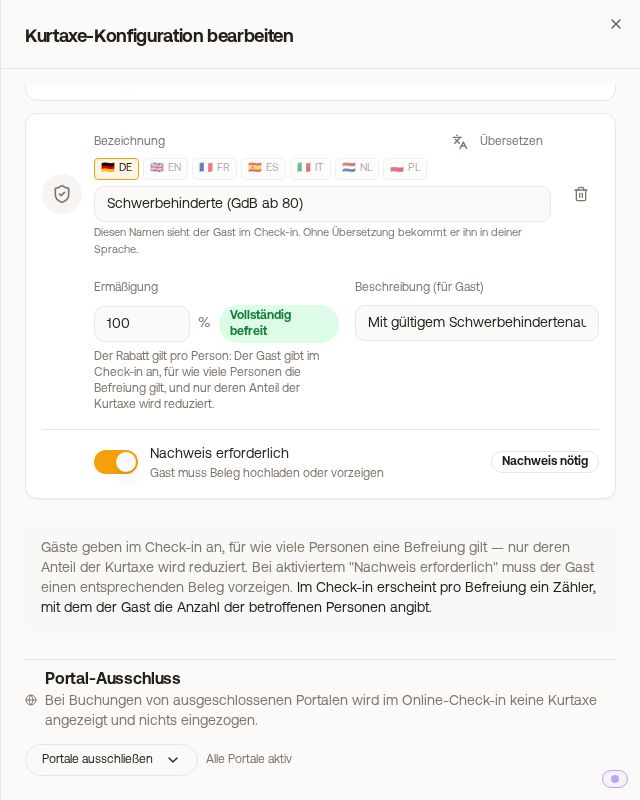 "Exemptions" tab: Exemption with "Proof required" and the portal exclusion below it
Exemptions and discounts
Exemptions are for special cases where the guest needs proof, for example a disability pass or a confirmation for a business trip. For age-dependent exemptions (for example children under 6), you use age groups instead.
- Via "Add..." you select a type: Severely disabled, Business travelers, Locals, or Others. If no exemption has been created yet, "Create default exemptions" creates all four at once, each with 100% and mandatory proof. Afterwards, you adjust the name and discount.
- For each exemption, you set the discount in percent (100% = fully exempt) and a "Description (for guest)". You can translate the name and description.
- In the online check-in, the guest specifies for how many people each exemption applies. Only their share of the tourist tax is reduced, not the entire booking.
If your guest registration runs via Feratel and Feratel calculates the tourist tax, the online check-in does not query your exemptions created here. Feratel categorizes each guest according to their date of birth. A discount, for example for severely disabled persons, accompanying persons, or business travelers, can only be chosen by the guest if your municipality lists a guest type without an age limit for it and you checked it in the Feratel setup under "Loaded guest types" under "Selectable at check-in". You check the proof upon arrival. If you calculate the tourist tax yourself instead of Feratel, your own categories and exemptions apply.
Requiring proof upload
If "Proof required" is turned on for an exemption, the guest must upload a file in the online check-in (photo or PDF, maximum 10 MB), otherwise they cannot proceed. You can find the proof in the booking under the "Online Check-in" tab on the "Tourist tax exemption" card. There it states which exemption the guest specified for how many people, and with "Open proof" you see the file. You will also be notified about a claimed exemption, and the notification names it by name.
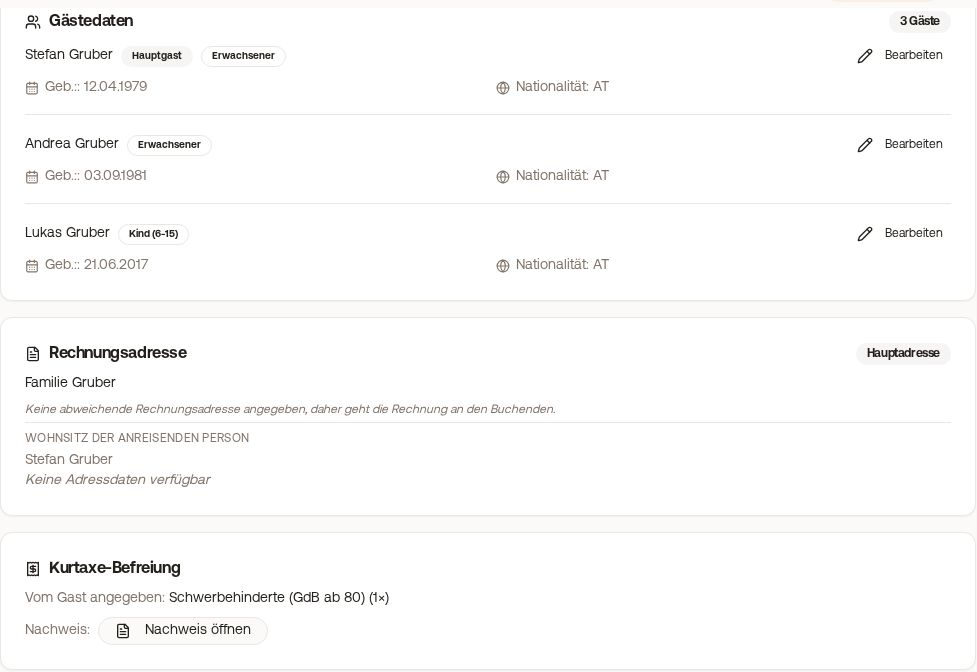 "Tourist tax exemption" card in the Online Check-in tab of the booking
Exclude portals that collect the tourist tax themselves
If a portal collects the tourist tax from the guest itself and remits it (for example Airbnb in some cities), you select it in the "Portal Exclusion" section under "Exclude portals".
- Without registration authority: Guests from this portal do not see any tourist tax in the online check-in and pay nothing.
- With registration authority (AVS Direkt, Feratel): The guest still sees the municipality's amount, but does not pay it in the check-in. The registration with the authority continues.
- The entry "Direct" applies to bookings that you created manually in Xentra, even if they are saved as "Direct". Bookings via the Xentra booking tool are not included. You exclude those separately with "Xentra booking tool". You can always find this entry in the list, even before the first booking via the booking tool has been received.
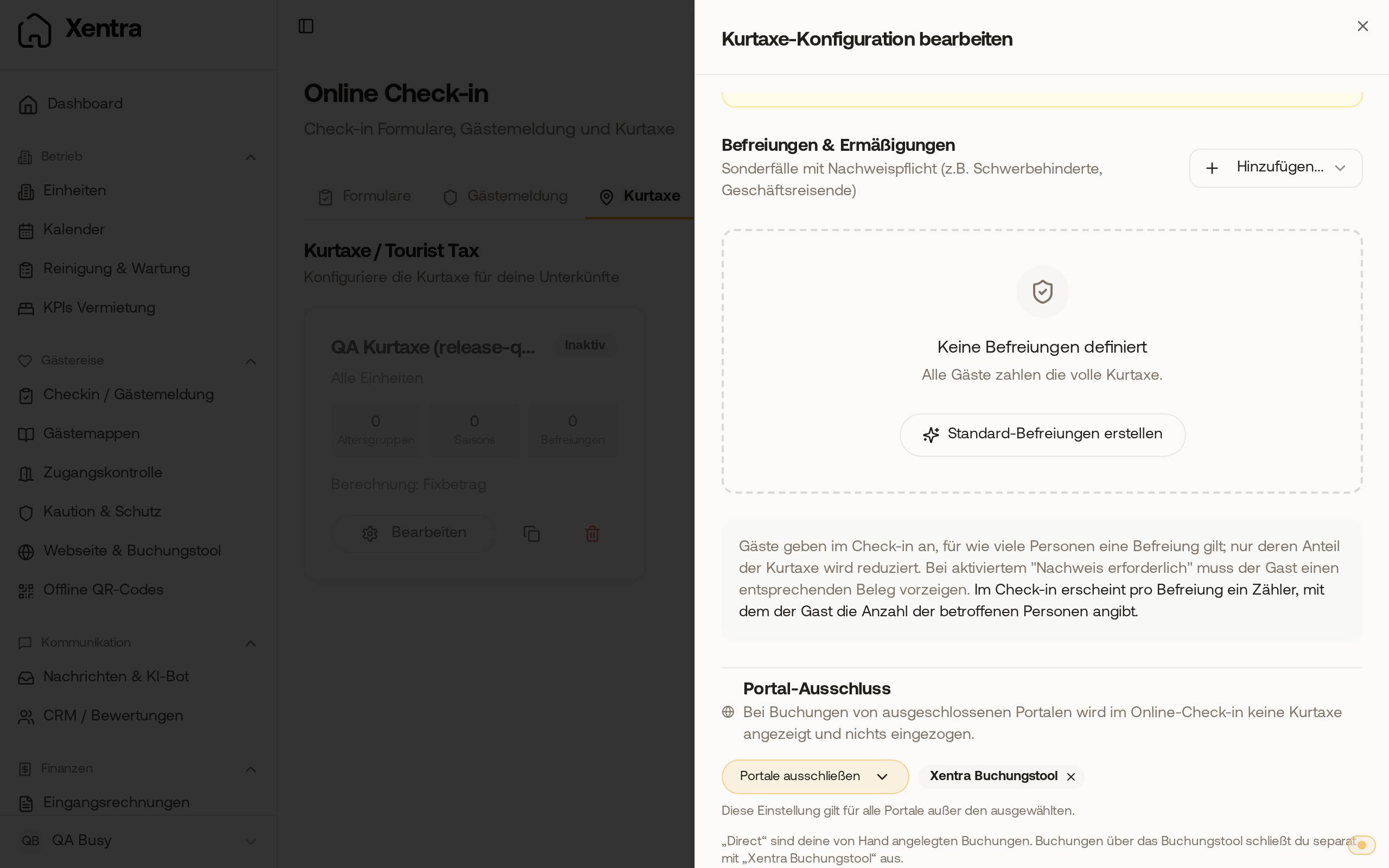 Portal Exclusion with selected "Xentra Booking Tool" and below it the note explaining what "Direct" includes
Only in a configuration with a registration authority does "Skip the registration with the authority" additionally appear below the excluded portals. If you check a portal there, no guest registration form is sent to AVS, Feratel, Tramino, or WinTOP for its bookings. Only check this box if the portal demonstrably submits the registration itself: The fact that a portal collects the tourist tax does not mean it also takes care of the guest registration. The registration obligation remains with you.
Waiving the tourist tax for an individual guest
There is no "do not charge for this booking" switch. You have three options:
- For one booking: Open the booking, click "Mark as already settled" on the "Tourist tax unpaid" card, and select "Paid by the host" as the reason. After that, the check-in no longer prompts the guest to pay. The card appears when the tourist tax is set as mandatory.
- For all bookings of a portal, for example all direct bookings: select the portal in the Portal Exclusion. This applies to all bookings of this portal, so uncheck the box again if it was only intended for an individual case. You do not check the "Skip the registration with the authority" box for this.
- Let the guest pay and refund the payment afterwards, see Refunds: refunding whole payment or individual line items.