
Tourist tax: age groups, seasons and rate changes
Age groups with factor or fixed amount, categories you select yourself, price tiers, seasonal prices and a new rate from a cut-off date.
Updated on October 19, 2026
You find both tabs under Checkin / Guest Registration → Tourist Tax → “Edit” on your configuration.
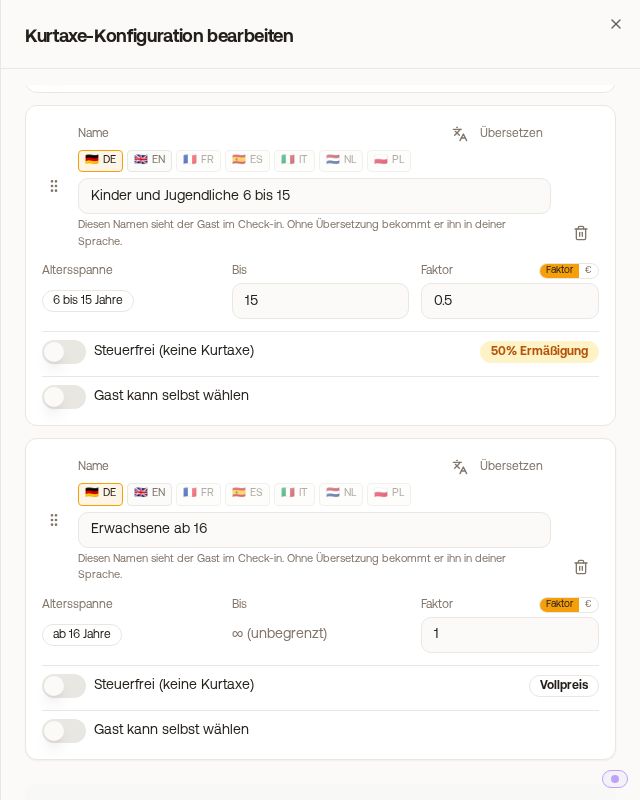 “Age groups” tab: children 6 to 15 with factor 0.5, adults from 16 with no upper age limit at full price
Age groups
With “Add age group” you create groups. As long as no group exists, Xentra offers “Create standard groups”. For each group you enter:
- “To”: the upper age limit. The lower limit comes from the group above it. You change the order via drag & drop.
- Factor or €: you select this via the toggle next to the field. The factor refers to the base amount (1.0 = full price, 0.5 = half price, 0 = free). A fixed amount is the amount per guest and night for this group.
- “Tax-free (no tourist tax)”: these guests pay no tourist tax.
Xentra assigns each traveler, via the date of birth from the online check-in, to the first matching group in the list. The last group has no “To” and is set to “unlimited”. If you need, for example, babies 0 to 5, children up to 15 and adults from 16, create all three groups first and then set “To” to 15 for group 2.
If a group without an upper age limit is higher up in the list, it catches all older guests, and the groups below it never apply. Xentra then shows a yellow warning and names the group that is never applied:
- If the hidden group is younger (children under adults), drag the open group below it or to the end of the list.
- If the hidden group is older (for example seniors from 65), enter an age under “To” for the open group or drag it to the end.
Guests see the group names in the check-in. You enter them in the guest's language via the translation field. Otherwise they see your name.
Reductions the guest selects per person
If a reduction depends on the person and not on age (for example severe disability at 50%), switch on “Guest can select this” for the group. The guest selects it in the online check-in for each traveler individually, so two adults and one reduced guest result in three amounts. Xentra never assigns such groups automatically by age. For units with AVS Direkt, Feratel or WinTOP this switch does not exist. There the categories come from the municipality.
Price tiers for “Tiered by accommodation price”
With this calculation method, you create “Price tiers” for each group: if the accommodation price per night is above “From” and up to and including “To”, the amount per guest and night applies. “To” empty means “and above”. Exempt groups do not need tiers, every other group needs at least one.
Seasons
In the “Seasons” tab you override the base amount for certain periods, for example 3.00 € in the main season. With “Standard seasons” you create a template, and with “Add season” a single season. The standard season applies to all days that no other season covers.
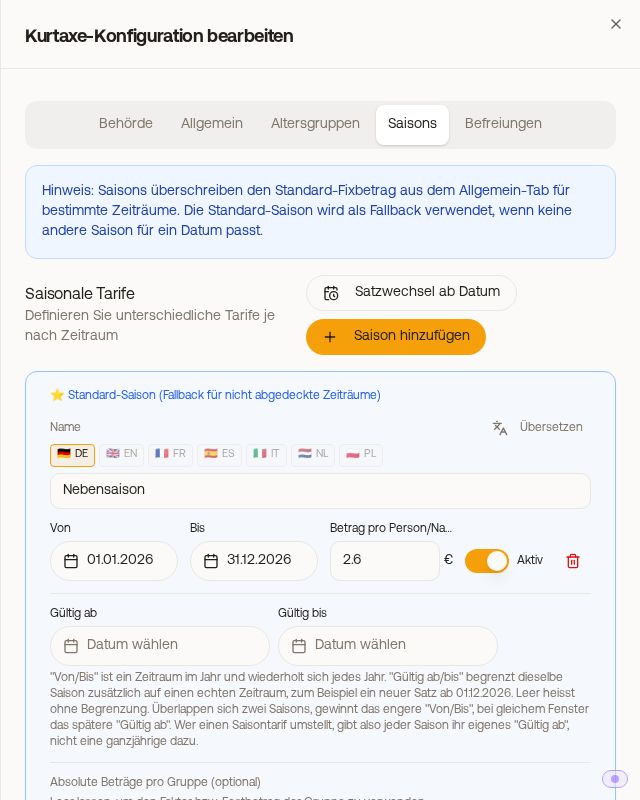 “Seasons” tab with standard season, “Rate change from date” and “Add season”
- “From/To” is a period in the year and repeats every year.
- “Valid from/until” additionally limits a season to real calendar dates. Empty means no limit.
- If two seasons overlap, the narrower “From/To” wins. With the same period, the later “Valid from” wins.
- Under “Absolute amounts per group (optional)” you set a fixed amount per age group for each season, for example children 0 €. Empty fields use the group's factor or fixed amount.
- With a fixed amount, every night counts separately. With a percentage, the arrival date counts.
New rate from a cut-off date
If your municipality raises the tourist tax as of a date, set it up in advance: tab “Seasons” → “Rate change from date”. Xentra creates a year-round season “New rate” that is still inactive, so nothing changes immediately. Enter the cut-off date under “Valid from” and the new amount, and switch the season to “Active”.
- A stay across the cut-off date pays the nights before at the old rate and the nights after at the new rate.
- If you have main and low season, give each season its own new entry with “Valid from”, instead of adding a year-round season.
- If you have absolute amounts per group, enter them in the new season as well.
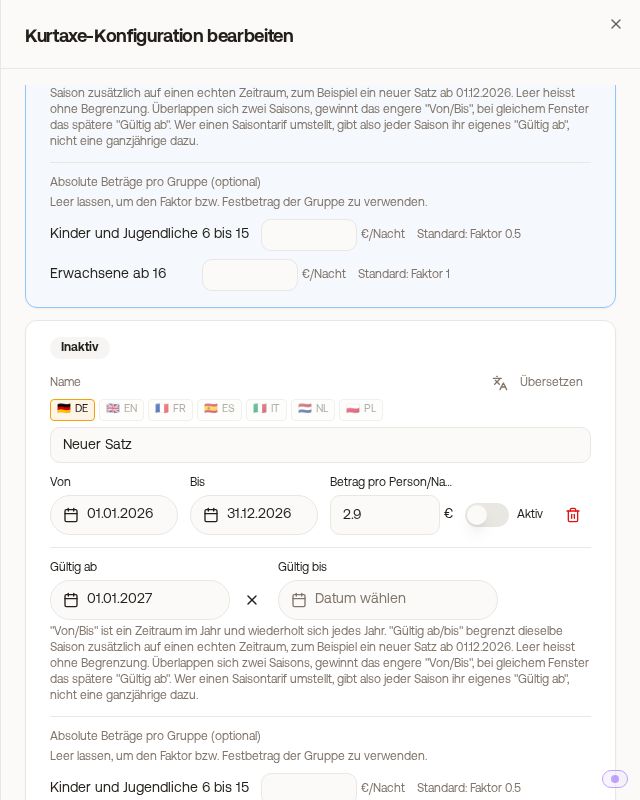 Rate change: season “New rate” with “Valid from” 01.01.2027, still inactive
Xentra reads the rates anew with every calculation. A change therefore applies immediately to all bookings whose online check-in is not yet completed. Tourist tax that has already been paid remains as it is.