
Same-day turnover: time overlap between check-out and check-in
Why Xentra warns about a same-day turnover, when you get the “Time overlap” notification, how to set it up and what you can do.
Updated on October 30, 2026
If a guest checks out on the same day the next guest checks in, Xentra compares the two times. It uses the time stored on the booking (from the portal or PMS), otherwise your default access times (see Set check-in and check-out times). An approved late check-out or early check-in counts too. Nothing gets blocked.
Note in the booking
If the check-out is later than the check-in of the next booking, the booking page shows a yellow note “Time overlap at changeover” in the Period box, for example “Check-out 14:00 overlaps with check-in 13:00 of the next booking.” If one of the two times is not on the changeover day, because a booking's access period was set by hand to other days, its date follows it, for example “Check-in 14:00 (13/04)”. On a computer you also see the note in the preview when you hover over the booking in the calendar.
If one of the times comes from an access period you set by hand, the note tells you where to fix it: on this booking further down in the Door access card, pencil icon; on the other booking via the button Open the other booking and there in the Door access card. Default sets the unit's normal times.
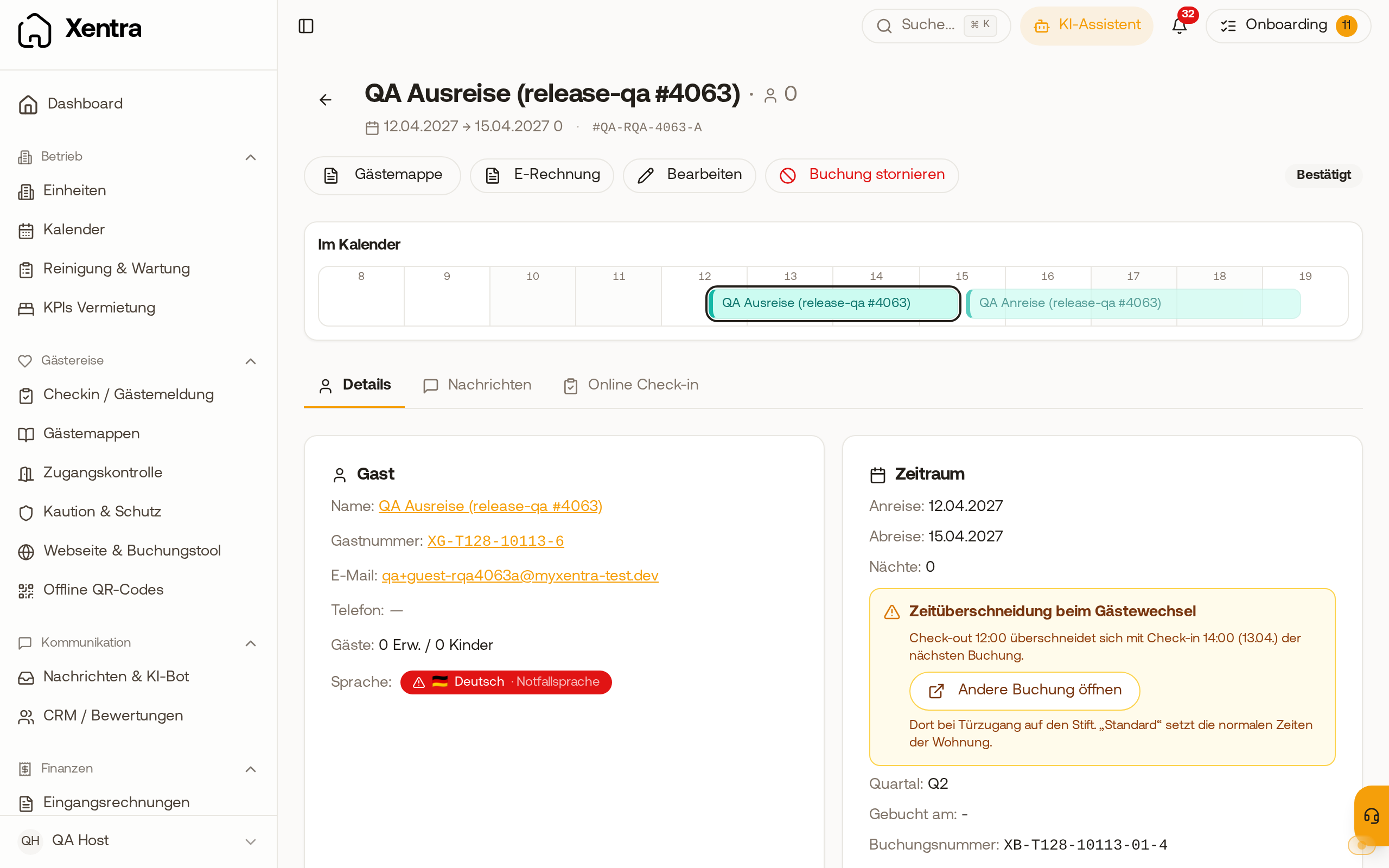 Time overlap at changeover note with the date of the check-in time and the Open the other booking button
If a guest asks for a late check-out or early check-in that you still need to approve, the same note already appears under the request: in the booking, tab Online check-in, section Booked services. Xentra uses the time the add-on service would set. Nothing gets blocked, you can still Approve.
“Time overlap” notification
When such an overlap occurs, you are notified once: in the bell as “Time overlap” with the day and both times (for example “19.11.2026: Check-out 16:00 / Check-in 14:00”; if a time is on another day, its date is shown with it, such as “Check-in 14:00 (13.04.2027)”), by email and as a push in the Xentra app. This happens when
- a new booking is added,
- you change the access period in the Door access card of the booking,
- you approve a late check-out or early check-in that the guest requested.
If you save the same booking again without changes, you get no second notification. Xentra does not report overlaps that already existed before, or days in the past. A time that only changes in your PMS does not trigger a notification.
To set it up: Settings, Notifications, section Bookings, row “Turnover time overlap”. It is on by default. There you switch push and email separately, and with Customize you limit it to certain objects. It always appears in the bell.
What you can do
Adjust the time for a single booking in the booking's access period (Door access card, pencil icon), or set buffer nights if you do not want same-day turnovers (see “Minimum stay and buffer nights between bookings”).