
Guest reviews
Collect, analyse and reply to reviews from Airbnb, Booking.com and Expedia, via Channex (full) or Beds24 (read only). Other PMS do not deliver any.
Updated on November 1, 2026
Where do I find my reviews?
Communication → CRM / Reviews → tab "Reviews" (Open reviews).
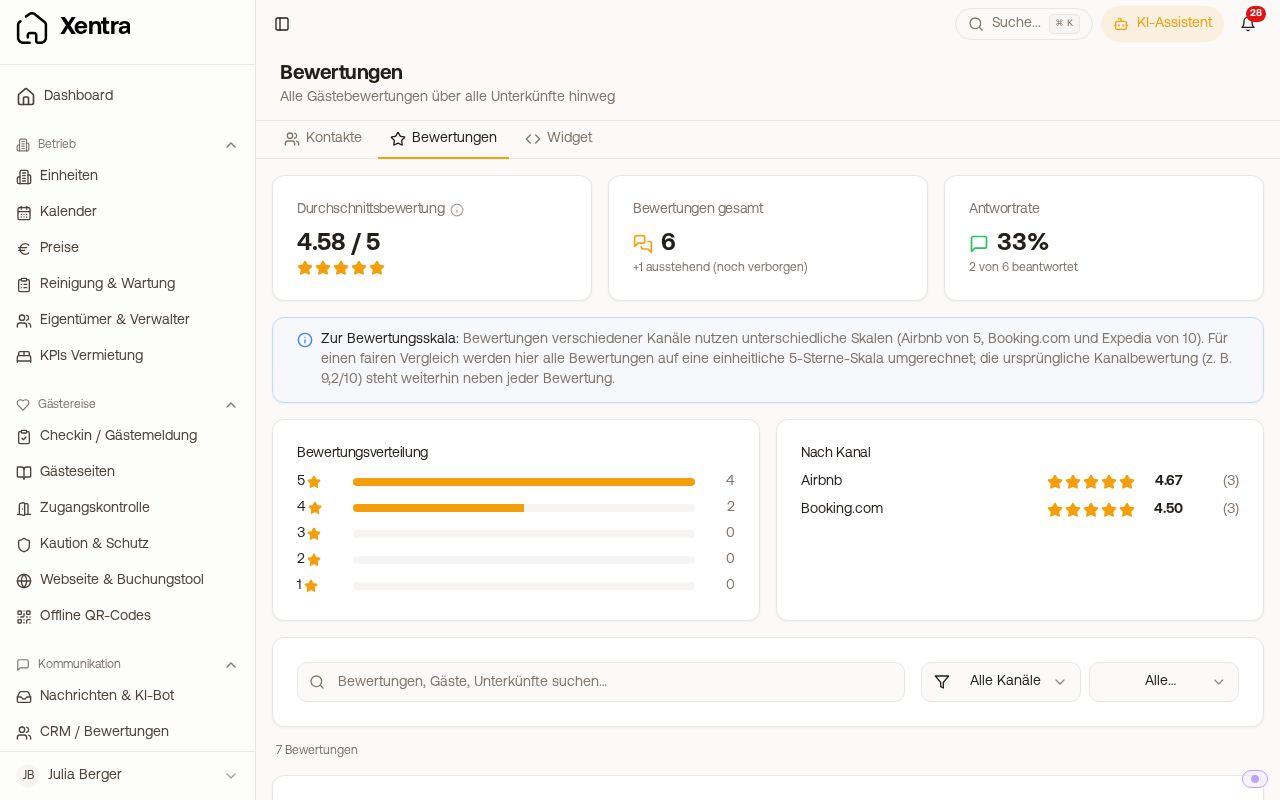 Review overview with average rating, response rate, distribution and list
There you see:
- Average rating (converted to a uniform 5-star scale)
- Total reviews incl. "pending (still hidden)"
- Response rate and rating distribution
- Breakdown by channel, plus search and filters by channel and stars
Reviews also appear:
- in the booking → tab "Reviews"
- on the linked contact → tab "Reviews" (only if there are any)
Team members see the reviews if their right Guest reviews is set to "View"; they can reply with "Edit".
Are reviews imported automatically?
Yes, but only via a connection: Channex or Beds24. There is no Google or Trustpilot import, and you cannot enter a review in Xentra by hand.
| Source | Read & analyse | Send replies | Rate guest | Runs by itself |
|---|---|---|---|---|
| Channex | ✅ | ✅ | ✅ (only Airbnb) | ✅ Webhook + every 8 h |
| Beds24 | ✅ | ❌ | ❌ | ❌ only on button press |
Reviews imported via Beds24 are for reading and analysis only in Xentra. You keep writing replies there, in the portal or in Beds24. The import is a one-time run that you start in the connection dialog under Integrations → PMS with "Import reviews". For new reviews, click there again.
Which portals are covered via Channex:
| Portal | Read | Reply | Rate guest |
|---|---|---|---|
| Airbnb | ✅ | ✅ | ✅ |
| Booking.com | ✅ | ✅ | ❌ |
| Expedia | ✅ | ✅ | ❌ |
| VRBO / others | ❌ | ❌ | ❌ |
The Channex import runs on two tracks: in real time, as soon as a review comes in, and additionally every 8 hours as a safety net. Xentra takes over everything that Channex delivers for your accommodation. With Airbnb, that usually reaches far back before the connection. From Booking.com only reviews written after connecting arrive; you still see the older total in the Booking.com extranet.
Prerequisites: the most common source of errors
- Channex must be connected and the accommodation must be assigned to a Xentra unit → Booking portals
- The Channex app "Messages & Reviews" must be installed for the accommodation. Without it, nothing at all arrives. By far the most common reason for "I don't see any reviews".
"Pending (still hidden)"
Airbnb works double-blind: until both sides have reviewed (or the 14-day window has passed), the review is hidden. Xentra then shows it as pending without text and without stars, and does not count it in the average or the figures. As soon as Airbnb releases it, Xentra loads it automatically; for this, the sync checks the pending reviews of the last 30 days again.
Reply to a review
Open booking → tab "Reviews" → write reply. Possible for Airbnb, Booking.com and Expedia via Channex.
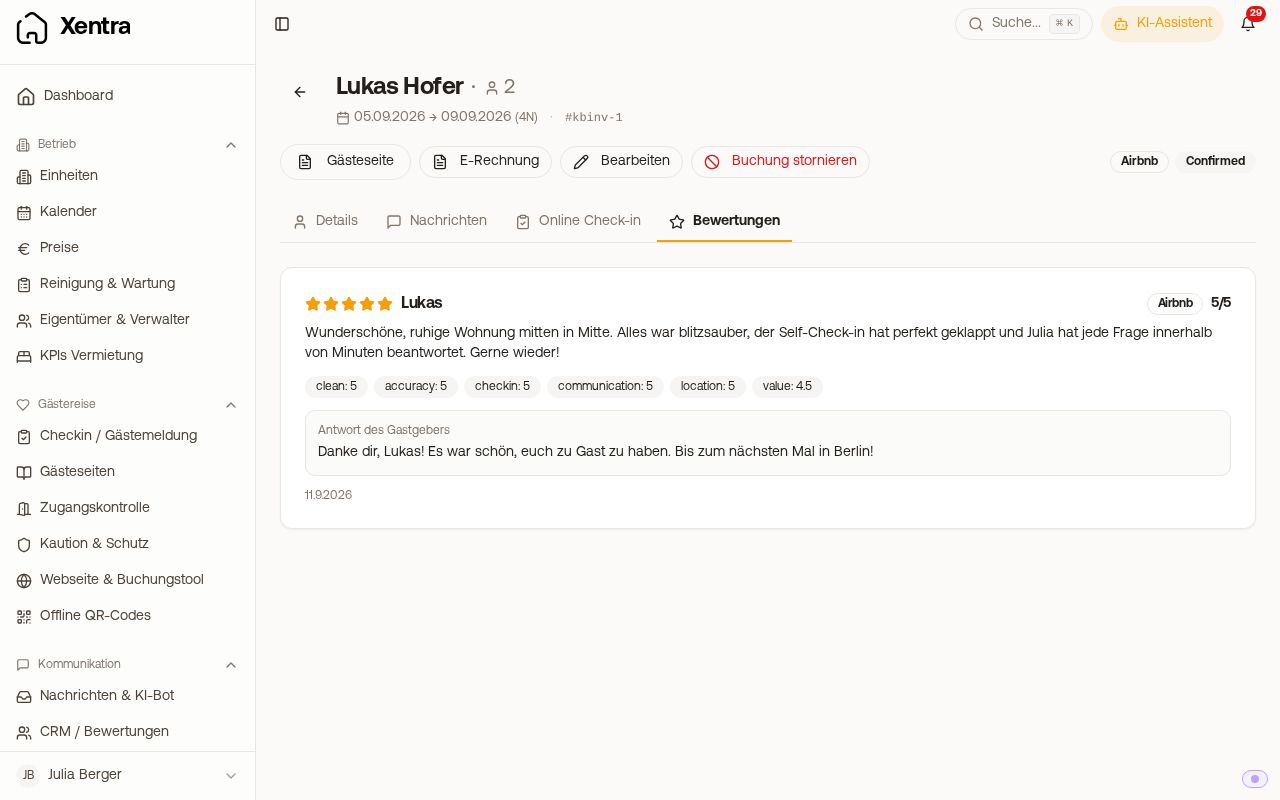 Reviews tab in a booking with review and reply
- Replies are always manual; there is no automatic reply function.
- You cannot reply to an Airbnb review that is still hidden; wait until it is visible.
Rating scale
Channex delivers all reviews on a 10-point scale. Airbnb is converted to the usual 5-point scale for display; for average and comparisons, Xentra converts everything to 0 to 5 so that channels can be compared.
When do I get my reviews?
When connecting, the first import: Channex fetches the latest reviews per accommodation, from the newest backwards, up to 500. If you have more, you don't see the oldest. The first run happens within 8 hours.
After that it depends on the portal, not on Xentra:
| Portal | When the review appears |
|---|---|
| Airbnb | Visible as soon as both sides have reviewed or the 14-day window has expired. Until then it shows as pending in Xentra. |
| Booking.com | The invitation goes to the guest roughly 48 hours after departure, and they then have three months to respond. |
| Expedia | Invitation after departure; Expedia does not publicly state a fixed deadline. |
A newly connected account is therefore not full right away. With Booking.com in particular, expect a few weeks.
Which PMS don't deliver any reviews at all
Via Smoobu · Guesty · Hostaway · Smily · Lodgify · voffice · iLoca · iCal calendar not a single review arrives. That is not a setting; these interfaces do not hand out reviews. If you want to see, analyse, reply to and show your Airbnb and Booking.com reviews in Xentra and in the review widget, you need the portals connected via Channex.
See also: Automatic guest review (Airbnb) and Review widget for your own website.