
Review widget for your own website
Show real Airbnb/Booking.com reviews on your own website with one line of code.
Updated on October 19, 2026
Review widget
Show your real guest reviews from Airbnb, Booking.com and Expedia on your own website: as cards with stars, portal badge, date and average summary.
1. Create widget
Communication → CRM / Reviews → tab “Widget” (Open review widget) → “Create widget”.
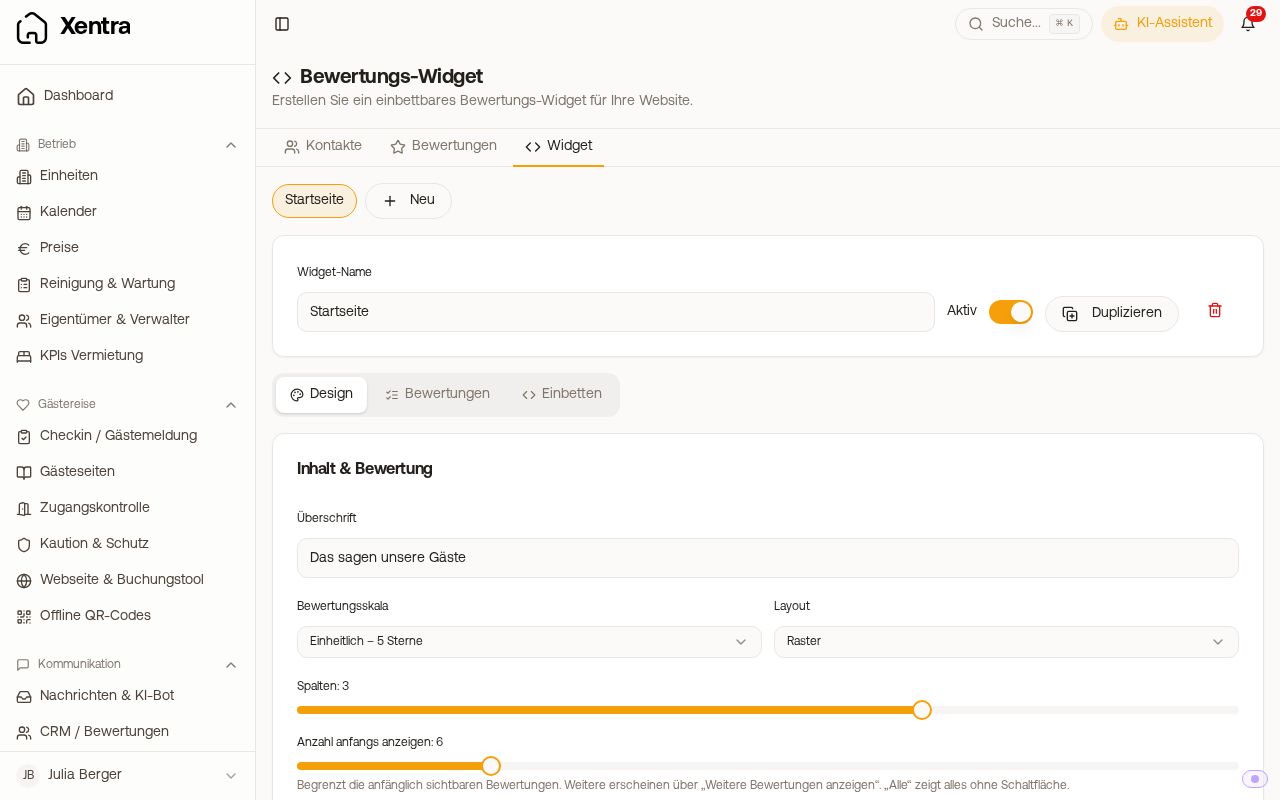 Review widget editor with selection of reviews and preview
You can create several widgets (for example one per property or per landing page) and switch between them via the chips at the top. With Duplicate you create a copy with the same design and selection; the copy gets a new embed code. Each widget has a widget name and an Active switch; an inactive widget shows nothing on your website.
You manage the widget with the main login or as a team admin; the tab is not visible to other team members.
2. Tab “Reviews”: choose what is shown
The reviews are grouped by accommodation; you tick them individually or mark a whole unit. The order of your selection is kept in the widget.
The selection is manual. There is no rule such as “all from 4 stars automatically”. You tick new reviews afterwards and save.
3. Tab “Design”: adjust appearance
- Content & review: heading and “Show heading”, rating scale (Per portal, Uniform 5 stars, Uniform 10 points), layout (Grid, Carousel, List), columns, “Number to show at first” (the rest via “Show more reviews”)
- Show and hide: summary, avatars, portal badge, date, shorten long reviews, “Powered by Xentra”
- Colours: stars, card background, background, text, secondary text, heading, border
- Layout & typography: font (System, Serif, Rounded, Monospace), maximum width, inner padding, corner radius, card border, card shadow
On a phone, the grid automatically turns single-column, and the carousel becomes a swipeable strip.
4. Tab “Embed”: copy code
In the tab “Embed” you find the embed code with a copy button. It looks like this:
<!-- Xentra Reviews Widget -->
<div data-lang="de"><script src="https://qzeciycouqpflpnxzfwq.supabase.co/functions/v1/reviews-embed-js?token=DEIN_TOKEN" async></script></div>
- Copy the code (your widget's token is already included, don't build it yourself).
- Insert it on your website at exactly the place where the reviews should appear. In WordPress, Wix, Squarespace or Webflow, this is a block of the type “HTML” or “Custom Code”.
- Save and publish the page.
With the website builder you don't need code: there you insert the Reviews block and select the widget.
Good to know:
- No iFrame. The widget appears directly at the place of the code in a shielded area; the design of your website and that of the widget do not influence each other.
- The enclosing
<div>withdata-langsets the language of the widget texts. Supported:de, en, es, it, fr, pl. Without a value, the widget uses the visitor's browser language, otherwise English. - Changes take up to about 2 minutes to become visible on your website.
- The preview in the editor only appears after saving, and only for an active widget.
Privacy
Only first name or initial, stars, channel, date and the public review text are published. The private feedback from Airbnb is never published.
Distinction: third-party review scripts in the booking tool
Don't confuse this with the Reviews area in the settings of the booking tool: there you store third-party widgets (for example Trustindex with Google reviews) that are shown in the booking tool. This review widget here shows your own portal reviews on your website.
The widget shows nothing
The widget only shows what is in Xentra under Reviews and what you have ticked. Check in this order:
- Do you have any reviews in Xentra at all? They only come via Channex or Beds24 (details under Guest reviews).
- Are reviews ticked and saved in the “Reviews” tab? New reviews are never included automatically.
- Is the widget set to “Active”?
- Have about 2 minutes passed since the change?
Freshly connected and still empty? Booking.com invites the guest only about 48 hours after departure and gives them three months, and pending Airbnb reviews cannot be selected until Airbnb releases them.