
Pricing type of a product: per night, per guest, per pet
Why the pricing type is not in the product catalog, where you actually set it, and which default quietly applies otherwise.
Updated on November 12, 2026
"Per day" is called "Per Night" with us
If you are searching for "per day" and cannot find it: The pricing type is called Per Night. It is calculated based on the number of nights.
The pricing type is not on the product
There is intentionally no field for it in the product catalog. The pricing type depends on the location where you offer the product; the same product can be billed differently in the online check-in than in the guest guide.
Here is how you get there (example online check-in):
- Guest journey → Checkin / Guest Registration → open your template → Payment & extras tab
- Check the box next to the product (e.g. "Dog fee")
- To the right in the same line, a gear icon now appears, click on it, only then the section unfolds
- Under Pricing type, select the matching variant
In the guest guide, it is the same path: Guest journey → Guest pages → Guest guide → Products & Upselling → Checkbox → Gear icon.
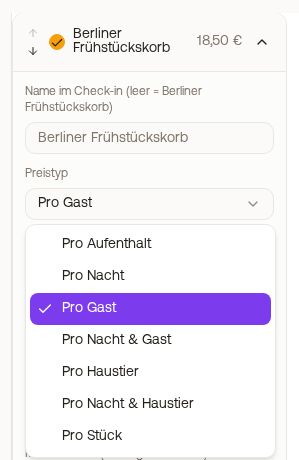 Gear icon of a product with the selection Pricing type
The point that costs money
As long as you do not expand the gear icon, the assignment silently stays on Per stay. A product for €10 is then calculated once for the entire stay, not per night.
There is no warning for this. If you have already checked products without opening the gear icon, please review them.
The pricing types
| Pricing type | Calculation |
|---|---|
| Per stay | Price × 1 |
| Per Night | Price × nights |
| Per guest | Price × guests of checked guest types |
| Per night & guest | Price × nights × guests of checked guest types |
| Per pet | Price × number of dogs |
| Per night & pet | Price × nights × number of dogs |
| Per item | Price × quantity selected by guest |
| Per day and person, guest chooses | Price × selected days × selected persons |
"Per day and person, guest chooses": the guest selects days and persons
Intended for breakfast and everything that is not needed every day for everyone. The guest sees the mornings after each night (starting tomorrow) as days to tap and chooses for how many persons, at most adults plus children of the booking. At least one day remains selected. Price = Price × days × persons.
Bookable in the guest guide, in the online check-in, and in the booking tool. Set up like any pricing type: open template, check product, gear icon, select "Per day and person, guest chooses" under Pricing type.
You can see the selected days in the booking under the Check-in tab with the booked services and under Calendar → Add-ons in the Orders per day card: how many persons are included on a day.
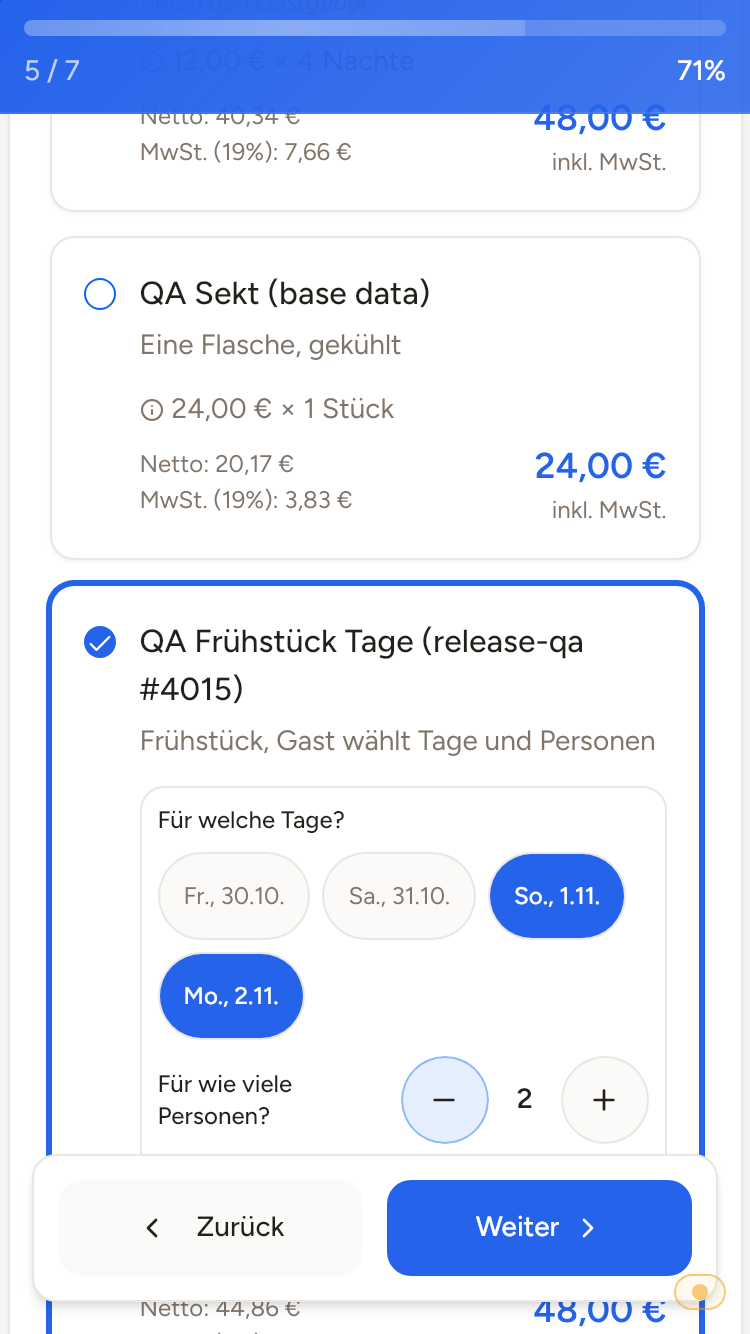 In online check-in, the guest selects the days and number of persons, the price calculates along.
Who counts for "Per guest": "Applies to guest types"
If you select Per guest or Per night & guest behind the gear icon, "Applies to guest types" appears underneath with checkboxes for Adults, Children (6-15), Children (under 6), and Infants. Only checked guest types are counted. If you changed nothing, only Adults count.
Linen package example: If children should pay nothing, leave only "Adults" checked. If children from 6 should pay as well, check "Children (6-15)" as well. If the guest should choose the quantity themselves, use Per item instead. Like the pricing type, this selection applies individually per offer location.
Selecting quantity only works with "Per item"
Only with the pricing type Per item can the guest choose a quantity (1 to 99), for example two linen packages or three bottles of wine. With all other pricing types, they book the product at most once, the quantity is fixed at 1. This applies equally in the online check-in and in the cart on the guest page. If the guest should be able to order multiple items, set the pricing type at this location to Per item. The field with plus and minus appears as soon as the guest taps the product. You set a maximum quantity on the product itself: Settings → Products → open product → Max. per booking.
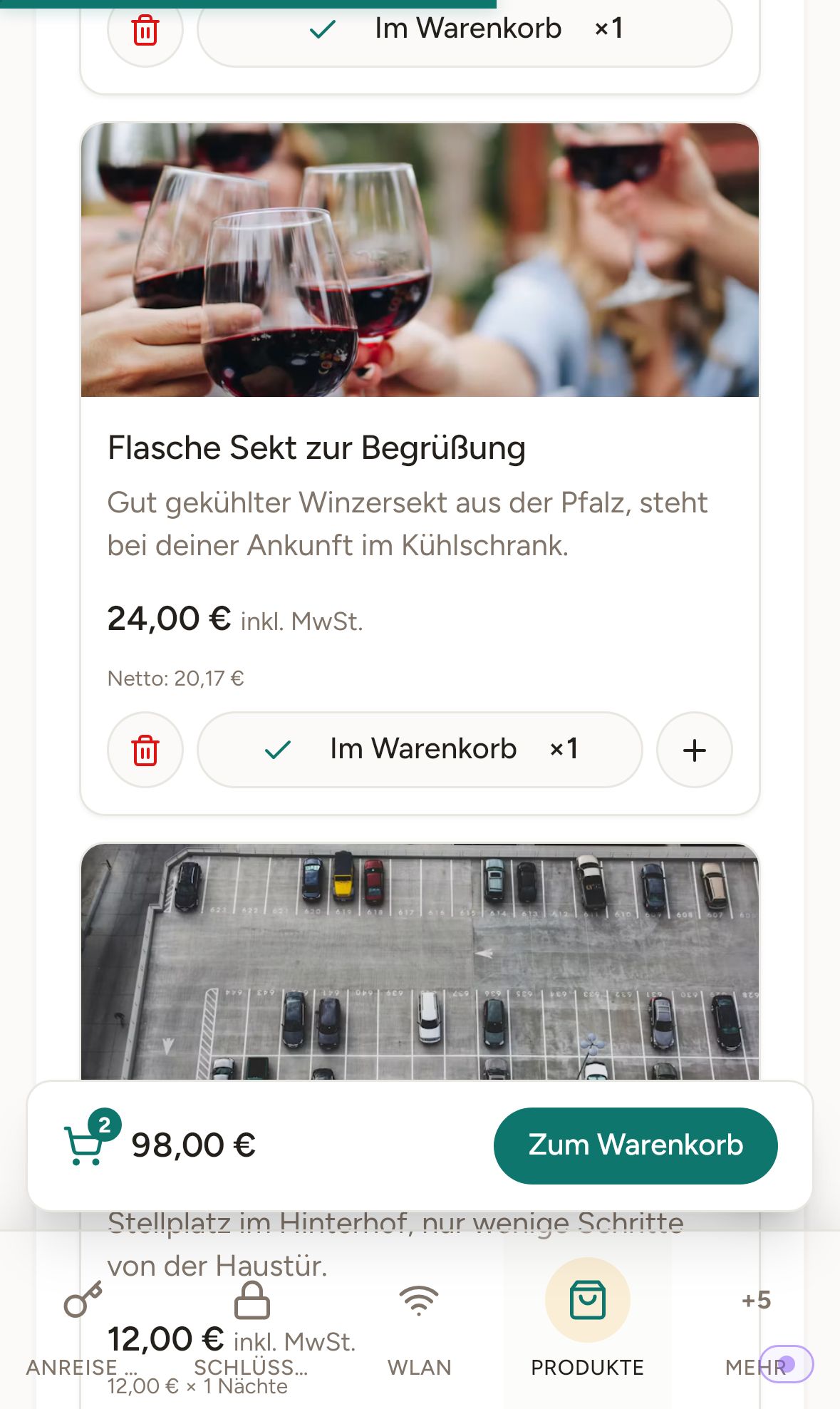 Guest page on mobile: products with price and quantity selection
What you change behind the gear icon, you apply in the online check-in and in the guest guide with Save in the bottom bar (Discard takes it back). In the booking tool, it saves immediately.
Surcharge for an extra person: "Per Night", not "Per night & guest"
If you want to charge for an additional person, Per Night is the correct pricing type, not "Per night & guest".
"Per night & guest" calculates with all guests of the booking, not with the one person who was added. At €25 and a booking with 4 guests and 3 nights, the guest then sees €300 in the cart, not the €75 you mean.
With Per Night, the price stands for that one extra person: €25 per night, so €75 for 3 nights.
If someone comes with two extra persons, you see this when approving the request and can adjust the amount in the invoice.
Prerequisite for guest and pet types
For Per guest or Per night & guest to calculate, the template must collect the number of persons. For Per pet and Per night & pet, the pet query must be active in the template. If the template does not query pets, the gear icon warns you: "This template does not query pets, so the number of pets is always 0 and the item never generates revenue." Such a product is not offered to the guest at all. For a dog fee, Per pet or Per night & pet are usually correct because the number of dogs is taken over from the check-in.
Set individually per offer location
If you offer the same product in multiple locations (online check-in and guest guide), you must set the pricing type separately at each location. It is not transferred. This also applies to multiple check-in templates (for example, one per apartment): in each template, you set the pricing type for the product individually.