You use placeholders like {{guest_first_name}} in message templates, automations, and guest pages. When sending, Xentra replaces them with the data of the booking. If a value is missing, the spot remains empty; the guest never sees the placeholder itself.
Insert placeholders: In the template editor, click "Placeholders". At the top is a search field ("Search, e.g. name, arrival, link"). Type part of the name, for example "door", "wifi" or "link", and you get a list of results with the category. Without searching, you click through the categories. A click inserts the placeholder where your cursor is, in the text or in the subject.
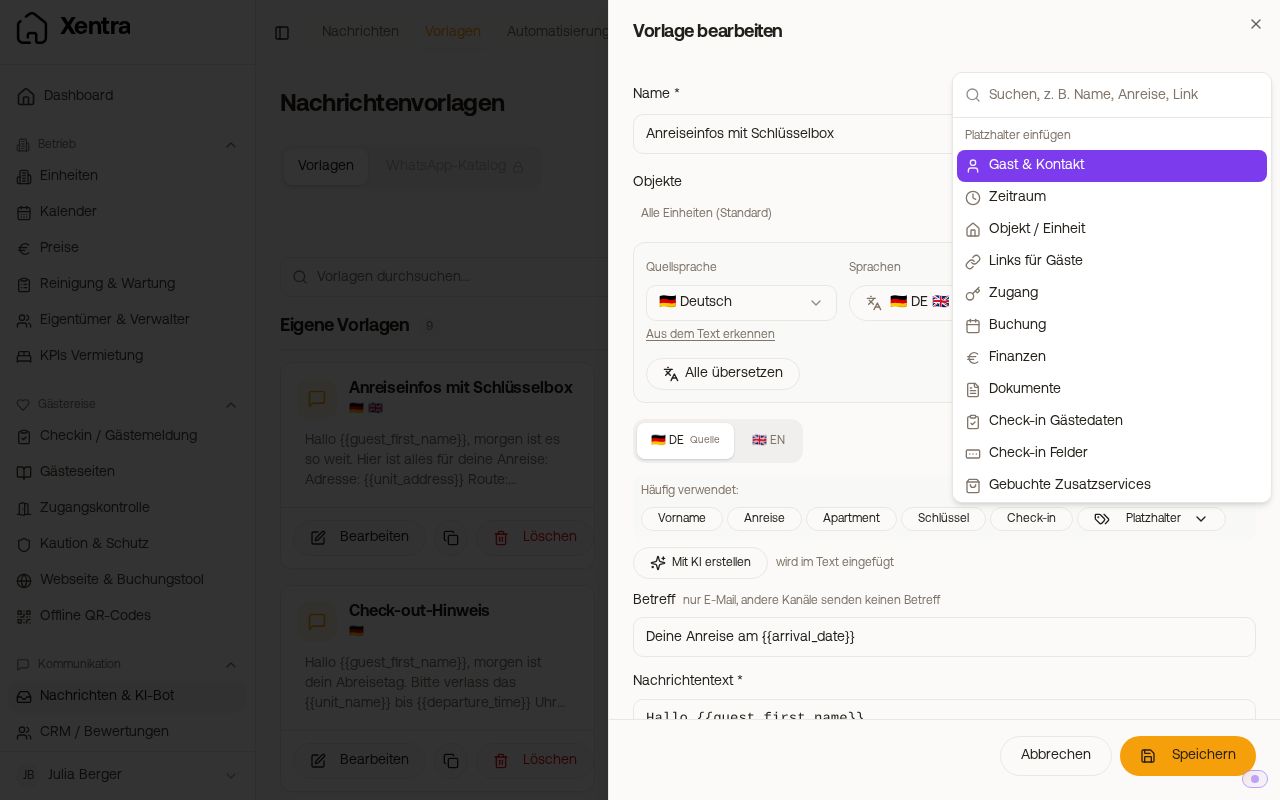 Placeholder menu with search field and categories
You only see some placeholders if you can use them: owners and managers with the Owners & Managers module, the self-service invoice link with the Self-Service Invoices module, the external check-in link with the Custom Check-in System module, and the Smoobu links with a Smoobu connection. Your custom fields are under "Custom fields".
Spelling: fixed placeholders with underscore ({{unit_address}}), your custom fields with dot ({{unit.parken}}).
Guest & Contact
| Placeholder |
Content |
{{guest_name}} / {{guest_first_name}} / {{guest_last_name}} |
Name, first name, last name |
{{guest_company}} |
Company name of the booking, empty for private bookings |
{{guest_salutation}} |
ready-made salutation: "Hello Max" (informal) or "Good day Max Mustermann" (formal), for a company without a contact person "Dear Sir or Madam", see Company bookings and salutation: Placeholders for company and greeting |
{{guest_email}} / {{guest_phone}} |
Email, phone |
{{adults}} / {{children}} |
Adults, children |
{{infants}} / {{dogs}} |
Infants, dogs (0 if none) |
{{total_guests}} |
Adults plus children, excluding infants and dogs |
{{total_guests_singvsplu}} |
the same number with word, e.g. "1 person", "3 people", in the language of the message |
Time period
| Placeholder |
Content |
{{arrival_date}} / {{arrival_date_long}} |
Arrival, e.g. 20.01.2026 or Tuesday, January 20, 2026 |
{{departure_date}} / {{departure_date_long}} |
Departure, short or written out |
{{number_of_nights}} |
Nights |
{{arrival_time}} / {{departure_time}} |
Check-in and check-out time according to your access times |
{{access_from_time}} / {{access_until_time}} |
Access from and to for exactly this booking, including booked early check-in or late check-out |
{{days_until_arrival}} / {{days_until_departure}} |
Days until arrival or departure |
Property / Unit
| Placeholder |
Content |
{{apartment_name}} |
Name provided by the portal, otherwise your property name |
{{unit_name}} |
your property name (field "Last name" on the unit) |
{{previous_unit_name}} / {{new_unit_name}} |
old and new room after a room change |
{{property_name}} |
Building or property group |
{{unit_address}} |
complete address |
{{unit_postal_code}} / {{unit_city}} / {{unit_country}} |
Postal code, city, country |
{{unit_maps_link}} |
ready-to-use Google Maps link |
{{unit_size}} |
Living area in m² |
{{wifi_name}} / {{wifi_password}} |
Wi-Fi name and password of the unit |
{{house_rules}} |
House rules from the online check-in, always up to date and in the language of the guest |
Links for guests
| Placeholder |
Content |
{{online_checkin_link}} |
Xentra online check-in |
{{digital_guestbook_link}} |
Xentra guest page (guest guide) |
{{guest_page_checkout_link}} |
Guest guide directly at check-out (list and "I have checked out") |
{{entrance_link}} |
Xentra door access |
{{external_checkin_link}} |
your own check-in system (Custom Check-in System module) |
{{invoice_self_service_link}} |
Guest creates their invoice themselves (Self-Service Invoices module) |
{{smoobu_checkin_link}} / {{smoobu_guest_guide_link}} |
Check-in and Guest Guide from Smoobu (only with Smoobu) |
Access
| Placeholder |
Content |
{{key_code}} |
Key code without smart lock |
{{nukicodesxentragenerated}} |
Nuki PIN generated by Xentra |
{{nukicodesnukigeneratedpaid}} |
code generated by Nuki (STR subscription, paid) |
{{xentrattlockcode}} / {{xentratedeecode}} |
TTLock or Tedee code generated by Xentra |
{{igloohome_code}} |
igloohome PIN of the booking |
{{xentralivioncode}} |
LivionKey PIN generated by Xentra for the compartment in the key safe (from check-in to check-out) |
{{xentramasuntcode}} |
code generated by Xentra for the Masunt key safe (from check-in to check-out) |
Booking
| Placeholder |
Content |
{{booking_number}} |
Booking number of the portal |
{{booking_number_short}} |
only the confirmation code, without prefix for Airbnb |
{{booking_position}} |
internal Xentra ID |
{{transfer_reference}} |
Reference that the guest saw after a booking via bank transfer in the booking tool, otherwise the Xentra booking number |
{{portal}} / {{status}} |
Portal, booking status |
{{quarter}} / {{created_date}} |
Quarter, booking date |
Finance
| Placeholder |
Content |
{{total_price}} / {{prepayment}} |
Total price (the saved price of the booking, without extras from an offer or the booking tool), deposit paid |
{{grand_total}} |
Total incl. extras: what the guest pays in total for a direct booking, meaning stay plus booked extras such as final cleaning from an offer. If an invoice exists, it is its amount (if the tourist tax is on the invoice, it is included). If the guest books several units together, it is the amount of the entire booking. For bookings from portals and from a PMS, the same amount as {{total_price}}. The placeholder includes the € symbol, so do not write your own € after it. Only in messages and automations, not in guest guide and check-in |
{{open_amount}} |
Open amount: what the guest still has to pay for a direct booking, as in the "Payment status" card of the booking. Only correct if you record payments on the booking; if you marked the booking as "Paid" yourself, 0.00 € is shown there. Empty for bookings from portals and from a PMS. Only in messages and automations, not in guest guide and check-in |
{{cleaning_fee}} |
Cleaning fee |
{{bed_tax}} |
Tourist tax, after online check-in the amount calculated there |
{{commission}} / {{payout}} / {{payment_charge}} |
Portal commission, payout, payment fee (rather for you than for guests) |
{{invoice_link}} / {{invoice_password}} |
Link to e-invoice, password for it. Remains empty as long as no invoice exists for the booking yet, usually in the booking confirmation. For the amount there, use {{grand_total}}. |
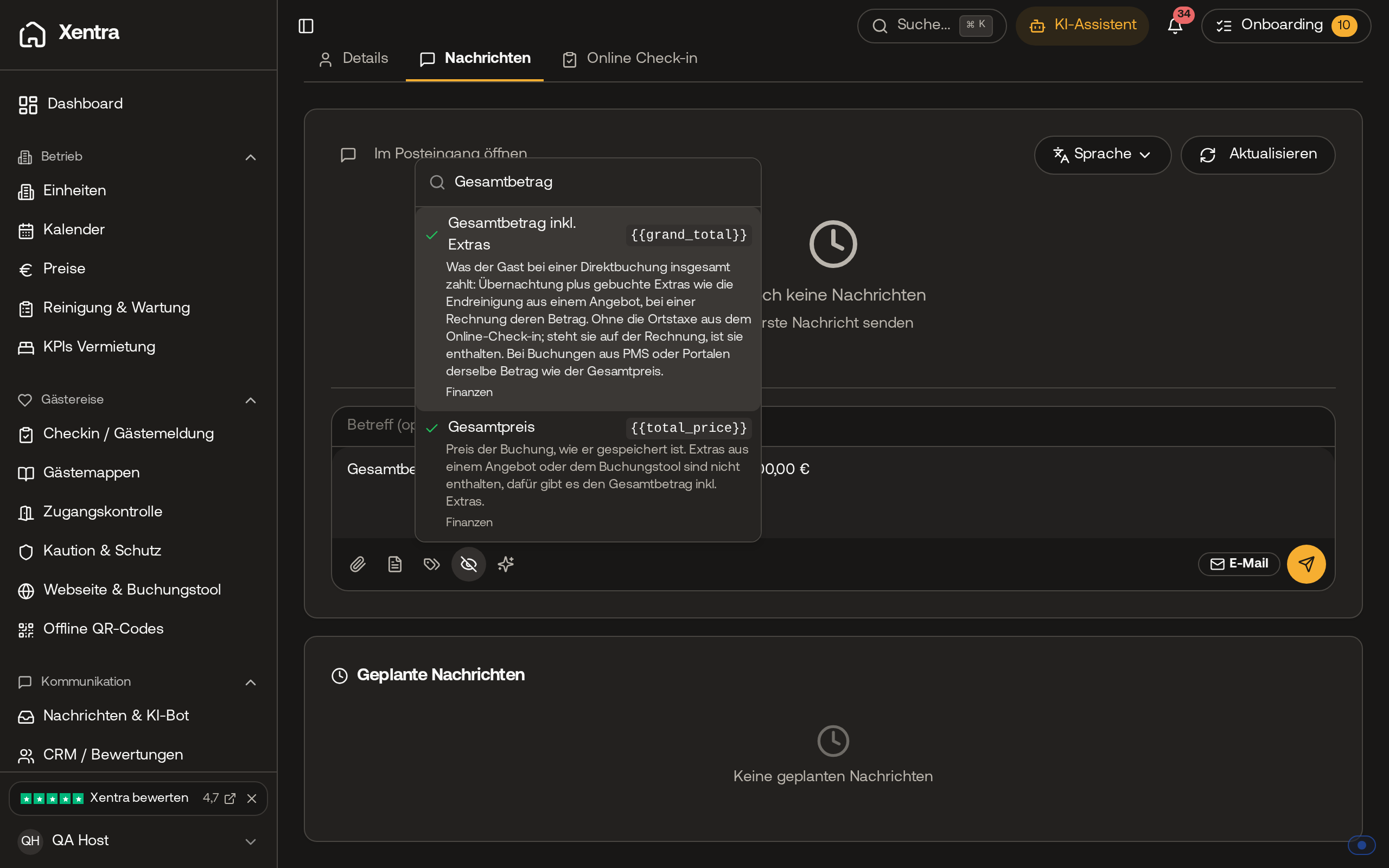 In the placeholder menu under "Finance", "Total incl. extras" with the placeholder {{grand_total}} is located directly above "Total price".
Documents
| Placeholder |
Content |
{{avs_direkt_meldeschein_link}} |
Guest registration form PDF (AVS Direkt) |
{{avs_guest_cards_link}} / {{feratel_guest_cards_link}} / {{tramino_guest_cards_link}} |
Page with guest cards (AVS, Feratel, Tramino) |
Check-in guest data and check-in fields
| Placeholder |
Content |
{{checkin_first_name}} / {{checkin_last_name}} / {{checkin_email}} / {{checkin_phone}} |
Primary guest from the online check-in |
{{checkin_birth_date}} / {{checkin_nationality}} / {{checkin_document_number}} |
Date of birth, nationality, ID number |
{{checkin_address}} / {{checkin_postal_code}} / {{checkin_city}} / {{checkin_country}} |
Address of primary guest |
{{checkin_status}} / {{checkin_submitted_at}} / {{checkin_guest_count}} |
Status, timestamp, number of recorded guests |
{{checkin_arrival_time}} / {{checkin_departure_time}} / {{checkin_flight_number}} / {{checkin_number_of_guests}} / {{checkin_travel_purpose}} / {{checkin_needs_parking}} / {{checkin_vehicle_license}} / {{checkin_needs_late_checkout}} |
Answers to the fields of the check-in form, empty if not requested |
Booked additional services
| Placeholder |
Content |
{{booked_services}} / {{booked_services_names}} / {{booked_services_total}} |
booked services with quantity and price, names only, total price |
{{available_services}} / {{available_services_names}} |
Services that the guest can still book |
Miscellaneous
| Placeholder |
Content |
{{current_date}} / {{current_time}} |
today's date, current time |
{{host_name}} / {{host_email}} / {{host_phone}} |
your host name and your contact details for guests |
{{notes}} |
Booking notes (internal, usually not for guests) |
Multi-room bookings
| Placeholder |
Content |
{{room_count}} / {{room_names}} |
Number and names of the rooms |
{{rooms_access_codes}} |
Door code per room, for one room only the code |
Owners and managers (Owners & Managers module)
{{owner_company_name}}, {{owner_contact_person}}, {{owner_email}}, {{owner_phone}}, {{owner_address}}, {{owner_tax_id}}, {{owner_iban}}, {{owner_website}}, {{owner_commission_rate}}, {{owner_contract_start}}, {{owner_contract_end}}, {{owner_payment_method}} and the same with manager_ for the manager.
More on individual placeholders
- Placeholders in the guest guide (invoice password, guest card link, house rules): Placeholders in the guest guide: links, passwords, and house rules
- Times, door codes, guest cards, invoice link, and placeholders from other systems: Placeholders: choosing times, access codes, and links correctly
- Booked and bookable services: Placeholders for additional services: booked and still bookable
- Custom fields, translations, and multi-line values: Custom fields as placeholders in messages
- Use placeholders in your own PMS: Using placeholders in your own PMS (PMS field rules)
- If something is missing or the preview looks different: Placeholders: preview, sending, and check-in answers
