
Minimum stay and buffer nights between bookings
Where you set minimum nights, why the rule applies to a date range, and how you automatically block nights before arrival or after departure.
Updated on November 10, 2026
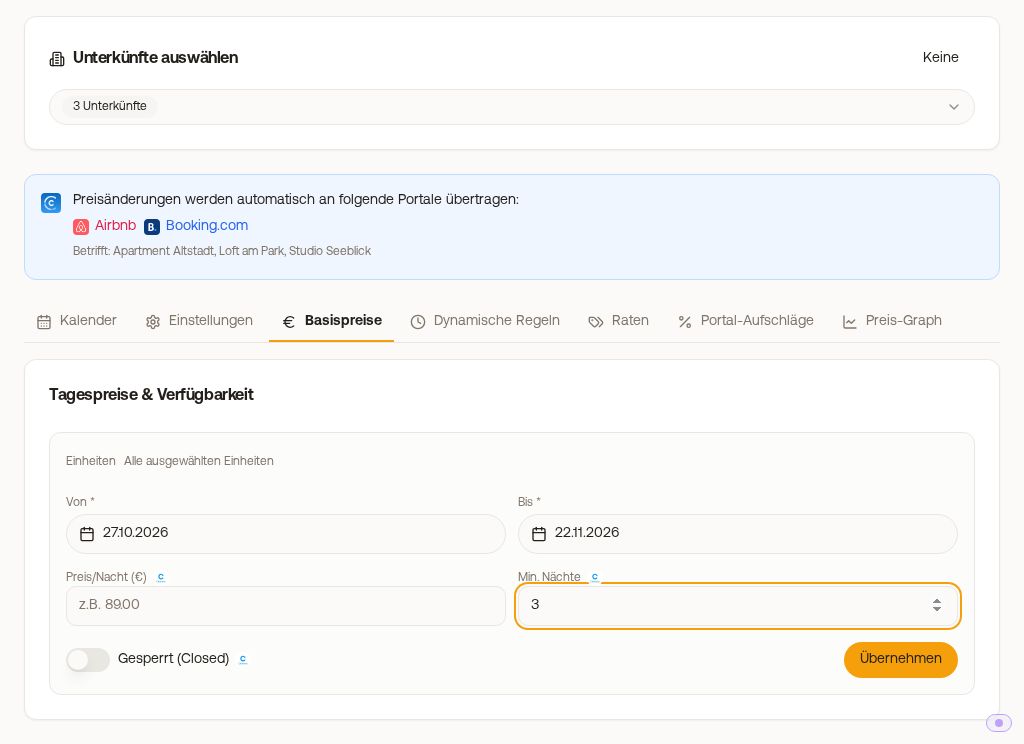
Setting minimum stay: where exactly
The minimum stay is not set under units, but under Open prices, Calendar tab, "Edit period" button above the calendar:
- Under Units, select the unit(s)
- Set From (first night) and To (last night) (e.g. today to 31.12.2027, maximum two years at once)
- Under "What to change", check only "Min. Nights" and enter the value
- Click "Save"
You do not have to enter a price for this. With Channel Manager, the value goes directly to the connected portals (Booking.com, Airbnb, and co.). You can also change individual days directly in the Calendar tab in the Min. Nights row.
The value always applies to a date range; there is no "forever" toggle. This is usually where things go wrong: individual days are still set to 1 night, others to 2, and from some date onwards nothing is stored at all. A run through the entire period you sell clears this up.
The portals receive the period opened by your Max. Advance (default 365 days, maximum 730). Anything you enter beyond that is already stored correctly with us and moves up automatically as the window advances.
Account for single-night gaps. From a 2-night minimum, single available nights between two bookings are no longer bookable. If you still want to sell such a gap, set that exact day as From and To and enter a 1 under "Min. Nights".
The minimum stay of the arrival date counts. If 10/07 is set to 2 nights and 12/07 to 5, a stay from 10 to 13/07 is allowed: only the value of the day the guest arrives is decisive. That is how your booking tool checks it, and that is how the value goes to Booking.com, Airbnb, and the other portals.
Do you work with PriceLabs? Then the minimum stay comes from there and is continuously reset; manual entry will be overwritten. In that case, you set the minimum stay in PriceLabs.
Buffer nights between bookings
If nights should be blocked automatically before an arrival or after a departure, you can find this under Open prices, Settings tab, on the unit under the "Buffer nights between bookings" section: Nights before arrival and Nights after departure, each "None" to 5. The setting only applies to bookings received after saving, and then to all connected portals and direct bookings. If a booking is canceled, Xentra automatically releases the nights again.
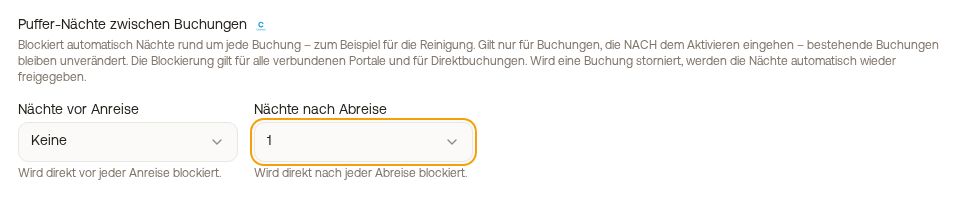 Buffer nights between bookings section in the Settings tab
This section only appears for units connected to portals via the Xentra Channel Manager. If your channel management runs through another system, you set up the buffer there. Not to be confused with the minimum stay (above) and advance (below).
Release an individual buffer night: In the calendar, it is called "Automatic buffer night". Open it and tap "Remove buffer night". The night becomes bookable again immediately, on all connected portals. The unit setting remains, but this specific date will not be automatically blocked again, even if bookings around it change. There is no editing or canceling for a buffer night.
Preparation time on Airbnb is something else. Airbnb has its own "Preparation time" setting in every listing that blocks nights after each booking. A value that existed in the listing before connecting remains, and Airbnb will then display "managed in channel manager". It applies in addition to your buffer nights. That is why a night on Airbnb can be blocked even though no buffer is set in Xentra. Only our team can change it: write to us at hello@support.myxentra.com stating which listing and which value (0, 1, or 2 nights).
Maximum stay in the booking tool
You set the maximum stay for direct bookings in the booking tool: Settings → Booking Rules → Max. Nights. Any whole number from 1 works; default is 30 nights. In the Per Accommodation tab, you set an individual value for specific units; an empty field takes the value from Global (Default). The booking tool does not allow longer stays.
Advance: how short-notice and how far in advance bookings can be made
Also in the Settings tab on the unit:
- Min. Advance (days): how many days before arrival at the latest a booking can be made. Together with the cut-off time, see "Cut-off time: until when bookings can still be made today".
- Max. Advance: how far into the future bookings can be made. With "Advance (days)", you specify a number of days that rolls forward every day. With "Open until (date)", you select a fixed date up to which the calendar is open (maximum 5 years in advance).
 Max. Advance with "Open until (date)"
With Channel Manager, both values go to the portals upon saving, for example on Airbnb as advance notice and booking window.
Fixed days of the week for arrival and departure (e.g. "Arrival on Saturdays only"): see "Fixed arrival and departure days (weekday restriction)".