
Images in messages: Inbox vs. automated templates
How many images work per channel, why PDFs cannot be attached, and how images still reach the guest automatically.
Updated on November 9, 2026
Images in messages: what works where?
In the inbox: images yes, PDFs and other files no
When writing in the Inbox, you use the paperclip to attach only images (JPG, PNG, WebP, GIF), up to 5 images with up to 5 MB each. PDF, Word, and Excel files are grayed out in the file dialog. This is intentional and not an error in your account.
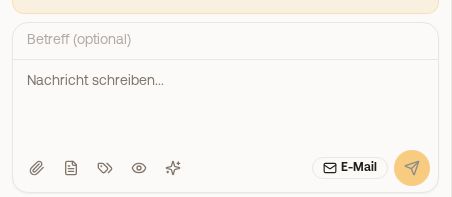 The input field in the inbox with the paperclip for images
How many images arrive depends on the channel:
| Channel | Images per message |
|---|---|
| up to 5, as mail attachment | |
| Portal via Channex (Airbnb, Booking.com) and Beds24 | up to 5 |
| Portal via other PMS (for example Smoobu, Guesty, Hostaway) | none |
| 1 | |
| SMS | none |
If you have attached more images than the channel allows, Xentra tells you before sending. If you still select a file that is not an image via "All files", it will not be accepted, and a note mentions it ("Only images can be attached here").
Send an invoice to the guest: not via the input field, but via Guest Invoices, click the three-dot menu at the invoice, "Send (Auto)". How the invoice arrives depends on the dispatch channel in the invoice settings: by email the guest receives it as a PDF attachment to the email, via the portal they get the link to their invoice.
Automated templates: no images
Message templates for automations and scheduled messages consist of subject and text. An attachment or image is deliberately not available there.
How images still reach the guest:
- Link digital guest guide: put the placeholder
{{digital_guestbook_link}}into the template. The guest page shows photos, instructions, and house rules with images. This is the intended way. - Send manually afterwards: let the automated message send and send the image afterwards from the inbox.
For WhatsApp templates for Meta, there are header, text, footer, and buttons, but no image out of Xentra.
Images and files from guests
- Via WhatsApp, guests can send photos, voice messages, and documents; you see them in the history.
- "Without text, probably a photo or a file …": If a guest sends a photo via Smoobu for example, only an empty message arrives at Xentra. In the inbox, this note appears with the channel where you can view the photo.
- "Attachment … was too large and was not accepted": Ask the guest for a smaller file or a link. If an attachment did not arrive for another reason, it says "Attachment … could not be accepted".