
Changelog: “What's new?”
Where you see what has changed in Xentra: the window after a release, the changelog page and news by email.
Updated on October 19, 2026
What's new in Xentra?
After each release, a small “What's new?” window appears once at the bottom left with the new features of this version, with text and screenshot. Once you click it away, it does not come back.
You can find everything older at any time on the Changelog page: on the left at the bottom of the sidebar, or directly via Open changelog. The entries are in chronological order, with screenshots and, where useful, a link directly to the affected feature.
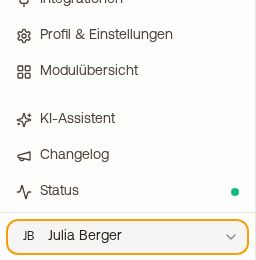 Sidebar with the Changelog and Status entries
- The entries are available in all six app languages; you see them in your chosen language.
- A release can contain several new features; they then appear individually one below the other.
- If you also want news by email, leave the switch Receive product updates by email on under Settings, Notifications. You can also unsubscribe there.
Who sees the changelog: you and your admins. Cleaning staff, caretakers, owners, booking managers and individual team members do not see it, so that they do not receive product announcements.
Whether something is currently disrupted is not in the changelog, but on the Status page directly below it (see “Status and outage notices: when a portal is not delivering right now”).
If you are missing an explanation of a change, write to us at hello@support.myxentra.com.