
Airbnb discounts: what works via Xentra and what does not
Why you set mobile rates, weekly and monthly discounts, and promotions directly on Airbnb, and which extra guest fee Xentra sends to Airbnb.
Updated on November 12, 2026
Airbnb offers several discounts that you set directly in the listing, including the mobile rate, weekly and monthly discounts, last-minute and early bird discounts, and promotions for new listings.
There is no field for this in Xentra
You set these Airbnb-specific discounts directly on Airbnb in the listing under "Pricing". The discount there applies in addition to the price that Xentra sends to Airbnb.
Therefore, the guest may see a lower price on Airbnb than your price from Xentra. This is correct and not a transmission error. Xentra does not overwrite your discount during the next price sync, it stays in place. In the price breakdown of an Airbnb booking, it appears as its own line item.
Factor the discount in when you set your minimum price floor: Xentra cannot calculate it into a minimum price.
What you can set in Xentra instead: dynamic rules (weekend, season, last minute, early bird) that go to Airbnb as a price per night, see "Dynamic Price Rules". A rule for length of stay, on the other hand, only applies to direct bookings; for Airbnb, you use the weekly or monthly discount in the listing.
Do not confuse this with derived rates on Booking.com (monthly, weekly, and mobile rates): those work differently, see "Booking.com: derived extranet rates ignore your minimum stay".
Extra guest fee: comes from Xentra
You maintain the two Airbnb values "guests included in price" and "extra guest fee" in Xentra: Open Prices, tab Settings, on the unit the fields "Guests in Base Price" and "Extra guest fee". When saving, Xentra sends both values to your Airbnb listing as soon as the unit is connected to Airbnb. Under the field it then says "Transferred to Airbnb when saved". Therefore, change the values in Xentra, not on Airbnb.
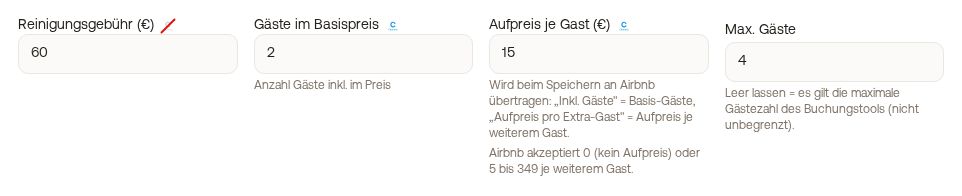 Guests in Base Price and extra guest fee with the Airbnb notice
It is only sent if you actually changed one of the two values. For example, if you only change the cleaning fee, the extra fee on Airbnb remains as it is. The amount goes to Airbnb as you enter it, without portal markup and in the currency of the listing. Airbnb accepts 0 (no extra fee) or amounts from 5 to 349 per additional guest; Xentra shows you this while typing below the field, in red as soon as your value is outside this range. If Airbnb rejects a value, it is only saved in Xentra, the old value remains on Airbnb, and Xentra shows you the reason Airbnb gives when saving. If your listing runs in a currency different from your Xentra account, Xentra does not transfer the value and also displays a notice.
Xentra does not transfer the extra fee to Booking.com. You can see which pricing model your Booking.com hotel has and what you can do under Integrations, Channel Manager, view Portals: open the menu (⋮) at the hotel on the Booking.com card, click "Room and rate mapping", at the top you will find the Pricing model. If Booking.com charges per guest, set up the rule in the extranet under "Prices per guest": base occupancy = your Guests in Base Price, plus your extra fee per additional guest. For "One price per room", ask Booking.com to switch the hotel to "Price per guest".
If the price fields on Airbnb are not clickable: first check whether the listing is published at all. For a paused or not yet listed property, they are locked; as soon as it is online, you can edit them normally.