
Who sets the price when a portal is connected via Channex
With a Channex connection, your overnight prices come from Xentra, plus portal surcharges. The cleaning fee is not sent.
Updated on November 12, 2026
As soon as a unit is connected to a portal via the Xentra Channel Manager (Channex), the overnight prices come from Xentra. You manage them under Open Prices: daily prices for date ranges, individual days in the calendar, and dynamic rules. From there, they go to all connected channels. At the top of the pricing page, it shows which portals the prices of the selected units go to, and in the Calendar tab you see the price arriving at each portal.
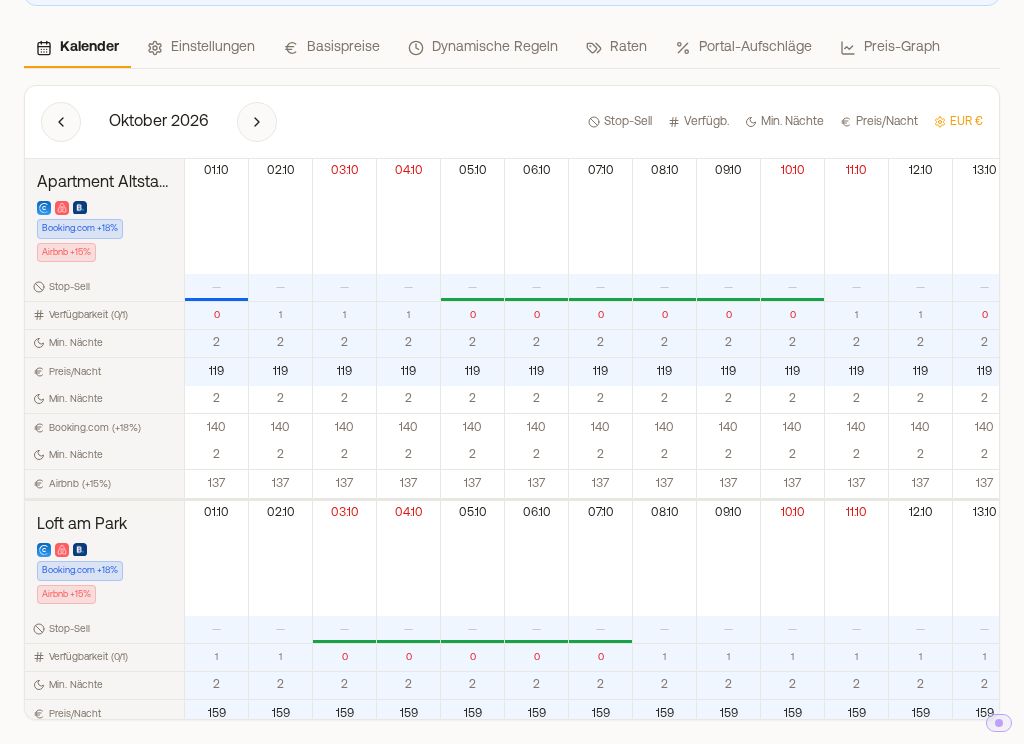 Price calendar with the note showing which portals the prices go to, and one row per portal
There is no switch that only transfers availability and excludes prices. Nothing like this is stored in the Channel Manager either: availability and prices run via the same route.
What this includes:
- One price per unit and night. Xentra sends portals (for example Booking.com, Expedia, Feratel) a price for the entire unit per night. Xentra only transfers an extra fee per additional person to Airbnb (fields "Guests in Base Price" and "Extra fee per guest" on the unit, see "Airbnb discounts: what goes through Xentra and what does not"). In the other portals, a group pays the same price as one person, unless Booking.com itself calculates per guest for your hotel. You can see this in the Channel Manager, view Portals, card Booking.com: at the hotel, open the menu (⋮), "Room and rate mapping", at the top under "Pricing model".
- Portal Surcharges are added by Xentra to the price before it goes to the respective portal, for example +15% for Airbnb. See "Portal Surcharges".
- No child prices. There are no separate prices for children in Xentra: for the extra fee per guest (Prices, Settings tab), children count like adults, in the booking tool just like on Airbnb. Xentra does not send child prices to Booking.com. If you have stored any there, you continue to manage them directly in the portal itself.
- The cleaning fee is not sent to portals. The cleaning fee in the Settings tab applies to your booking tool and to bookings that you create yourself. For Airbnb, Booking.com, and others, you set it directly in the portal itself or cover it via a portal surcharge.
- A Dynamic Price Rule takes effect immediately upon saving, including on portals (except stay length rules). Details in "Dynamic Price Rules".
- Airbnb's own discounts such as the mobile rate or weekly and monthly discounts are still set by you in Airbnb. See "Airbnb discounts: what goes through Xentra and what does not".
- With PriceLabs, PriceLabs sets the prices for this unit, and Xentra passes them on to the portals.
If you want to manage night prices directly in the portal again, the connection for this channel via the Channel Manager would have to be disconnected. However, calendars and bookings would then no longer run through this channel either.