
PMS integrations: what each PMS can do
Which PMSs you can connect to Xentra, what each integration can do (bookings, webhooks, writeback, messages), and how to import properties.
Updated on November 12, 2026
Xentra can be connected to your existing PMS or used entirely as a PMS. You can connect booking portals (Airbnb, Booking.com, VRBO/FeWo-direkt, Expedia) directly via the Channel Manager without a PMS (included in the Pro Plan), see Channel Manager: what it costs and how to set it up and Connecting Booking.com and Expedia via Channel Manager; disconnecting and mapping: Channex: Disconnect portals, map rooms, and minimum stay type.
You can find your PMS connections under Integrations → PMS & iCal (Open PMS & iCal). At the top under "Connected", you will see your active connections with their last sync status and the Settings button. Below, under "Available systems", you will find everything you can newly connect. Systems marked with "Coming soon" cannot be connected yet.
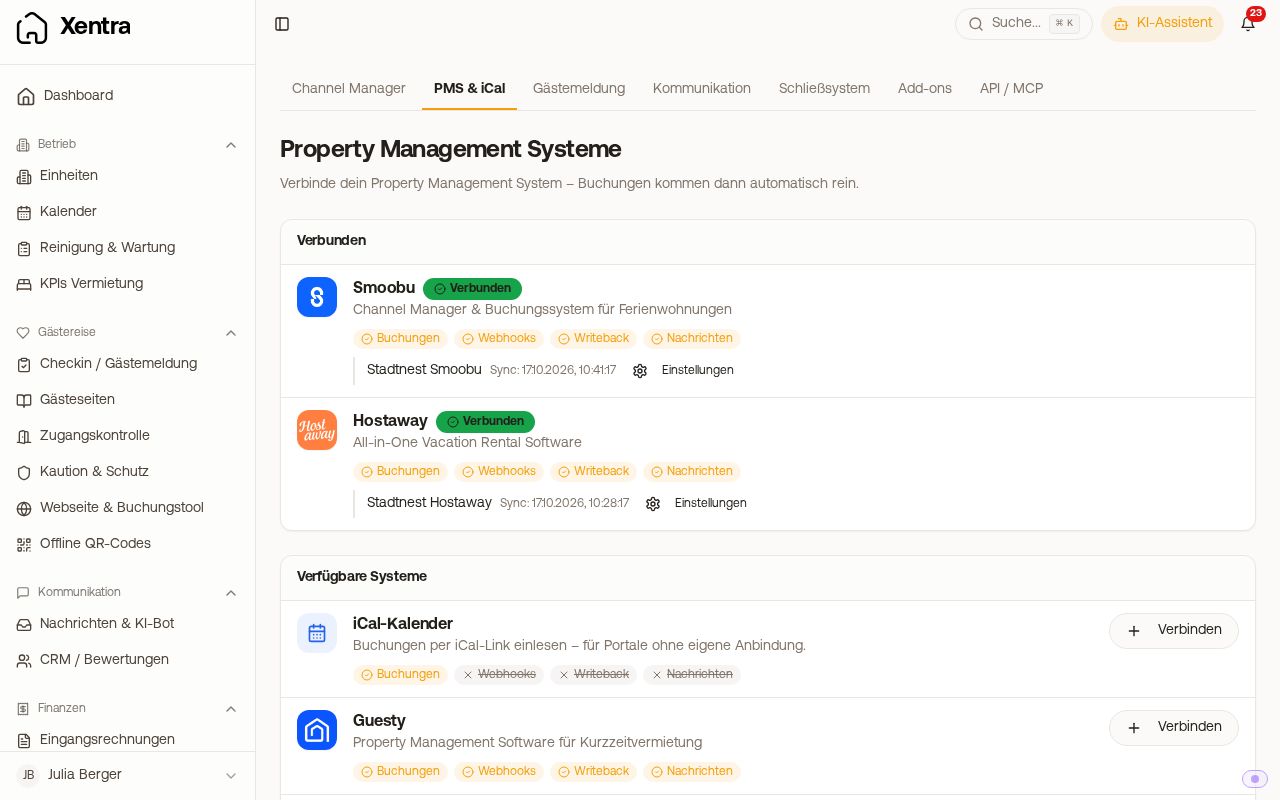 The PMS & iCal page with connected Smoobu and Hostaway
What each integration can do
Each row on the page has four indicators. Strikethrough means: this integration cannot do that.
- Bookings: Bookings are imported and continuously synchronized.
- Webhooks: New and modified bookings arrive in real time, not just during the next sync.
- Writeback: Xentra writes fields such as check-in link or door code back to the PMS, see Use placeholders in your own PMS (PMS field rules).
- Messages: Guest messages from the PMS land in the Xentra inbox, and you reply from there.
| Integration | Bookings | Webhooks | Writeback | Messages | Send bookings to PMS |
|---|---|---|---|---|---|
| Smoobu | ✅ | ✅ | ✅ | ✅ | ✅ |
| Guesty | ✅ | ✅ | ✅ | ✅ | ✅ |
| Hostaway | ✅ | ✅ | ✅ | ✅ | ✅ |
| Lodgify | ✅ | ✅ | ✅ | ✅ | ✅ |
| Beds24 | ✅ | ✅ | ✅ | ✅ | ✅ (toggle in booking tool) |
| Smily | ✅ | ✅ | ✅ | ✅ | ✅ |
| iLoca Hotel | ✅ | ✅ | ✅ (single-line custom fields only) | ✅ | ❌ |
| iCal calendars | ✅ | ❌ | ❌ | ❌ | ❌ |
| PMS Excel Upload | one-time | ❌ | ❌ | ❌ | ❌ |
If an integration does not deliver messages, Xentra still sends your automated guest messages via email, SMS, or WhatsApp. Xentra simply does not update the portal's inbox in that case.
iLoca Hotel is available in the Pro plan and during the trial phase, but not in the Basic plan; you enter the webhook there yourself, see Connect iLoca Hotel. Lodgify: see Connect Lodgify. For Hostaway and Smoobu, see Hostaway: Bookings do not arrive in real time and Set up Smoobu: register new API key with secret and webhook.
Import properties from your PMS
You do not have to recreate your properties manually. Open Settings for your connection: under "Property mapping", you will find every property from the PMS.
- Map it on the right to an existing unit, or create it as a new unit using the plus button ("Import as new unit").
- "Import all" creates all unmapped properties as units at once.
- A unit that you create newly in Xentra is immediately available for selection. A property that you create newly in the PMS can be fetched into the list using "Refresh".
- An imported unit takes the map pin from your PMS. If the PMS sends none, Xentra determines it from the street and postal code, provided the address is found unambiguously. If the postal code is missing or no match fits exactly, set the pin yourself: open unit, Dates tab, section Address, "Get from address" or "Set pin on map", then Save.
Quick Sync synchronizes bookings for mapped properties (the last 30 days and the coming year), Full Sync loads the complete booking history. Neither changes the property list, that is what "Refresh" is for.
Change bookings from the PMS in the PMS
As long as the connection is active, an imported booking belongs to the PMS. Canceling and changing dates are locked in Xentra for it. You will see, for example, "This booking comes from Smoobu. Cancel it there, Xentra will adopt the change during the next sync." The same applies to blocks coming from the PMS.
Conversely, Xentra can send bookings created in Xentra (calendar, booking tool, Data API) to your PMS so that nothing is double-booked there: see Send bookings to your PMS.
Without API connection: iCal and Excel
- iCal calendars for portals without direct integration (HomeToGo, Holidu, Tripadvisor, Traumferienwohnungen). It only imports dates, see iCal: portals without direct connection.
- PMS Excel Upload: upload your booking list from your previous system once as an Excel file (Open Excel upload).
Reviews
Guest reviews from Airbnb, Booking.com, and Expedia arrive in Xentra via Channex and Beds24. You can only reply to reviews and rate your guests via Channex. Beds24 provides them read-only at the click of a button. No reviews arrive via Smoobu, Guesty, Hostaway, Lodgify, iLoca, and iCal; this is a limitation of these interfaces, not a setting. Read more under Guest reviews.
Other integrations
You can find the remaining integrations under Integrations in the Marketplace:
| Area | Provider |
|---|---|
| Dynamic pricing | PriceLabs (Marketplace tab) |
| Guest registration / guest registration form | directly connected: AVS Direkt, Feratel Deskline, Tramino Pass, WinTOP; for abroad (for example Italy, Spain, Portugal): Chekin |
| Access control | Nuki, TTLock, Igloohome, Salto, SwitchBot, Tedee, Ring, LivionKey, masunt |
| Communication | WhatsApp, Instagram, SMS via Twilio |
| Accounting | Lexware Office |
| Sensors and monitoring | Minut, MasterMind · Tech |
| Storage | Google Cloud |
| Custom systems and AI | Data API, webhooks, and MCP (API / MCP tab) |