
Automations: extra service booked and fixed recipients
The trigger “When an extra service is booked”: only for certain services, damage waiver, triggering again, and messages to fixed addresses in the message history.
Updated on October 19, 2026
When the trigger “When an extra service is booked” sends a message, how you limit it to individual services, and where messages to fixed addresses appear in the history. The other settings in the editor are under Setting up automations: channel, fallback, filters and catch-up.
Trigger “When an extra service is booked”
- Only for certain services: Under “When is it sent?” choose the trigger “When an extra service is booked”. Below it is “Extra services” with the switch “All”. As long as it is on, the automation applies to every service. Switch “All” off, then your services appear and you click the ones you want. Only active services are offered. With the condition “Extra service booked” the selection works the same way.
- When exactly it is sent: Paid services without approval trigger after payment. Services that require approval trigger directly on your approval. The guest only gets the payment link then and has not paid yet. So do not write “we have received your payment” in such a message.
- The Damage Waiver counts as a booked service.
- If the guest later books another service, the automation triggers again. The same service is never sent twice, and with a product filter only the services listed in the filter count.
- There is no time setting, it is sent directly when the event happens.
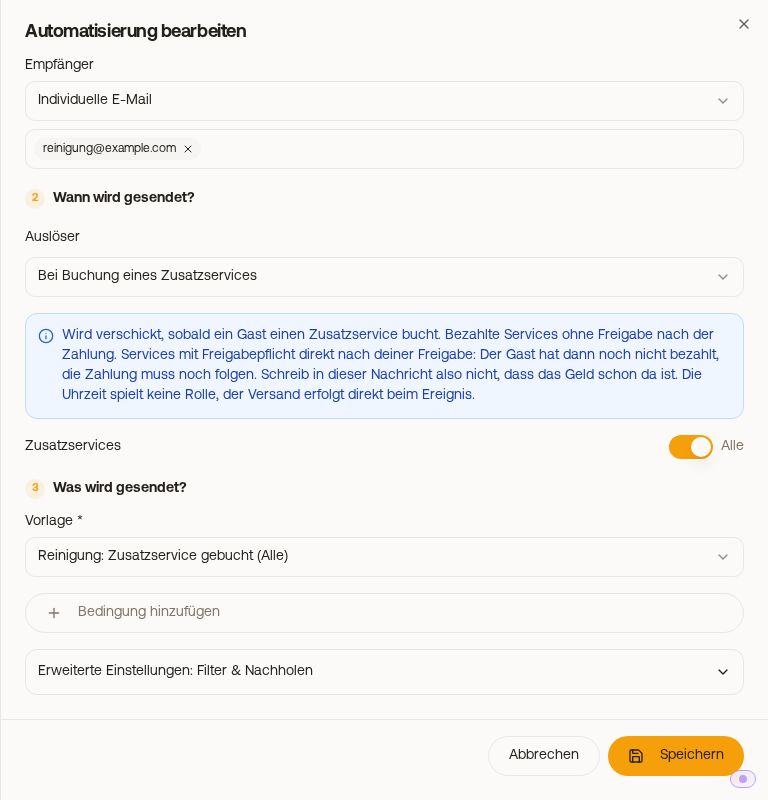 Trigger “When an extra service is booked” with the “All” switch
To write what was booked into the message, use {{booked_services}}, for example to your cleaning team: name, quantity and price per service. More on this under Placeholders for extra services: booked and still bookable.
With the condition “Extra service booked” you build an upsell reminder: the “not met” branch goes to guests who have not yet booked the service.
Message to a fixed address: in the history, but marked as internal
An automation to a fixed address (recipient “Custom email”, for example your cleaning company) still appears in the booking's message history, greyed out and with the badge “Internal”, which shows that the message did not go to the guest. This way you see in one place what went out, and at a glance what of it reached the guest.
In the inbox list, such a message does not appear as the last preview line, because the preview only shows what the guest has seen. Open the booking, Messages tab, and it appears in the history.
The same applies to the recipients Host, Owner and Manager: anything that does not go to the guest is marked as internal in the history. Counted as guest messages are the recipient Guest and every delivery via the portal.