
Automations: typical workflows step by step
Ready-made recipes: Check-in reminder and arrival info, last-minute, one night, late check-out, thank you & review.
Updated on November 12, 2026
Ready-made recipes for the most common workflows. You create all of them under open Automations with "New Automation". How triggers, conditions, and time modes work in general is explained under Automations: triggers, conditions, and time modes.
Check-in reminder and arrival info
Goal: Anyone who has not checked in yet receives a reminder. Anyone who has checked in gets the arrival info with code.
- Reminder: Trigger "day(s) before arrival", 3 days, 10:00 AM. "Add condition", Check-in Status. Top (met) "No Message", in the condition block ("Reminder if not (yet) checked in") your reminder template. Mode "Check once at the set time".
- Arrival info: Trigger "day(s) before arrival", 1 day, for example 4:00 PM. Condition Check-in Status. Top ("Message after completed check-in") the arrival info, in the condition block the reminder once more. Mode "From the scheduled time, wait until met".
If the guest checks in after 4:00 PM, the arrival info goes out immediately. That is the reason for the waiting mode: With "Check once", a guest who only checks in afterwards would never get their arrival info. That is the most common mistake with this workflow.
Short-term bookings receive two messages right after each other? If "Also send if the send time has already passed" is enabled for the arrival info, Xentra catches up on the message about one minute after the booking confirmation for a booking placed after the send time. The guest has not checked in yet at that point and immediately receives the reminder from "Reminder if not (yet) checked in". If your booking confirmation already contains the link to the online check-in, set this field in the arrival info to "No Message". The arrival info will still arrive as soon as the guest checks in. There is no minimum interval between two automations.
Check-in confirmation and arrival info arrive at the same time? An automation with the trigger "Immediately after check-in (fully completed)" always goes out directly after check-in, there is no delay for it. If the guest only checks in after the time of your arrival info, they receive both shortly after each other. Write in the confirmation that the access info comes in a separate message.
Remind multiple times: An automation sends at most one message per booking, there is no repetition until check-in. For multiple reminders, you create a separate automation for each day (for example 2 days, 1 day, On arrival day) with the same condition. Anyone who checks in will no longer receive the remaining ones.
The reminder goes to guests who have already checked in? Then it is placed at the top in the field "Message after completed check-in". This happens if you select the template first and add the condition afterwards: The top field is the same one that holds the template when there is no condition. Set the top to "No Message" and enter the reminder only in "Reminder if not (yet) checked in". If the same template is in both fields, every guest receives it.
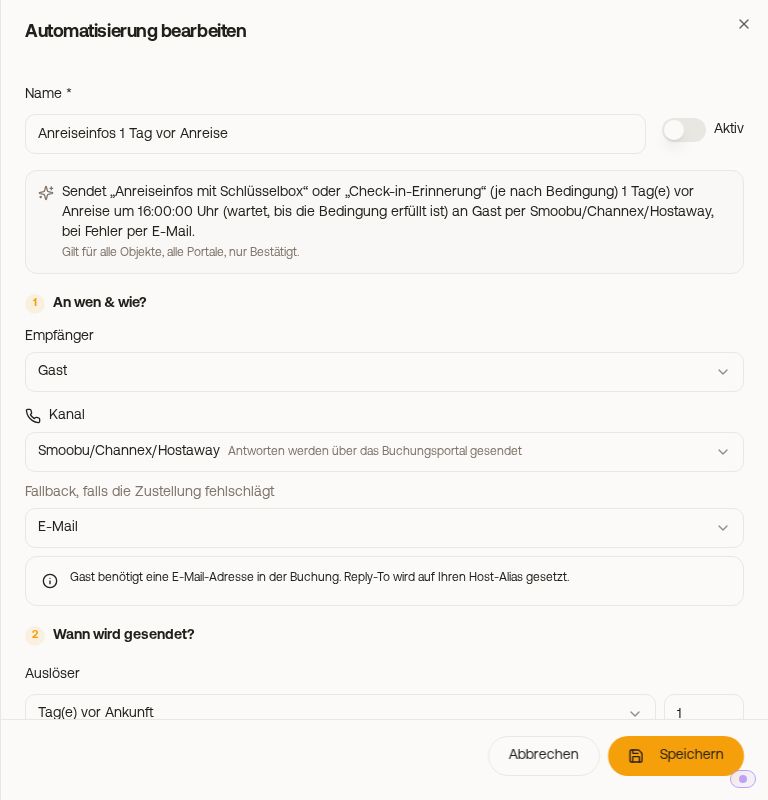 Arrival info with Check-in Status condition
Short-term bookings (last-minute)
With the Booking lead time condition, short-term bookers receive a different message than guests who booked early. Whole days between booking day and arrival day are counted, without time of day: Booking on August 1, arrival on August 5 results in 4 days, booking on arrival day results in 0. The decisive factor is the booking time on the portal, not the import into Xentra.
The condition only changes which template goes out, not when. If the send time has already passed when the booking arrives (automation "3 days before arrival", booking 1 day before, or booking at 10:30 AM for a message at 10:00 AM), nothing is sent without further settings. For last-minute messages, you therefore set both:
- Booking lead time condition "less than (<)", for example 3 days.
- Under "Advanced settings: filters & catch-up", the toggle "Also send if the send time has already passed".
Then the message goes out a few minutes after the booking arrives.
Guests with only one night
Example: The message "1 day after arrival" should only come for longer stays. Trigger "day(s) after arrival", 1 day, condition Length of Stay "at least (≥)" 2 nights. For one-night guests, a second automation "On arrival day" with the same template and Length of Stay "exactly (=)" 1 night.
Offer late check-out
Trigger "Before departure", 1 day, for example 6:00 PM. Condition Nights after departure free, 1 night. Top ("Message when the nights are free") your offer for late check-out or an extension, in the condition block ("Message when the nights are taken (turnover)") the reminder for punctual check-out. Checked once at the set time.
Thank you and review request
A completely normal automation: Trigger "day(s) after departure", for example 1 day, recipient Guest. You change the text in the template under open Templates. If the setup wizard created your automations, it is usually called "Thank you & review 1 day after departure".
Do not confuse with Settings, section Reviews: There you configure Xentra to automatically rate your guests on Airbnb (see Automatic guest review (Airbnb)). That is your review of the guest, not a message to them.
Messages to you and your cleaning team (copy to you, note for a repeat guest, cancellation info to cleaning): see Automations: messages to you and your cleaning team.