
Add add-ons to a booking and issue the invoice via the API
Add add-ons such as EV charging, minibar, or parking to a booking via the Xentra API or MCP and issue the invoice for the stay.
Updated on November 12, 2026
With the Xentra API (or an AI assistant via MCP), you can add add-ons to a booking after the stay that end up on the guest invoice: for example, EV charging by kWh from the wallbox, minibar, extra cleaning, parking, or a damage fee. Afterwards, you issue the booking invoice, also via the API.
What an add-on is
A line item that the guest still owes. An add-on does not move money and the guest does not receive anything. You specify:
- Label, for example "EV charging"
- Quantity, decimals are possible (for example 23.456 kWh)
- Gross price per unit and VAT rate
- optionally a Unit (kWh, bottle, day), it then appears on the invoice after the label: "EV charging (kWh)"
Or you pick a product from your catalog (Products & Services): Then name, price, and VAT come from there and you only enter the quantity. The API reads the list of your products as well.
Which permission the API key needs
The API key needs the "Read and write" permission for Invoices. With only "write bookings", a key cannot set add-ons, and the API will respond with 403. Existing keys do not have this permission. Create a new key for this:
- Open Integrations → API / MCP, tab API keys, "New Key".
- Select "Read and write" for Invoices (to check the booking, also select at least "Read" for Bookings).
- Check the confirmation in the yellow box and click Create.
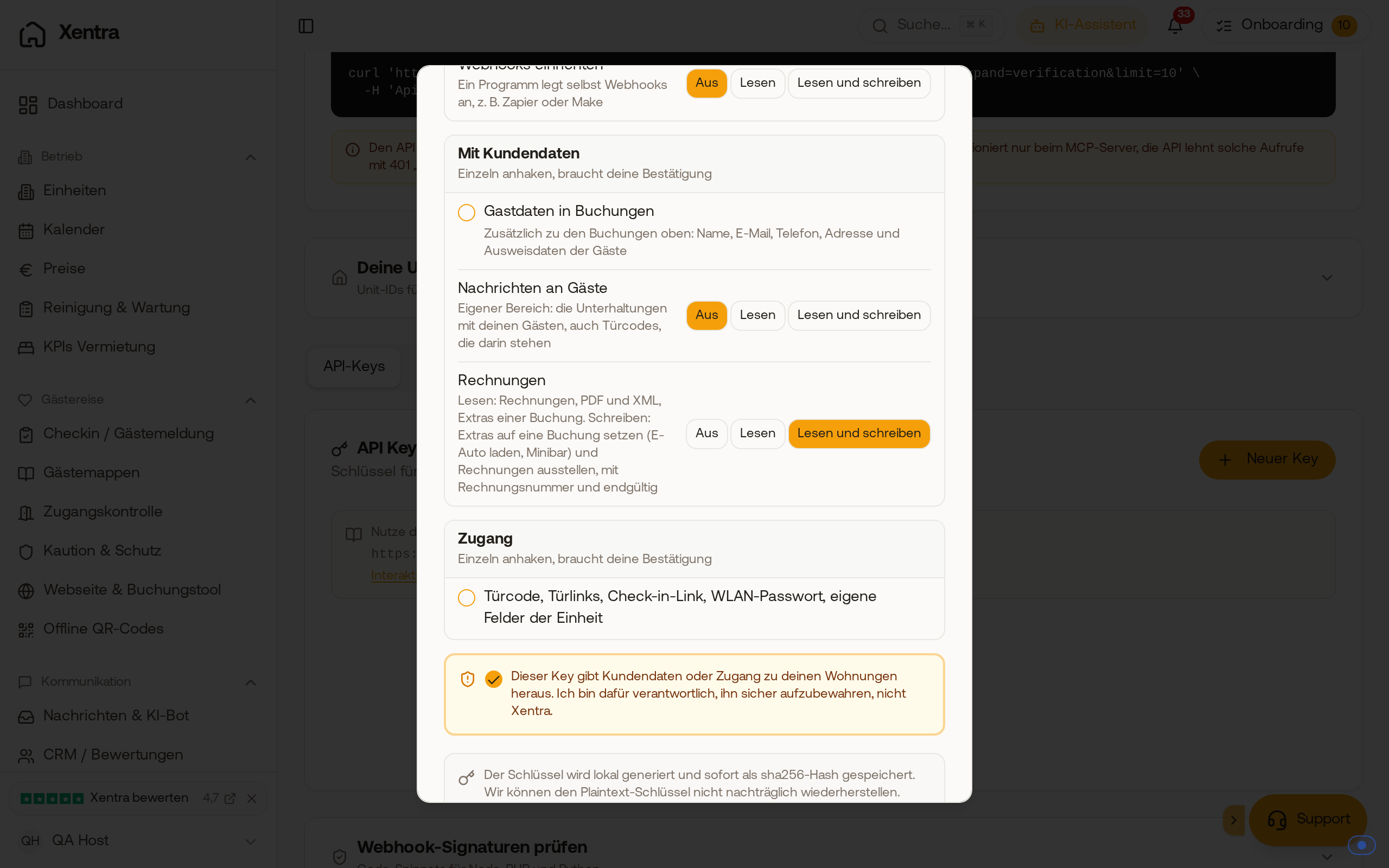 When creating an API key, the level "Read and write" for Invoices allows setting add-ons and issuing invoices.
Reconnect an AI assistant connected via MCP and check the permission there.
Which invoice the add-ons end up on
The next invoice for the booking includes the add-ons, whether it is the automatic invoice after check-out, "Create invoice" in the app, or the invoice via the API. Add-ons always end up on the invoice, even if "Add-ons" is turned off in your invoice settings.
Issuing the invoice via the API
- First as a Preview (dry_run): You see the line items and totals, no invoice number is used.
- Then issue: The invoice gets its number from your number range and is final. Changing it is only possible via a credit note in the app.
The invoice is not sent to the guest. Under Guest Invoices, it counts under "Not sent", and you send it from the app.
Has the stay already been invoiced?
Then a new add-on goes on a Follow-up invoice. It contains only what is still open and not yet invoiced: your add-ons, add-ons from quotes or the booking tool, and approved services. What the guest has already paid, the tourist tax, and the overnight stay never appear again. If nothing new is open, no invoice is issued.
Only one invoice creation runs per booking at a time. A second request at the same moment is rejected, so a duplicate invoice is never created.
Marking as paid and removing
- Paid: An add-on is only considered paid once you mark the invoice or the line item as paid. A card payment from check-in for a product with the same name and price does not count for the add-on.
- Removing: As long as no invoice contains the add-on, you can remove it again (like "Cancel" in the booking). If it is already on an invoice, this is only possible via a credit note in the app.
In the booking
Under Payments, each add-on appears as its own card "Invoice - Unpaid" with "Mark as paid" and "Cancel". In the Finance area, add-ons count towards the total price, open or paid. Canceled add-ons do not count.
The technical details (fields, endpoints, examples) are in the API documentation at https://rest.myxentra.com/docs. For general information about keys, see Data API: Keys, access and documentation.