
Data API: Keys, access, and documentation
Where you create API keys, who is allowed to do so, how permissions and validity work, where you find unit IDs, and where the documentation is located.
Updated on November 13, 2026
For connections to accounting, custom tools, or partner systems, Xentra offers a public REST API, outgoing webhooks, and an MCP server for AI assistants.
Where to set it up
Integrations → API / MCP (Open API / MCP); the same page is also available under Settings → API / MCP. At the top, you find the API address (rest.myxentra.com) and "View full reference", below that the AI connection (see Connect Claude or ChatGPT with Xentra (MCP)), the unit IDs, and the API keys and Webhooks tabs.
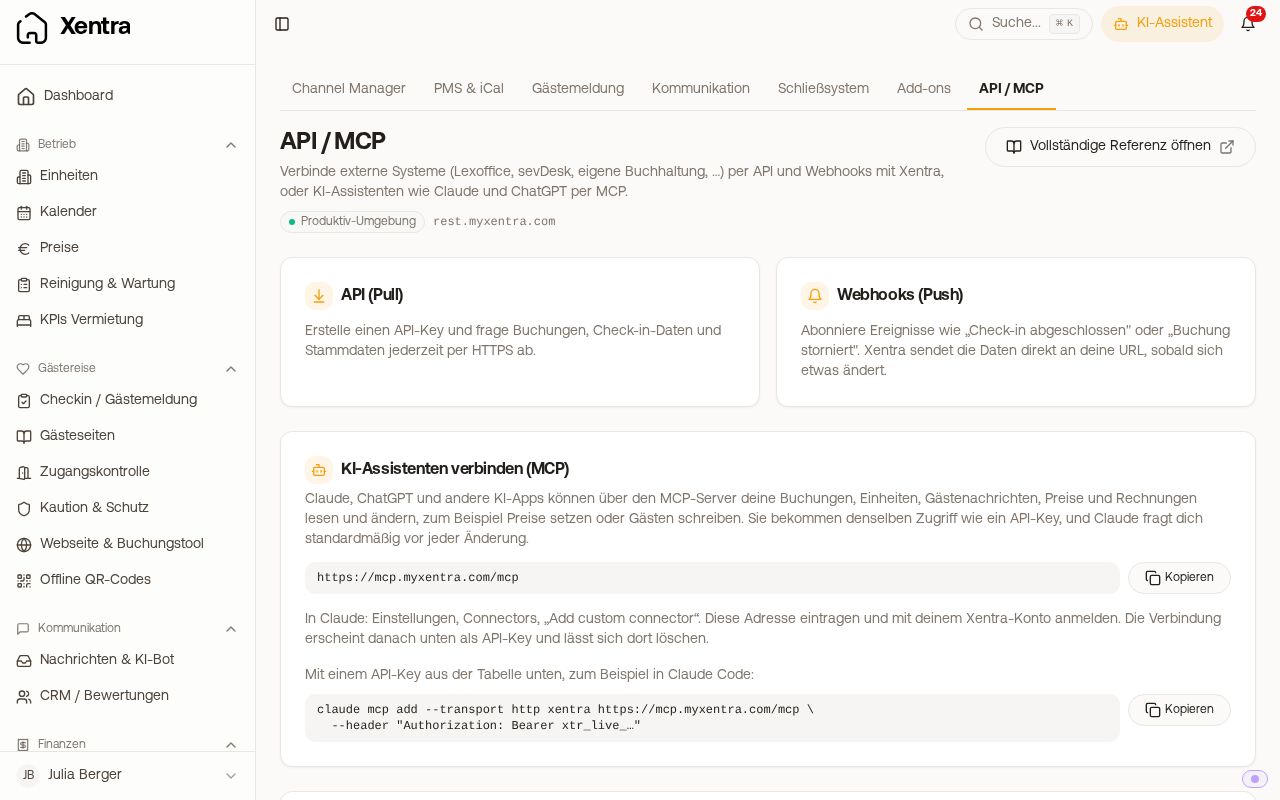 The API / MCP page under Integrations
Who is allowed to do this
Only your main account and your team admins. For other team members, this is not a permission you can assign in the permissions grid; the section is hidden for them because an API key acts on behalf of the whole account. You can only create new keys and webhooks with an active subscription; during the free trial without a payment method, this is not yet possible. Existing keys and webhooks remain valid.
Create API key
- In the API keys tab, click "New Key".
- Enter a name (for example, the name of the program that uses it), select the Valid for and Permissions.
- Create. The key starts with
xtr_live_and is shown only once: save it securely right away. Later, you will only see the name and the last four characters.
Permissions: For each area, you define what the key is allowed to do (Off, Read, or Read and write); initially, everything is off. Guest data, messages to guests, invoices, and Access (door code, door links, check-in link, Wi-Fi password) are separate checkboxes. If a permission is missing, these fields remain empty or the API responds with 403. Permissions cannot be changed retroactively; create a new key for this. Valid for: 90 days, 1 year (recommended), or unlimited. Everything about this, including rotating and renewing: see API key: Permissions, validity, rotating.
In the list, for each key you see its permissions, limit, when it was last used, its status, and via the clock icon ("View requests") its last 50 requests with route, status, and duration. "Revoked" revokes an individual key starting from the next call without affecting the others. It is best to create a separate key for each integration.
A first request
curl https://rest.myxentra.com/api/v1/bookings/ \
  -H 'Api-Key: xtr_live_...'
You always send the key in the Api-Key header, without "Bearer" in front of it. Authorization: Bearer only works with the MCP server. If the API rejects a call with 401, the detail field in the response tells you why: the key is missing, in the wrong header, or was not accepted (typo, revoked, or expired). If a key that worked just a moment ago suddenly stops working, try it again first before creating a new one.
The full documentation with all endpoints and fields is located at https://rest.myxentra.com/docs.
Where do I find the unit ID of a unit?
On the API / MCP page, expand the "Your units" section (it is initially collapsed). The table shows each unit with name and unit ID; clicking the icon next to it copies the ID. Programmatically, you get them via GET /api/v1/properties/get-user-properties.
What the API can do
Bookings and blocks (read, create, change, cancel), units (with description, maximum number of guests, and the house rules from your online check-in), prices, minimum stay, and availability, guest invoices (with PDF and e-invoicing XML), adding extras to a booking and issuing the invoice, products, insurance, guest messages, and managing webhooks. The details are described in dedicated articles:
- Data API: Create, change, and read bookings
- Add extras to a booking and issue the invoice via the API
- Data API: Read and send guest messages
- Read and set blocks via the Data API
- Price API: Prices, minimum stay, and availability via the API
- Webhooks: Events, fields, and signature
- Data API: Limits, 403 blocks, and syncing correctly
Portals that sell your rentals via the API (for example Travanto) fetch your prices including surcharge for the portal, your pricing rules, your extra services from the booking tool, and the data of your rentals (bedrooms, beds, bathrooms, pictures). Their bookings arrive with the portal as the source and with the commission. You set the surcharge yourself: see Surcharge for Travanto.
Where API changes are announced
There is no separate email mailing list for API changes. Product changes can be found in the changelog in the sidebar, and the current state of endpoints is in the documentation at https://rest.myxentra.com/docs.