
Data API: Create, modify, and read bookings
Create and modify direct bookings via the Data API: available fields, why some are null, check-in and guest guide links, and PMS forwarding.
Updated on November 12, 2026
Basics on keys: see Data API: Keys, Access and Documentation. All fields are listed at https://rest.myxentra.com/docs.
Permissions: Without "Guest data in bookings", name, email, phone, address, and verification return as null, and setting email or phone returns 403. Without Access, key_code, checkin_link, guest_page_link, wifi_password, and custom_fields are null, and the link endpoints as well as setting door codes or Wi-Fi passwords respond with 403. See API Key: Permissions, Validity, Rotation.
Create and modify direct bookings
If you accept bookings by phone, email, or WhatsApp and enter them via the API (POST /api/v1/bookings/create or POST /api/v1/bookings), you create them completely right away. Specify the unit with its unit ID (accommodation). This field is required, for bookings as well as blockings: without a unit, the API responds with 400 because a booking without a unit would not appear in any calendar, cleaning schedule, or for any team member. The IDs are listed under API / MCP in the "Your units" section.
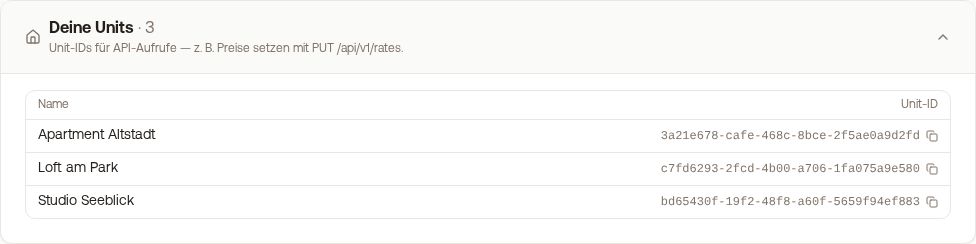 The "Your units" section with name and unit ID of each unit
| Field | What it does |
|---|---|
portal |
Direkt marks the booking as a direct booking (also Direct and Direktbuchung are saved this way). You cannot set portals like Airbnb or Booking.com, they come from their import. |
cleaning_fee |
The portion of total that is cleaning. total remains the total price including cleaning. |
internal_note |
Your own note. Never goes to the guest, not into the calendar export, and not onto the invoice. |
cleaning_notes |
Notes for your cleaning team on this booking. |
language |
Language of automated guest messages (de, en, …). Considered chosen by you, Xentra does not replace it with the detected language. |
payment_status, payment_method |
Whether the guest paid (paid/unpaid) and how (free text, for example bar). Triggers nothing. |
guest_remark |
Guest remark (maximum 5000 characters), attached as a special request to the booking. This does not send a message. |
infants, dogs |
Infants and dogs, integer starting from 0. |
Xentra calculates the number of nights, booking date, and the night price without cleaning automatically, just like for a booking from the calendar. With PUT /api/v1/bookings/{id}, you modify the same fields later; if dates change, Xentra recalculates the nights. portal, cleaning_fee, payment_status, payment_method, and guest_remark only work for bookings created via the API or in the app; for imported bookings, the next sync would overwrite them, which is why the API responds with 400 there. You can set internal_note, cleaning_notes, and language on any booking.
You can send back a booking the same way you received it via GET: unchanged fields change nothing. The general note field of the booking is neither readable nor writable via the API; internal_note is there for your own notes.
Bookings from the API also go to your PMS
If you have connected a PMS and turned on "Push bookings to PMS" there, Xentra treats a booking from the API just like one from the calendar: creation, modification, and cancellation go to your PMS, including blockings. If you delete such a booking with DELETE, Xentra cancels it first in the PMS. If the transfer fails, your API call still does not fail; the booking just remains in Xentra. Learn more: Send bookings to your PMS.
Overrides and guest details
Three fields often return null, even though values are visible in the account:
| Field | What it is | Why it can be null |
|---|---|---|
check_in_time, check_out_time |
Override for this specific booking | Not set: the unit standard applies |
key_code |
Door code for the placeholder {{key_code}} |
see below |
The actual effective times are returned per unit by GET /api/v1/properties/get-user-properties and GET /api/v1/properties/get-property/{id} as effective_checkin_time and effective_checkout_time. Where the time comes from is indicated by checkin_time_source and checkout_time_source: unit (unit's own times), account (your standard for all units), or fallback (nothing set yet, Xentra assumes 14:00 and 12:00; do not show this to guests as a firm commitment).
The door access window of a booking is provided by access_valid_from and access_valid_until in GET /api/v1/bookings and GET /api/v1/bookings/{id} as UTC timestamps, including purchased early check-in or late check-out and manual changes. They do not include the "Door code buffer".
What the guest specified themselves can be found in the check-in block of GET /api/v1/bookings/{id}: verification.arrival_time, verification.departure_time, and verification.custom_fields[] (your custom check-in fields, files with file_url).
Regarding key_code: The field returns a door code supplied by a connected PMS or set by the API itself. Codes generated by a smart lock integration (for example Nuki) do not appear here; the field is null in that case, even though valid codes go to the guest. You can see the generated code on the booking in the app or output it via {{key_code}} in a message.
Additional fields
| Where | Fields |
|---|---|
| Bookings (list and single booking) | infants, dogs, reservation_group_id (connects rooms of a multi-room reservation), booked_at (when the guest booked), created_at (when the booking arrived in Xentra) |
| Single booking | cleaning_fee, bed_tax, commission, payout, payment_charge (read only) |
| Single unit | pricing with cleaning_fee, extra_guest_price, base_guests, max_dogs; plus wifi_name, wifi_password (modifiable) and your custom fields custom_fields |
booked_at is empty if the source does not provide a time, and for bookings created directly in Xentra; there, created_at is the booking time. For imported bookings (for example after switching PMS), created_at is the import date.
Portal booking number and check-in payment
For bookings, invoices, and messages, you get the portal's booking number via the API as platform_booking_number, which is the number the guest sees on Booking.com, Airbnb, or Expedia. It is the same number as in the invoice_created webhook. For other bookings, or if the portal did not provide its own number, it is null. You can also search for it: GET /api/v1/bookings?platform_booking_number=4012345678. The search requires exact spelling and also finds past bookings.
With expand=checkin_payment (in the list and on individual bookings), you see the payment from the online check-in for each booking: status, total, tourist_tax_amount (tourist tax), currency, paid_at (when paid), and payment_method (stripe online or invoice by invoice). null means: there is no payment from check-in for this booking. Each booking also contains apartment (name of the unit) and booking_source (where the booking comes from).
Check-in link and guest guide per booking
| Endpoint | Purpose |
|---|---|
GET /api/v1/bookings/{id} |
contains checkin_link and guest_page_link as ready-to-use URLs |
GET /api/v1/bookings/{id}/checkin-link |
Check-in link with expiration, view count, and whether check-in is completed |
GET /api/v1/bookings/{id}/guest-page-link |
Guest guide link with view count and whether the page requires a password |
These are the same links as in the placeholders {{online_checkin_link}} and {{digital_guestbook_link}}, using your own custom domain if configured. Both links are Access details, which is why they only appear on the single booking, not in the list. null means: no active link at the moment. The guest guide password is never outputted.