
Reading and setting blocks via the data API
How to recognize blocks in the data API (kind), filter, create and remove them, where they are passed on, and why Pending is not suitable for this.
Updated on October 19, 2026
Via the data API, blocks are the same objects as bookings; GET /api/v1/bookings/ returns them too. You recognize them by the field kind:
kindisreservation(real stay) orblock(blocked period: owner block, maintenance, block taken over from the channel, buffer night, block of a linked unit).statusdoes not tell you. A block is saved as confirmed; otherwise it would drop out of the channel calendars, which is why it also arrives aslive.- Filter with
?kind=reservation,?kind=blockor?kind=all(default). - Create with
kind: "block"atPOST /api/v1/bookings/create, plusaccommodation(the unit ID), the period and optionallyblock_reason. Remove withDELETE /api/v1/bookings/{id}. kindandblock_reasoncannot be changed afterwards: a booking does not turn into a block.
A block created via the API blocks the nights on the portals connected via Channex, just like a block from the calendar. If a PMS is connected and “Send bookings to PMS” is switched on there, the block also goes to your PMS, and when it is removed it is removed there again (see Send bookings to your PMS).
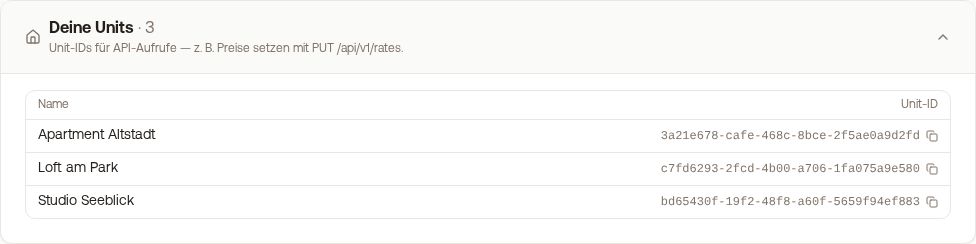 Unit IDs for the accommodation parameter, in the “Your units” section
Do not use the status “Pending” or “Blocked”. Both count as occupied within Xentra, but they are not passed on to your connected portals: your calendar would be closed, and Booking.com keeps selling the nights, without an error message. The API therefore rejects both values with 400. To block, use kind: "block"; for a non-binding request, use the status Anfrage.
For more on the API, see Data API: keys, access and documentation.