
Connecting multiple Airbnb accounts, and why co-host access is not enough
How to bring listings from other Airbnb accounts into your Xentra when you manage them, why co-host is not enough, and how to disconnect an account again.
Updated on November 12, 2026
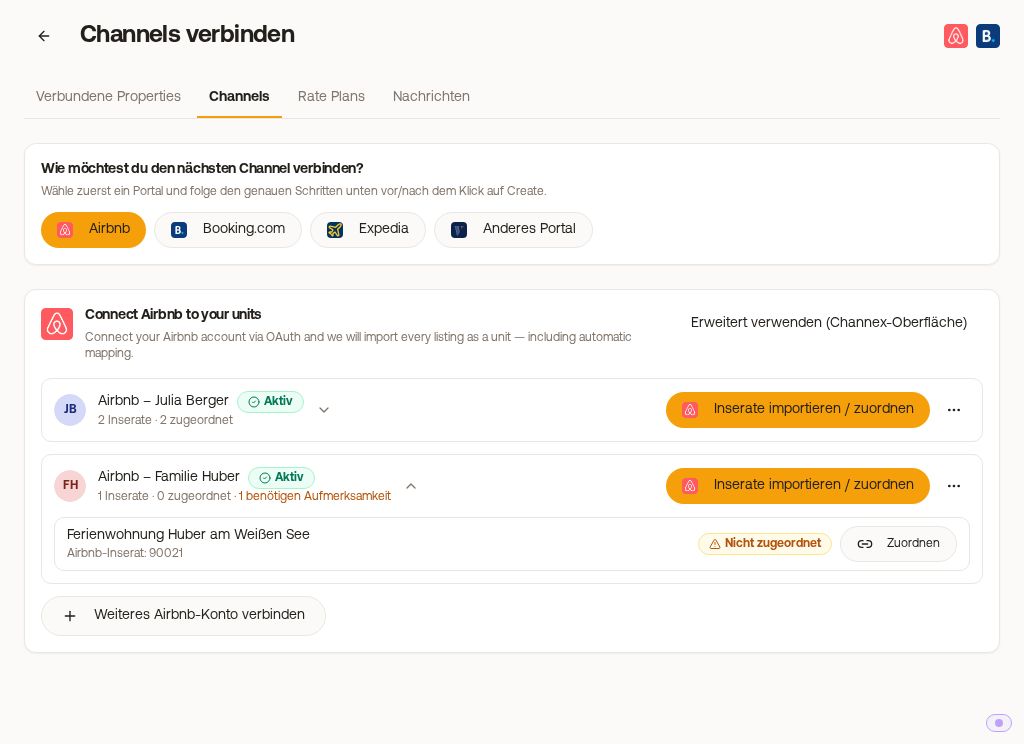
Multiple Airbnb accounts in one Xentra account
You can connect multiple Airbnb accounts in Xentra. Your own listings and the properties you manage for others then end up in the same list, with messages, automations, and calendar just like for all other units.
Co-host access is not enough
This is the most common hurdle, and it comes from Airbnb, not from us: Airbnb only allows connecting to a channel manager from the account that owns the listing. Your co-host access is not enough for this, no matter what rights you have there.
It is the same authorization that the owner must grant once for any other system as well.
How to connect another account
- Integrations, Channel Manager, "Add Channel", Airbnb tile. You see "Your Airbnb accounts".
- "Connect another Airbnb account", then "Log in to Airbnb".
- An Airbnb tab opens. Here, the owner logs in and grants authorization.
- Afterwards, under "Pick the listings to connect", you specifically select only their relevant listing. Their remaining listings are left out.
In practical terms: The owner must log in once on your computer, or you do it together in a screen share. You can also copy and send them the address from the opened tab. Xentra does not send an invitation link by email.
Each account can be disconnected individually: in the channel manager, Portals view, Airbnb card, the menu (⋮) at the account, "Disconnect", prompt "Disconnect this Airbnb account?". Via the same menu, you open an account's listings again later with "Manage listings". Other connected Airbnb accounts, your units, and your Booking.com setup remain untouched.
If the owner ends up in the sign-up path
The most common stumbling block after sending the link: Airbnb does not show the owner the log-in page, but Sign-up, where they would have to enter everything again. This happens in Airbnb's login, not in Xentra.
The sequence that works reliably:
- The owner opens airbnb.de first and logs into their own account, ideally in a private window so that no other Airbnb session interferes.
- You generate the authorization link fresh via "Connect another Airbnb account" and send them the address from the newly opened tab.
- They open the link in the browser where they are logged in and confirm the authorization.
The link contains a key that assigns the connection to your Xentra account, and it expires after some time. Therefore, send it promptly and, when in doubt, generate a new one instead of using an old one again.
If the owner does not want to grant authorization
Then iCal remains. With it, the calendars sync in both directions, but there are no messages, no guest data, and no automations for this property. For pure protection against double bookings, that is enough, but not for managed operations. See "iCal: Portals without direct connection".
Billing
The third-party listings count as units in your Xentra account just like your own.