
Connect PriceLabs to Xentra
Connect PriceLabs via add-ons, select units, what happens next with prices, rules, and rates, mirror units, and what PriceLabs costs.
Updated on November 10, 2026
Connect PriceLabs
PriceLabs calculates market-based prices for your units. Xentra is an official PriceLabs partner, you do not need any additional PMS for this.
- Tap Integrations, Marketplace, PriceLabs card, then "Connect": Open Marketplace
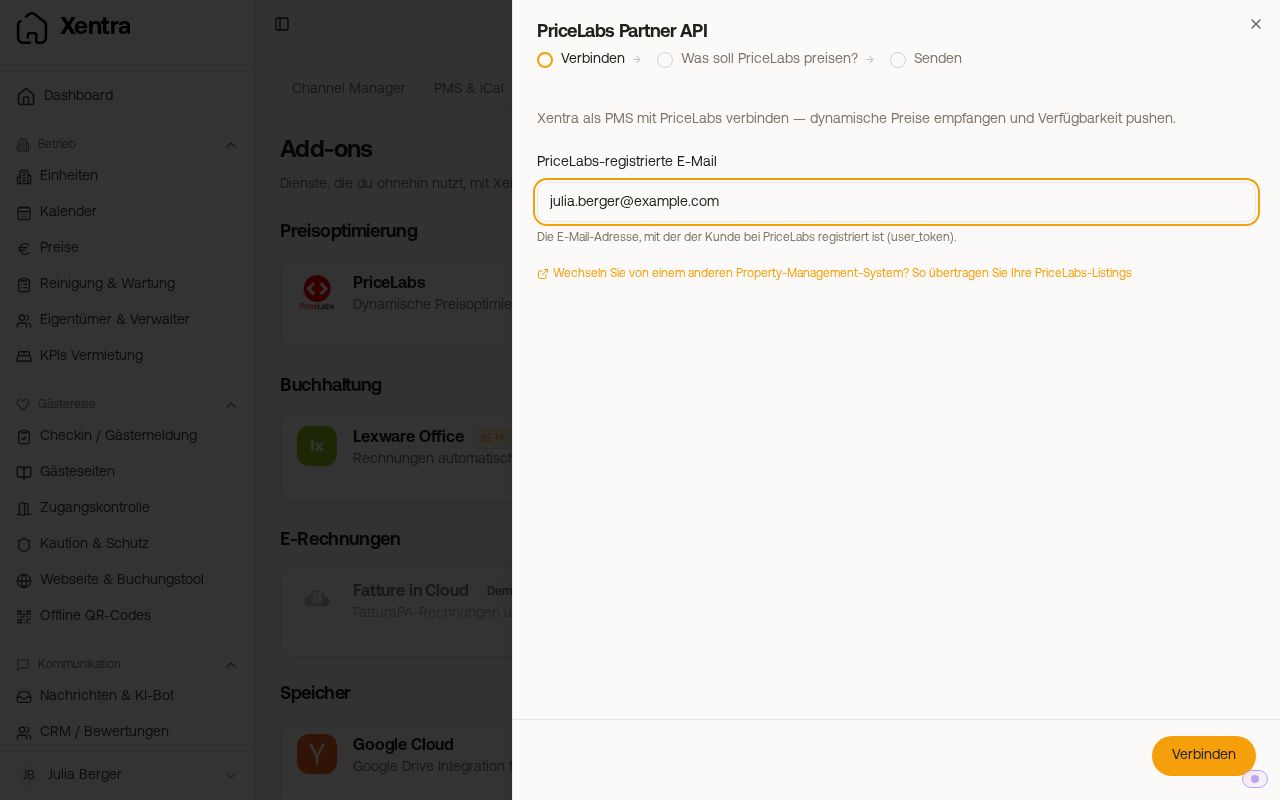
- Connect step: enter the email address you are registered with at PriceLabs.
- In PriceLabs, confirm the connection to Xentra under PMS / Channel Manager. You will see in the dialog as soon as PriceLabs has responded.
- "What should PriceLabs price?" step: check the units and select in the "PriceLabs listing" column:
- "create new", if there is no listing for the apartment in PriceLabs yet. Xentra creates it automatically.
- an existing listing, if the apartment already exists in PriceLabs and is available there. Xentra partly assigns matching listings automatically and asks you to check the mapping.
- "Save & sync". Xentra transmits listing, calendar, and reservations immediately. You do not need a separate sync button.
 PriceLabs dialog, Connect step with PriceLabs email
 PriceLabs dialog, "What should PriceLabs price?" step with three units
Every unit needs a complete address with city, country, and coordinates. Otherwise it says "Address incomplete" and Xentra does not send it. You can complete the details via "Edit unit". The number of Bedrooms of the unit is also sent to PriceLabs and determines the competitor group, see "Number of bedrooms: how PriceLabs compares your unit".
If the listing list remains empty: see "PriceLabs does not offer existing listings".
What happens next
- Xentra automatically sends listing data, occupancy calendar, and reservations to PriceLabs whenever a change occurs.
- PriceLabs sends optimized prices and minimum stays back. Xentra transfers them into the price calendar and forwards them to your connected portals.
- Expect it to take a few hours after connecting until PriceLabs sends prices on its own for the first time. Until then, the price page says "first price sync pending", and you can still edit prices yourself. In PriceLabs, you can also trigger the push manually per unit.
- After that, the price and minimum nights of the linked units in the price calendar and under "Edit period" are read-only ("Locked by PriceLabs"), because the next delivery from PriceLabs would overwrite them anyway. You can still lock and open nights: in the price calendar using the lock icon in the cell, by selecting multiple nights (Lock / Open), or via "Edit period", section Availability. PriceLabs does not change your lock.
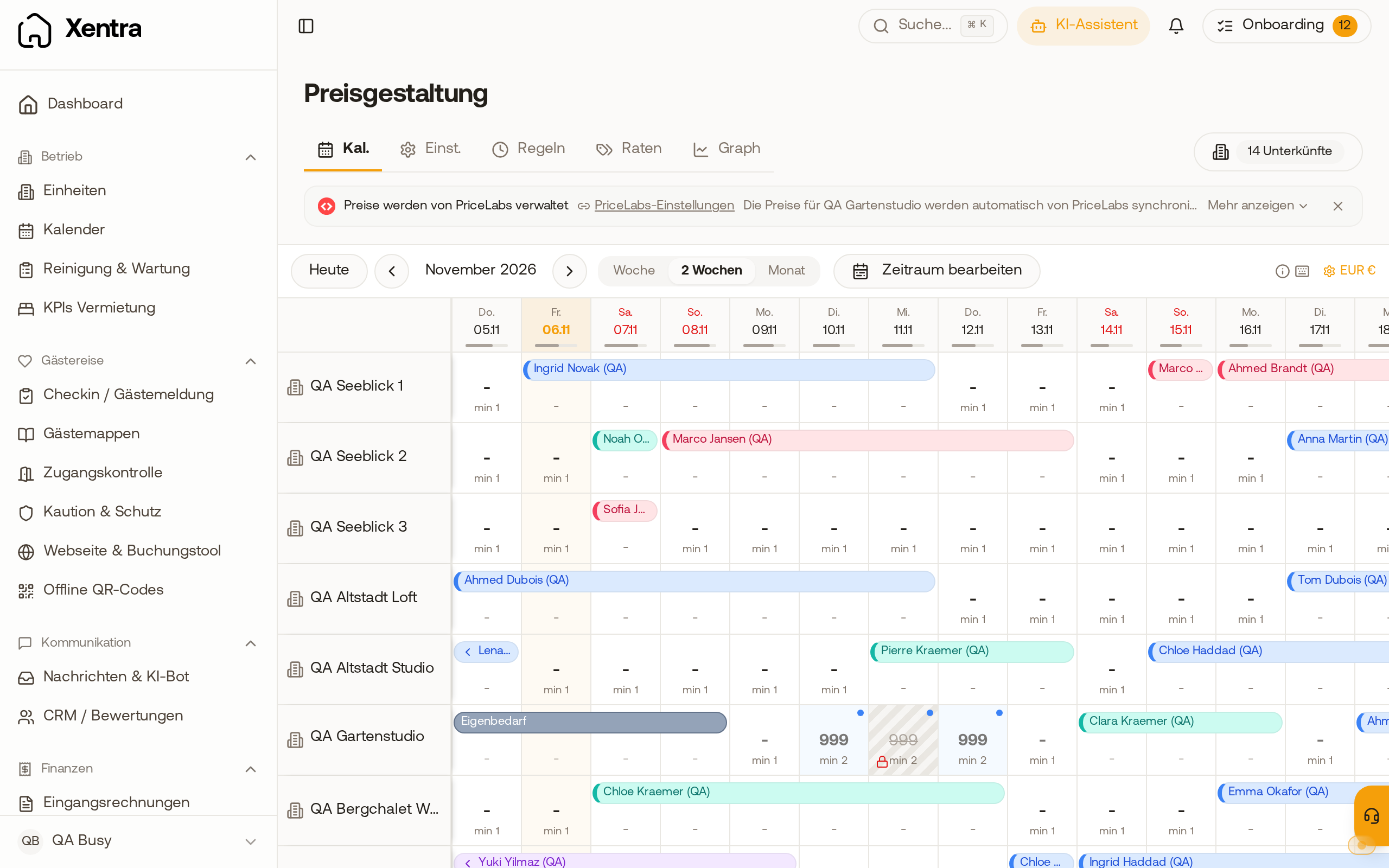 In the price calendar, one night of a PriceLabs unit is blocked, price and minimum nights from PriceLabs remain unchanged.
- Xentra does not support Length-of-Stay pricing (prices per length of stay) from PriceLabs. Therefore, PriceLabs hides this option for your listings. Minimum stays, on the other hand, are transferred by Xentra.
- Xentra accepts fixed check-in and check-out days from PriceLabs (for example "Check-in only on Saturdays") if you turn on "Take check-in and check-out days from PriceLabs". Then PriceLabs decides on all days for which it sends values, including for Channex and the booking engine; the weekday setting of the unit only applies beyond that. Without the switch, only prices and minimum stays are received, see "Fixed check-in and check-out days (weekday restriction)".
Rules, rates, and special prices alongside PriceLabs
- You can still create dynamic rules and additional rates. For PriceLabs units, they calculate on top of the PriceLabs price, apply only to direct bookings, and are not sent to the portals. The editor points this out.
- You can set a special price for an acquaintance by creating the booking yourself and entering the total price freely, or with a discount code in the booking engine, limited to that single apartment and one-time use.
PriceLabs and portal surcharges
PriceLabs sends one price per night for all portals. Xentra does not accept individual prices per portal from PriceLabs. Your portal surcharges (Prices, "Portal Surcharges" tab) are added to this price before it goes to Airbnb, Booking.com, and the other portals. If you have already calculated a surcharge in PriceLabs, the Xentra surcharge will be added on top. Therefore, set it in only one place.
Multiple identical apartments, one listing
If you have multiple identical apartments that should receive the same price, you only link one to a PriceLabs listing. In the row menu of this unit, select "Mirror units …" and check the others. They will then receive the same prices, and their manual price management is locked while mirrored.
Xentra creates its own listing in PriceLabs
If you select "create new", Xentra creates a new listing in PriceLabs for the unit. If you already have the same apartment there from another source, it will appear twice afterwards. This is intentional and not an error. Assign the new listing in PriceLabs to the existing one as a sub-unit instead of deleting it. Then both share the same strategy, and the prices continue to flow back to Xentra.
Disconnecting, switching from another PMS, and which revenues PriceLabs sees: see "PriceLabs: disconnect, PMS switch, and revenue data".
What PriceLabs costs
The use of PriceLabs is not included in the Xentra price. PriceLabs is an external partner and bills its fees directly to you under a separate contract and account. Xentra provides the connection, not the license. The PriceLabs connection is part of the Pro plan.
Included at no extra cost are our own pricing tools under Open prices: daily prices and seasonal periods, dynamic rules for weekends, season, last minute, early bird, and length of stay, as well as additional rates. For many hosts, this is enough. PriceLabs is worth it if you want real market data-based dynamic pricing.
Property category, first price recommendation, and Airbnb link
- PriceLabs initially classifies every new listing as "Midscale" (medium). You set the property category (Economy, Midscale, Upscale) in PriceLabs itself for each listing. Xentra cannot transfer it, nor does it copy the mapping of a new listing to an old one.
- A new listing in PriceLabs takes about 14 to 21 days until a first price recommendation (Recommended Base Price) is calculated. If you are coming from another PMS, follow the recommendation of your old listing there until then.
- Xentra sends the Airbnb listing ID of your unit (from the Airbnb connection or the Airbnb URL in the unit). PriceLabs only uses it if the neighborhood profile of the listing is on Airbnb; for a Booking.com profile, PriceLabs does not offer this field at all.
- Enter the Cleaning fee under Prices, Settings tab. Without it, PriceLabs compares your pure nightly price with the competitor total prices.