
Number of bedrooms: how PriceLabs compares your unit
The number of bedrooms sets the comparison group in PriceLabs, and if it is wrong, all price suggestions are wrong. Where you set it.
Updated on October 19, 2026
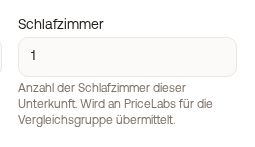
You set the number of bedrooms per unit in two places, and both are the same value:
- Open units, edit the unit, field Bedrooms (next to Max. guests and beds).
- Open pricing, tab Settings, field Bedrooms on the unit.
 Bedrooms field in the Settings tab with the note about PriceLabs
If the unit is connected to PriceLabs, this value goes to PriceLabs one to one as the number of bedrooms. It determines which comparable properties (comparison group, comp set) PriceLabs uses to calculate your price recommendations. If it is wrong or was never set (default: 1), the suggestions do not fit, for example a four-bedroom villa is compared with studios.
For a studio without its own bedroom, enter 0.
The free-text description of the unit is independent of this, it is not sent to PriceLabs for the comparison group.
The number of bedrooms is also shown in your booking tool. More about PriceLabs: “Connect PriceLabs with Xentra”.